

🔥 Check out this insightful post from Hacker News 📖
📂 Category:
✅ Main takeaway:
This article is currently an experimental machine translation and may contain errors. If anything is unclear, please refer to the original Chinese version. I am continuously working to improve the translation.
Introduction
This blog post should be the final part of the “Running Your Own ISP at Home” series, and we’re going to talk about how to modify the geolocation of the IP addresses we announce.
By tweaking IP geolocation, you can:
- Display absurd IP locations on various platforms — for example, Antarctica (which barely has internet infrastructure), North Korea (which isn’t connected to the global internet), or some obscure tiny country with only tens of thousands of people
- Use a single VPS to obtain IP addresses from all over the world,
show off on probe networksand achieve a weird kind of “All In One” status (yep, even this is All In One now) - Unlock region-locked streaming services — see this hostloc thread
Run a one-man IDC selling VPSes from all corners of the globe— I found one called GlobalVM, but haven’t tried it, so no recommendation. Feel free to search on your own.
This article will mainly focus on modifying IP geolocation and using WARP to get a corresponding-region IPv4 address. Unlocking streaming content and running an IDC won’t be covered in depth — refer to the link above if interested.
Prerequisites
This is probably common knowledge for many, but for completeness, let’s go over it briefly.
IP Databases
IP database providers compile mappings from IP → geographical location using methods like network scanning and WHOIS lookups. They also include data such as IP threat scores and type (residential, server, or VPN). These databases are sold to users — typically websites — which then query them in the backend to display location info and perform risk assessment. A handy tool for querying multiple geolocation databases at once: https://iplark.com/
Popular IP databases include Maxmind, IPInfo, and DB-IP. Smaller databases often sync data from larger ones.
WARP
WARP is a WireGuard-based VPN service provided by Cloudflare. While they offer an official Linux client, most people use native WireGuard to connect. WARP can provide your server with both IPv4 and IPv6 addresses, commonly used to add IPv4 connectivity to IPv6-only VPSes (or vice versa). One key feature of WARP is that the public IP it assigns will have the same geolocation as the IP you’re connecting from — we’ll use this property later. For a detailed WARP setup guide, check out: https://p3terx.com/archives/use-cloudflare-warp-to-add-extra-ipv4-or-ipv6-network-support-to-vps-servers-for-free.html
Submitting Geolocation Correction Requests
In reality, the “location” of an IP is inherently fuzzy. For instance, my 2a14:7c0:4d00::/40 block was originally allocated to Israel. But later, I bought parts of this range and announced them via BGP in Germany, the US, and Singapore (see previous article on Anycast networks). Meanwhile, I’m physically located in mainland China. As the owner of this IP block, I can also freely edit the country field in the WHOIS database — and I set it to KP (North Korea).
Because of this ambiguity, it’s nearly impossible to precisely determine an IP’s location using any single technical method. As a result, almost all geolocation databases accept public/user-submitted correction requests.
Preparation
Before submitting any requests, let’s do a little prep work.
IP databases collect IP ranges from global routing tables. Previously, we were announcing the entire 2a14:7c0:4d00::/40 block without subdividing it in RIPE NCC, which makes it harder for databases to process smaller segments. So let’s fix that.
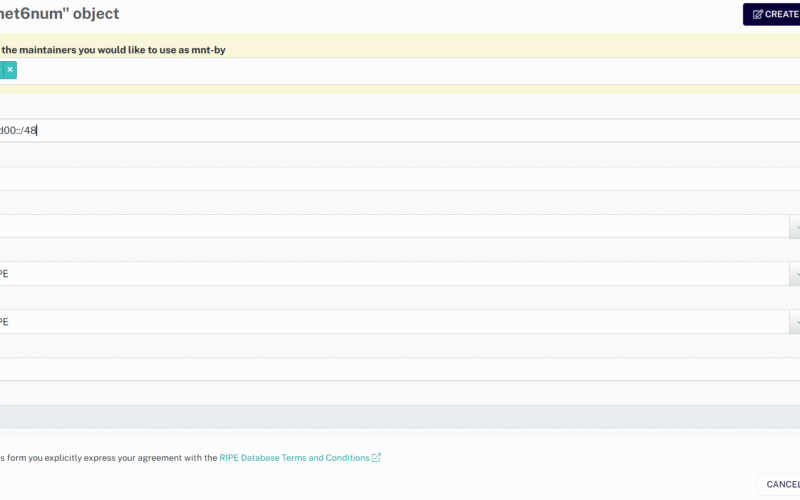
Log in to the RIPE Database, go to My Resources → IPv6 → Create assignment, and fill out the form to create a new inet6num (which represents an IPv6 address block):
inet6num: Enter a subnet. The smallest allowed is/48, so I entered2a14:7c0:4d00::/48. If you only own a/48, you can’t subdivide further — you can only edit the LIR-assigned block.netname: Pick a name you likecountry: Choose the country/region you want this IP block to appear inadmin-c&tech-c: Fill in two contact objects — use the ones you created earlierstatus: SelectASSIGNEDto indicate it’s assigned
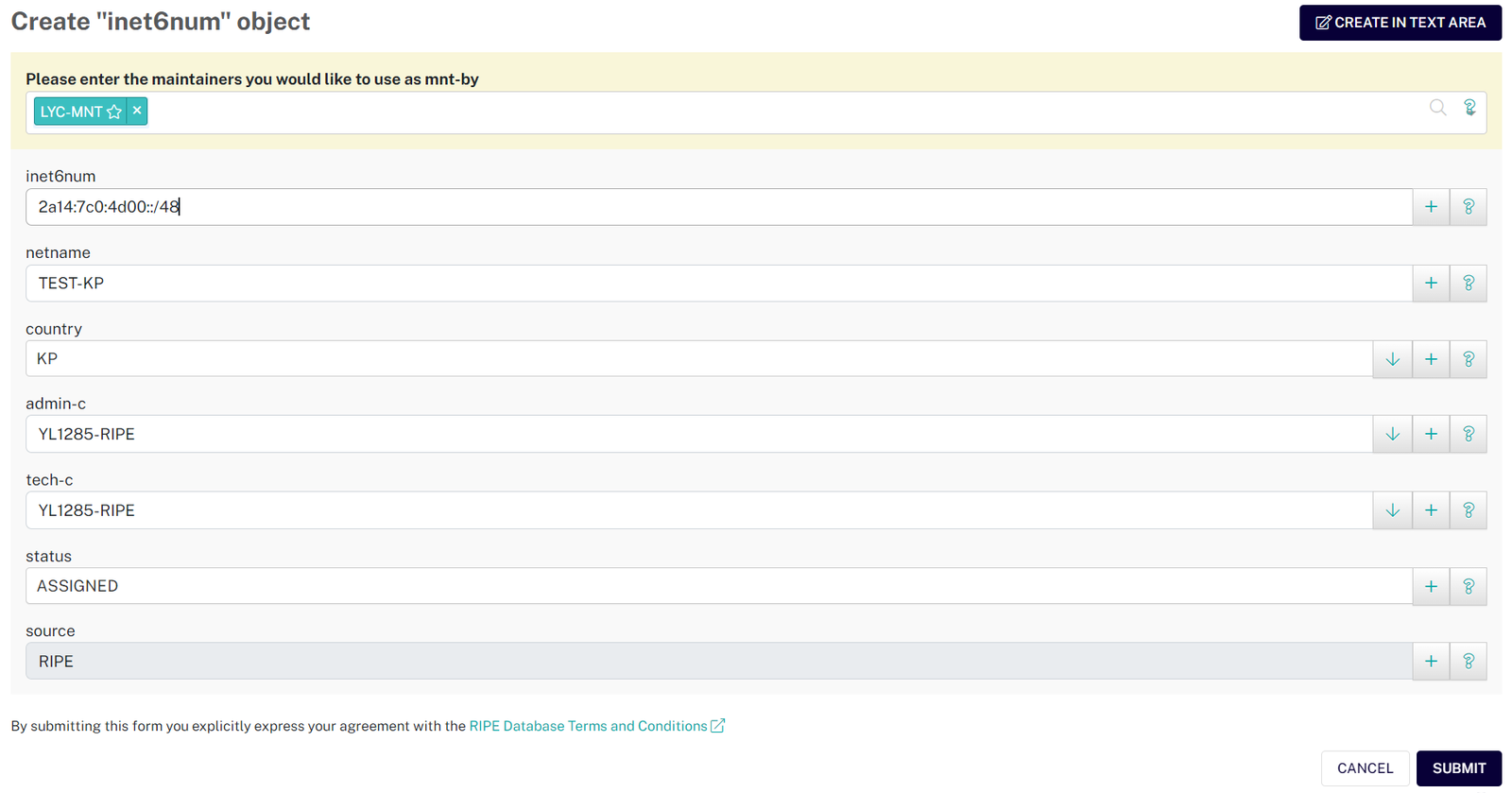 Form for creating a new inet6num
After creation, you can see all your subnets under “My Resources”:
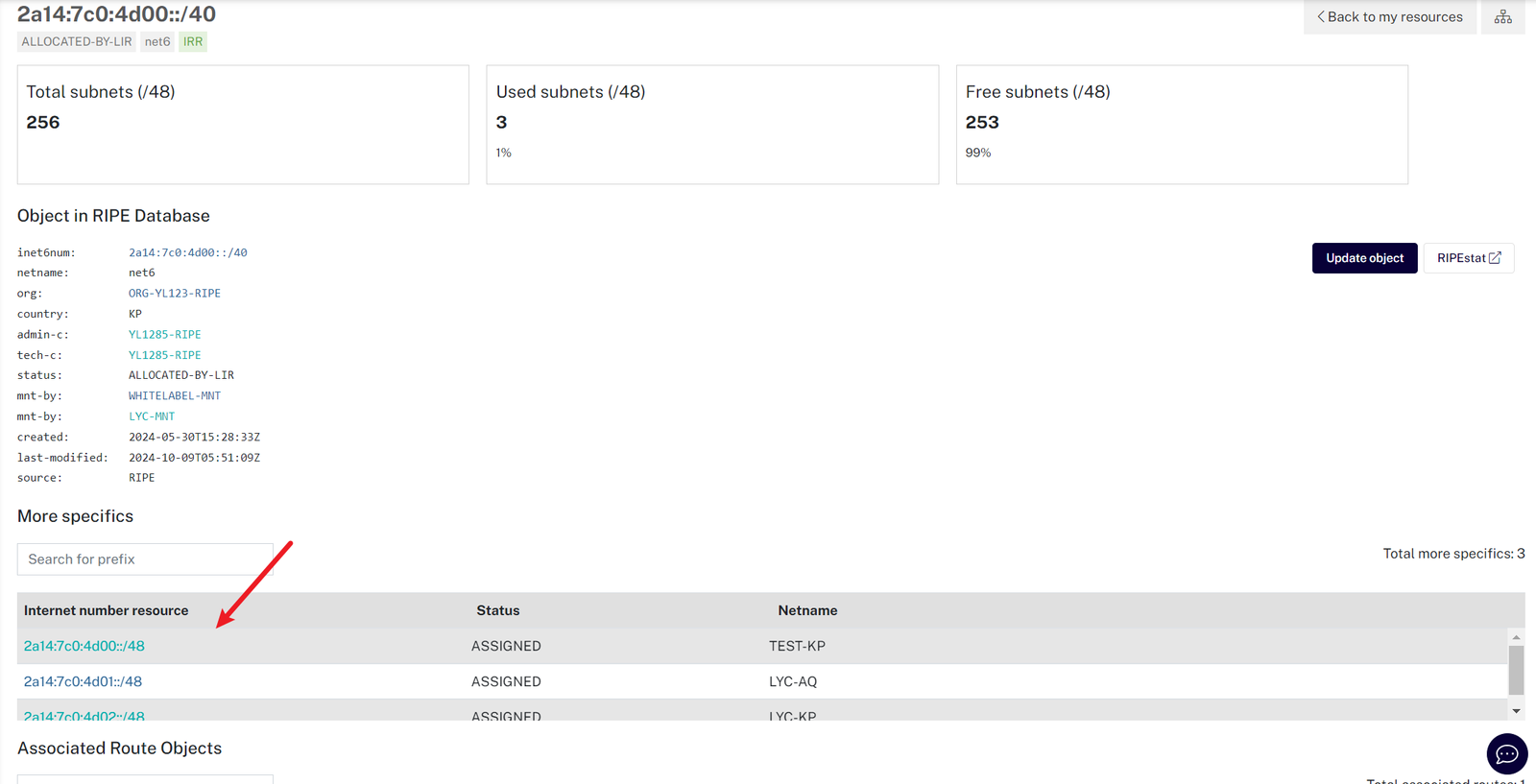 Viewing subnets under the LIR-assigned block
Next, update the BIRD configuration from our previous article, changing 2a14:7c0:4d00::/40 to 2a14:7c0:4d00::/48, then restart BIRD.
After some time, use BGP Tools to verify that 2a14:7c0:4d00::/48 is now visible. The old /40 page should return 404.
Submitting Correction Requests
You can submit geolocation correction requests to common IP databases: Maxmind, IPInfo, Google
If asked for justification, write something like “Due to incorrect IP geolocation, I/my clients cannot access region-restricted websites” (in English). Avoid mentioning use for anonymous proxies — that might violate their correction policies.
Each database has its own review process. Some involve manual checks, and changes usually take 3 days to 2 weeks to go live. Most offer online lookup tools (like Maxmind’s Demo) — you can use them to check progress, or use IPLark for batch queries.
In my test, IPInfo accepted my request within a week. Maxmind didn’t respond after two weeks, so I followed up via their contact form, and they finally approved it. (Wait a bit first — only reach out after multiple failed submissions.)
(p.s. Recently, Maxmind has been rejecting requests to set location to Antarctica (AQ) — probably too many people trying to go there. That’s why this article uses North Korea as an example. If you really want an Antarctica IP, try the geofeed method at the end to bypass manual review.)
Below is for reference only — feel free to make up craft your own justification:
Q: Hello, I am the network operator and owner of AS214775. I found out that my IP address segment 2a14:7c0:4d00::/40 is incorrectly localized to Israel, causing me to be denied access to other websites. I have tried several times to submit data corrections using the data correction form, but no response. I have corrected the country of my IP segment in the RIPE NCC database, and some other databases such as ipinfo.io have been synchronized, but Maxmind keeps locating my IP segment to Israel. I would like to politely ask why MaxMind has not responded to my correction request?
A: Thank you for your email. This will be updated in Tuesday’s release of the database.
Using WARP to Get a Region-Matched IPv4
Cloudflare uses Maxmind’s database, so as long as Maxmind reflects your desired location, WARP will follow suit. Note that Cloudflare may lag behind Maxmind by 1–2 weeks. If Maxmind shows the correct location but Cloudflare hasn’t updated, just wait a little longer.
WARP assigns IPv4 (and IPv6) addresses based on your connection IP’s geolocation. The IPv4 address not only allows access to IPv4-only sites, but its geolocation is maintained by Cloudflare — highly accurate and consistent across databases, much more reliable than manually submitting corrections everywhere.
We’ve already introduced WARP, so let’s jump straight into setup using this guide:
1 |
|
Now test your VPS’s IPv4 geolocation using Cloudflare’s /cdn-cgi/trace endpoint (available on any site behind CF). ip=104.28.212.208 means we got that IP, colo=DUS means we’re connecting via the DUS (Düsseldorf Airport) data center (IATA code), loc=IL means geolocation is IL (Israel) (country code), and warp=on confirms WARP is active:
We did successfully change our location, but loc=IL means Cloudflare hasn’t picked up Maxmind’s update yet — let’s wait a bit longer
1 |
root@s39230 ~ |
After nearly ten real-world days, Cloudflare WARP finally updated its database! Even slower than Cloudflare’s other services… At this point, it had been about two weeks since Maxmind updated, and a full month since my first correction request — almost missed the deadline before my server expired (thankfully, it didn’t).
Retest, and now we see the new IP 104.28.197.243 returns loc=KP, and Bilibili’s API shows North Korea:
1 |
root@s39230 ~ |
Let’s check our own IPv6 and WARP-assigned IPv4 using IPLark:
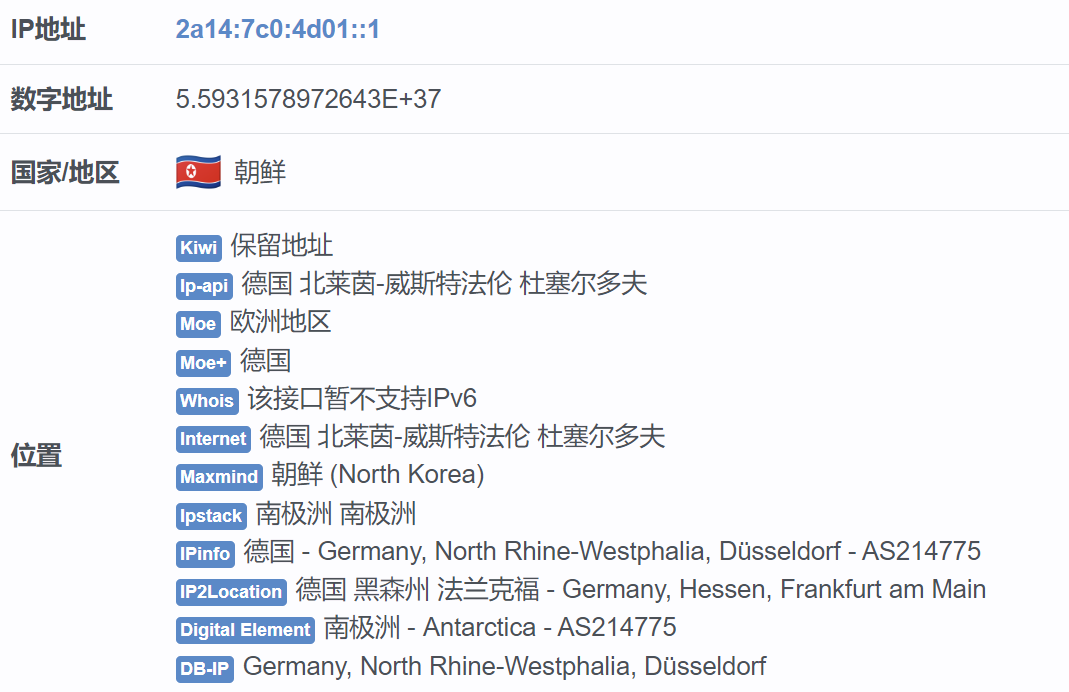 Our IPv6 is only recognized as North Korea by Maxmind — others think it’s Antarctica or Germany — all over the place (but 80% of sites rely on Maxmind anyway)
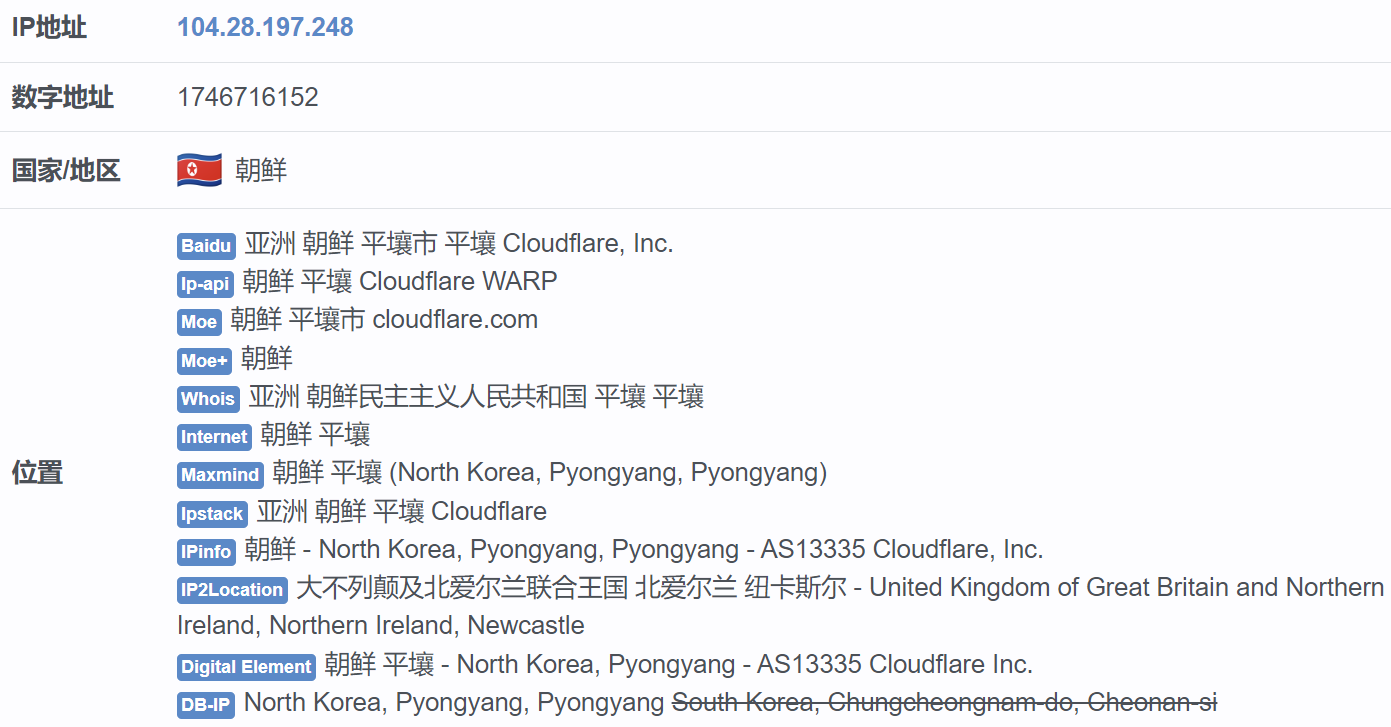 WARP-assigned IPv4 is consistently shown as North Korea
Now just set up a proxy on this VPS, and you can proudly flaunt your North Korean IP across the web. (If you’ve read this far, I assume you know how to set up a proxy.)
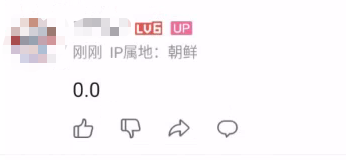 Final proof: a real Bilibili comment screenshot 🤣
Optional: Geofeed and Preventing Reversion
Lastly, the promised “Light Up the Globe” trick. For large providers with IPs all over the world, manually submitting corrections isn’t practical.
That’s where Geofeed comes in — a standard allowing bulk geolocation submissions: https://docs.ipdata.co/docs/publishing-a-geofeed. Besides submitting your Geofeed via support ticket to Maxmind, you can also embed the Geofeed URL in the inet6num object in WHOIS, allowing databases to automatically crawl and update your IP locations. With this, you can get IPs from all sorts of bizarre countries, show off on probe dashboards and achieve “Light Up the Globe” status.
IP geolocation isn’t set-and-forget — databases may re-scan and revert your location. To reduce this risk, block ICMP (ping) and common ports via firewall to avoid scanning. Also, avoid using your server’s native IPv6 to browse the web — stick to WARP-assigned IPv4. Some providers (cough Google cough) may even use client-side (mobile) location to correct server IP geolocation. See this article for details.
Conclusion
Finally… This series began planning in June 2024, went through countless hurdles and waiting periods, and now wraps up just before December. If I waited any longer, my ASN and server would’ve expired (quietly).
We’ve explored setting up and maintaining an autonomous system on the Internet, configured BGP, peers, Anycast, and now IP geolocation spoofing — satisfying some bizarre curiosities, and gaining a new appreciation for ISPs and one-man IDCs (or not).
I might try DN42 next, or maybe not. For now, this series ends here. See you in the next blog post~ o/
💬 What do you think?
#️⃣ #Running #ISP #Home #Part.5
🕒 Posted on 1763089501
