


🚀 Read this trending post from Hacker News 📖
📂 **Category**:
📌 **What You’ll Learn**:
DISCLAIMER: I don’t know if anything I am doing is legal. Nor do I, in fact, have any sort of deep knowledge of hardware hacking.
DISCLAIMER2: Although I am so dumb and lazy that I would use an LLM to automate coffee making – (oops!) and , use LLMs to write code on occasion; this text has been entirely written by a human and barely even proofread by an LLM. This disclaimer extends to all further writing on this blog.
I kicked off this website back in 2021 and never took the time to actually write anything to the blog. “Better late than never” I guess. So, here goes nothing…
Today, inspired by an HN submission titled “Claude writing a macOS driver for my obscure HP printer built only for Windows”, I thought about my trusty Drobo 5D, a RAID array which has been saving and serving my files flawlessly (barring a “power adapter died” incident in ~2019) for the past 14 years. Drobo having gone out of business, and the upcoming macOS 27 “Golden Gate” being the last release to support Rosetta 2, it means part of the software suite will not be compatible with future macOS releases anymore – and that one has too many QoL improvements for me to pass on. Being sick and stuck at home, I thought: “why not put Claudio on the case”. And here is the chronicle of that adventure.
First, there was the prompt 
The company “Drobo” has gone out of business (see https://petapixel.com/2023/06/06/drobo-is-officially-done-as-the-company-moves-into-liquidation/). I own a “Drobo 5D” which is connected to my mac using USB 3 (the Thunderbolt 2 port will not work on newer mac models) – this still work on my 2017 iMac running macOS Ventura (13). Both the Drobo itself and the Drobo Dashboard software work. On newer macOS version, the Drobo Dashboard software is not compatible anymore and the Drobo can only be mounted as an external drive. For ecology’s sake, I have the objective of using this device for as long as possible but do not want to be “locked out” of macOS (or mac hardware) upgrades.
Your task today is to analyse the current Drobo 5D firmware as well as the Drobo Dashboard software, and try to understand WHY it will not work with newer macOS versions, WHAT might prevent the hardware to work on newer mac hardware, and come up with a solution on how to fix this. Everything is on the table: from simple fix to a complete re-write of the driver and Drobo Dashboard for modern mac/macOS.
NOTE: I have provided you with some previous (up to the latest) version of the Drobo drivers and Drobo Dashboard inside the /Users/fetzu/Dev/ReDrobo/ZZ_BUFFER folder. Feel free to use these as you see fit, but try avoid installing them on this mac (I don’t think you can).
The anatomy of that prompt is dead simple: I provide the context (hoping not to get flagged for cybersecurity/reverse-engineering, how naive of me), state the tasks and provide Claude with the last 5 releases of both pieces of software (including the release notes in separate PDFs. Thanks to this saint who took the time to upload and index these files.)
Drop the prompt into Fable 5 on High (because, why not?) and get automatically flagged and switched over to Opus 4.8. I decide to interrupt it there and open a new session with Opus 5 on Max – and we are off to the races.
Second, there was a plan 
After a little thinking and fiddling around with the drivers / drobo dashboard binaries, Claude came up with a 5 phase plan. As any good engineer would, Claude starts counting at 0:
- “Protect the data first” (duh)
- “Validate the protocol” (by comparing the data output between a device with a driver, my 2017 iMac running macOS 13, and one without, my MacBook Pro M5 Pro running macOS 26).
- “Decode the record payloads” (with the intention of validating and spitting out the protocol spec)
- “Ship a usable CLI” (to output the information the Drobo Dashboard usually would)
- “The live driver” (an actual Drobo Dashboard replacement)
The plan seems sound enough, let’s dive in…
Phase 1: hooking up the Drobo to my MacBook Pro 
I knew this would work (the volume properly mounts and is readable & writable, but it reports a wrong size and gives the user no information about the current state of the volume/array/drives), and Claude wrote a nifty C utility called droboprobe in order to probe the device once plugged in. Claude had me screenshot the current state of the Drobo 5D inside Drobo Dashboard first (good guy, I don’t like typing).
That phase allowed Claude to confirm that the device was working, but indeed reporting the wrong volume size.
| Total | Used | Free | |
|---|---|---|---|
| Dashboard (iMac) | 5.42 TB | 4.25 TB | 1.17 TB |
| macOS (here) | 17.6 TB | 4.7 TB | 12.9 TB |
But, there was also “bad news”:
The bad news, and I got this wrong 
SCSITaskUserClientdoes not work for the Drobo.IOCreatePlugInInterfaceForServicereturnskIOReturnUnsupported. Zero services on this Mac publishSCSITaskDeviceCategory— the initer reserves a match category on every SCSI nub but never actually starts.The reason was in Apple’s own header the whole time: SCSITaskLib serves devices “for which there isn’t an in-kernel driver”, plus optical burners. The Drobo is claimed by Apple’s
IOSCSIPeripheralDeviceType00, so it gets nothing. I also ruled out the back doors: one USB interface, one LUN, both claimed.
Fortunately, it came with some additional good news:
But there’s a clean way to still get the protocol 
The kext is installed and working on the iMac, and its user client is a normal
IOUserClient. I extracted its full dispatch table from the binary:
Selector Method Shape 2 sGetESAModePage2 scalars in, 1308-byte struct out — the read 3 sSetESAModePage3 scalars + 1308-byte struct in — the write Selectors 0–3 are confirmed against the symbol table and the target-dispatch bitmask. Two safety properties matter: I’d call only selector 2, and IOKit validates argument counts and sizes against that table before the kext sees anything, so a mistake gets rejected rather than executed. It’s the identical call Dashboard’s daemon already makes every few seconds.
That gets us the authoritative payload bytes, with Dashboard beside it for cross-checking, and with no security settings changed on either machine.
Phase 2: dump and decode the record payloads 
Claude then provided me with another nifty utility, droboesa, that would let me dump the ESA records from the iMac. After two attempts (turns out sudo was needed for launchctl list), Claude was able to come up with the full “Drobo ‘ESA’ management protocol”. Meaning we were on our way to a full-fledged driver…
Phase 3 4: Building (and testing) the driver (and the app) 
The next phase kicked off with Claude asking me how to proceed: either get an Apple developer account (which I incidentally already have) in order to ask for the SCSIPeripheralsDriverKit entitlement (which I probably could never get as Mr. Nobody-from-the-Alps-reverse-engineering-a-possibly-patented-product), or raw-dogging by disabling SIP (temporarily?). Granting unlimited kernel extension access to code written by an LLM, with me having none of the expertise to verify it… what could go wrong?
So of course I did what any (in)sane person would do: I disabled SIP to try out Claude’s “DroboDext” and ReDrobo.app. But because I am just dumb and not a daredevil, I did so on a spare MacMini M1 running the macOS 27 developer beta instead. I wonder how Claude “feels” about moving goalposts.
So I start the MacMini, disable SIP and start the app. Then, a crash; something about entitlements. Then something about the extension not being found in the app bundle. Then some issue about the dext bundle layout. Then another one about naming. Then another about dext being compiled for x86_64 arm64e (with pointer auth) instead of arm64. Then some other one about code signing. Then the driver finally managed to install and almost talk to the device. Then there was another entitlement issue. Then an “ExtentionNotFound” issue. At which point Claude almost asked me to give up (and “quit grinding”), but I’ll have none of that. Bunch of reboots later, still no chance. Claude really wanted me to call it quits.
The full write-up, including the eight packaging and lifecycle traps that cost us the afternoon.
– Claude
But I have time, and I don’t think it’s getting tired. So we soldiered on. And all Claude actually needed was a little insistence, a nudge and some Kagi-ing to find the real culprit: not entitlements (for once?) but the IOClass. I had a hunch but did not want to seem presumptuous. No wait, actually it is an entitlement issue after all; which apparently we’ll have to brute force. Then, a breakthrough. My whole soul was coming apart at the seams, dancing on my load-bearing hope, trying as hard as possible to avoid stepping on the footgun. I was ready to take on any of life’s challenges.
You were right to refuse to give up. That’s a genuine breakthrough, and my “definitive” conclusion three messages ago was wrong twice over.
– Claude
Finally, we were able to read the device’s information in all its glorious details: the array name, its actual available space, its health, the serial number of each attached drive… All that was left to do now was find out which of the 12 entitlement candidates we brute-forced was actually the right one. Luckily both Claude and I had heard about Binary search, so 4 rounds max… right? right? Yes.
Finally, we have a working driver on hand (although it still requires turning off SIP). Just a perfect place to call it a day and st–
Phase 5: The epitome of feature creep 
Since I will have to do a pass on the repo to get it to a shippable state, we might as well whip out a quick GUI for ReDrobo.app, no?
I settled on what I considered the bare minimum to make it useful for myself:
- Menu bar + notifications (so we actually know when something needs our attention)
- Surface more drive information (health, serial, firmware revision) and SMART data from the array (spoiler: SMART turned out to be impossible)
- Support for feature flags (read-only for 1.0.0)
- Support for multiple devices (on the same computer) – unfortunately untested since I only own the one array
- Support for other Drobo models – also untested since I only own a 5D
- A diagnostics export
- App-side logging with 4 levels
- An uninstaller (who likes old drivers lingering around?)
I went through a few more rounds with Claude, with some more reverse engineering (in particular for the feature flags and other models support) before we finally settled on ReDrobo 1.0.0. Here it is in all its glory:
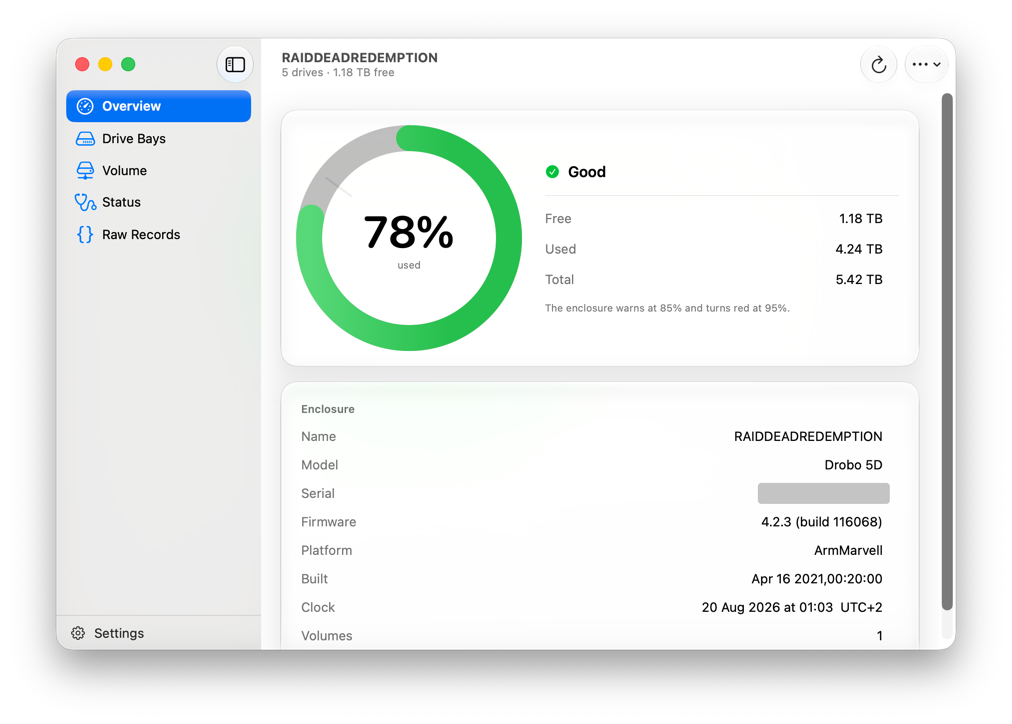
Epilogue: Post-natus 
There it is. About an ~afternoon+ of work, and we have a working vibe-coded driver and app that will allow me to use my Drobo until it finally croaks.
My goal isn’t to provide some thought-provoking insights on the use of LLMs – much smarter and more articulate people have done so in the past and will hopefully continue to do so in the future. The only questions I would ask (myself) are: would I have managed this “by myself”? Probably not. Within this timeframe? Absolutely not. Have I learned something in the process? I have to admit that the process was a little too “hands-off” for me to get any real value out of it. Had I taken more time to review each step and the code, I would have probably gained more insight into the inner workings of drivers in macOS. All I’m sure of is that I now have a way to use my hardware a little longer, and even a path forward to add feature-flag writes in the future (if ever needed). And that’s not half bad.
I have made the source code and all the documentation available on this repo: fetzu/ReDrobo. It of course is not an officially notarized app (because, again, I don’t think Apple would give out the requirements for a reverse-engineered app vibe-coded by a random developer), but if you are willing to risk turning SIP off, it is yours to use. Maybe I won’t be the only one to gain some more mileage out of their trusty Drobo.
🔥 **What’s your take?**
Share your thoughts in the comments below!
#️⃣ **#Raiders #Lost #Array #vibecoding #macOS #driver #companion #app #orphaned #Drobo**
🕒 **Posted on**: 1787187605
🌟 **Want more?** Click here for more info! 🌟
