


💥 Check out this trending post from Hacker News 📖
📂 **Category**:
💡 **What You’ll Learn**:

Steven J. Searle
Web Master, TRON Web
The BTRON Computing Model
Although it may not seem like it, what can broadly be termed
“personal computing devices” are based on only three
conceptual models. In order of their historical appearance, they
are: the “stand alone computer model,” which first came
into being as the batch processing mainframe with a command line
interpreter; the “networked stand alone computer model,”
which saw its first incarnation as the object-oriented workstation
with a graphical user interface (GUI); and the “network interface
computer model,” a terminal-like computer for single users
in an environment where all computers are linked together. The
golden age of the first conceptual model has long passed, and
the current age is a transitional period in which we are moving
from the second conceptual model to the third.
What may be surprising to many is that the third conceptual
model was first conceived not in the U.S., which has rightly earned
the distinction of the “world’s systems house,” but
rather in Japan, which has historically been viewed as a country
that creates great hardware but is poor at software–particularly
systems software. However, in the mid 1980s, long before computing
platforms based on either the IBM-PC or Macintosh operating systems
were considered for use as interfaces to a “network of networks”
called the Internet, the TRON Project began work on the BTRON-specification
operating system, which was conceived as a real-time human-machine
interface to a “hypernetwork in which all computers and computerized
devices throughout human society would be interconnected.”
The network interface computer differs from the standard personal
computers of today mainly in terms of size. Network interface
computers have very small operating systems, and hence they require
very little in the way of hardware resources to run. This allows
them to be built at very low cost, which in turn allows organizations
that employ them to save considerable amounts of money on management
information systems. But all network interface computers are not
based on the same design precepts.
One computing model for the network interface computer, the
“network computer” proposed in the late 1990s in the
U.S., was conceived of as a machine that would operate inside
a company’s local area network (LAN). Since it would always be
used in conjunction with a company-owned server, programs and
data could be stored there and downloaded as necessary. In fact,
Sun Microsystems Inc., one of the companies that is strongly pushing
for the adoption of network computers in the U.S., is planning
to take this paradigm and apply it to the Internet. The company
plans to offer its freeware StarOffice productivity suite via
StarPortal,
a Web site from which users can download data and applications
and do data processing inside their browsers. People signing up
for this service will only need a browser and an Internet connection.
However, there is a problem with this computing model in that
current browsers are huge applications, and they run on even larger
operating systems, so the cost savings will mainly be limited
to software. (For a critique of Sun’s efforts with StarOffice,
click here.)
That’s where the BTRON-specification operating system is different.
BTRON lies between today’s gargantuan personal computer operating
systems–which have become as large as mainframe computer operating
systems and continue to get bigger with each new upgrade!–and
the stripped down operating systems of LAN-based network computers.
BTRON is compact, which is why basically the same BTRON3-specification
source code can be used in both PDAs and IBM-PC/AT compatibles,
and yet it is extremely powerful. The design specification calls
for word processor and graphics editor functions as standard equipment,
but the commercial implementation by Personal Media Corporation
called B-right/V has, in addition, a spreadsheet program, a scripting
language, an e-mailer, a card database program, a Web browser,
PC communications software, plus various utilities, such as file
converters–and that’s not even to mention a World Wide Web-like
hypertext filing system at the system level.
As a result, a BTRON-specification computer requires no Internet
or LAN connection to do data processing, but the hardware required
to run the latest BTRON implementation, B-right/V R2, is minimal:
an Intel 486DX microprocessor-based PC, 16 megabytes of main memory,
and a few hundred megabytes of hard disk space. In other words,
a BTRON-based system can be manufactured almost as cheaply as
a network computer, although it has all the functionality of a
standard computer. And if that sounds too good to be true, it
gets better. B-right/V R2 has for the first time in the history
of personal computing implemented a true multilingual computing
environment that allows users to employ up to approximately 130,000
characters in their documents. The majority of these characters
are kanji (Chinese characters), which for the first time
allow the Japanese people to write any word in their language–and
they come in outline fonts to boot!
The True TRON Multilingual Environment Finally Appears
The BTRON3-specification “B-right/V” operating system
for IBM-PC/AT compatibles was first marketed in Japan on July
18, 1998. Historically, B-right/V is a descendant of the “3B”
operating system, which was designed for a TRONCHIP-based hardware
platform called MCUBE that hit the Japanese market in 1995. The
3B operating system subsequently bifurcated into µBTRON-specification
“B-right,” which is used in Seiko Instruments Inc.’s
BrainPad TiPO PDA, and B-right/V (B-right for DOS/V machines,
which is what IBM-PC/AT compatibles are called in Japan). The
code for both of these operating systems, which are based on a
micro kernel design, is basically the same; there are only minor
variations having to do with window functions, selectable colors,
power saving, character input, etc., which are a result of the
hardware limitations of handheld devices that do not use a keyboard.
There are, however, many differences between B-right/V and
“B-right/V R2,” the latter of which hit the Japanese
market on November 12, 1999. The major difference is that B-right/V
had only a partial implementation of the TRON Multilingual Environment.
Specifically, its multilingual capabilities were based on a “single
48,400 character plane” (a plane is called a “script”
in the TRON Architecture) into which multiple national character
sets were loaded. The B-right/V R2 operating system, on the other
hand, implements the true TRON Multilingual Environment, which
is based on “multiple character planes of 48,400 characters”
that can be switched in and out as required using “language
specifier codes.” [1] In fact, the current implementation
has 31 such character planes defined for it, which means that
it can handle a total of 1,500,400 characters. Needless to say,
it is going to take some time to fill up that space.
- [1] Some readers might be wondering why the “script
planes” in the B-right/V R2 operating system are not switched
in and out using “script switching codes.” The answer
is that the language specifier codes used for this purpose have
“multiple functions,” one of which is to switch in
and out of script planes. In addition, they specify what script
“group” is involved and what “language” the
data are written in. For an introduction to the four layers of
the TRON Multilingual Environment hierarchy (Font, Script, Group,
and Language), please click here.
The B-right/V R2 script planes and their current contents are
as follows:
| System Script (0xFE21) |
|
| Japanese Script 1 (0xFE22) | Reserved |
| Japanese Script 2 (0xFE23) | Reserved |
| Chinese Script 1 (0xFE24) |
|
| Chinese Script 2 (0xFE25) | Same as above |
| Chinese Script 3 (0xFE26) | Traditional Chinese |
| Chinese Script 4 (0xFE27) | Same as above |
| Korean Script 1 (0xFE28) |
|
| Korean Script 2 (0xFE29) | Same as above |
| Various National Scripts (0xFE2a) |
|
| Mojikyo Script 1 (0xFE2b) | Konjaku Mojikyo characters |
| Mojikyo Script 2 (0xFE2c) | Same as the above |
| Mojikyo Script 3 (0xFE2d) | Same as the above |
| Mojikyo Script 4 (0xFE2e) | Same as the above |
| (0xFE2f – – 0xFE3F) | Reserved (17 planes) |
One thing that is important to note here is that there is no
official “TRON Character Set.” The BTRON operating system
merely provides a “framework,” called “TRON Code,”
into which character sets that have, or will, come into wide use
are loaded. Of course, once those character sets are loaded into
the TRON Code framework, a de facto “TRON character set”
comes into existence as can be seen above, but there are no TRON
Project committees deciding which characters can or should be
used by BTRON end users. The TRON policy is to register all characters
and leave it to the end user to decide which characters he or
she should employ in data processing. In order to implement this
policy, the TRON Project has also created a character registration
center (officially called the “TRON
Character Resource Center”) on the Internet through which
new characters can be added to the TRON character set. As long
as the source of new characters is clear and there are no copyright
complications involved, the character or characters will be registered
free of charge and made available for downloading by BTRON user
community.
Another thing that it is important to note–which no doubt
is something that any Unicode folks reading this article would
like to point out–is that the exact same Chinese character can
appear on different planes in the TRON character set. That is
absolutely correct, and it is in fact the reason that only a BTRON-specification
computer can used used to discuss via e-mail the “unification”
that the Unicode movement is undertaking, and it is why only a
BTRON-specification computer can print out the entire Unicode
specification. In other words, the lack of unification is not
viewed as something bad, but rather as something that is good.
There is, of course, the chance that the user will not be aware
of what character plane he or she is dealing with. However, there
are ways of checking. Hexadecimal savvy users merely have to check
the language specifier codes given in the parentheses above, and
ordinary users can pull a character into the Character Search
Utility (see “New Utility for Searching for Kanji“below).
Finally, since there are disagreements among specialists about
what is and is not a “distinct Chinese character,” a
“thesaurus-like function” is also under development
to give end users information to make their own judgments.
However, improvements to character-related functions in the
B-right/V operating system that appeared with Release 2 are not
limited to solely to the processing of kanji. As the following
list of character-related improvements shows, proportional font
compatibility and word wrap functions have been added. These functions
are necessary for processing languages that are written with the
Latin script. Moreover, there is also a multi-font function, which
is necessary for doing high-quality word processing and desk-top
publishing.
- Multi-kanji, multilingual functions
- Character Search Utility that can find kanji using
elements, readings, and number of strokes - Multi-font function
- Proportional font compatibility
- Gray scale font function
- Word wrap function
- Function for displaying a list of candidates for kana-to-kanji
conversion - Function for customizing kana-to-kanji operations
Among the kanji-related processing functions in the
above list, the Character Search Utility, which will be described
below, is essential to enable the end user to easily find his
or her way through the large kanji character sets that
come with B-right/V R2. But that utility is only necessary when
the Japanese-language input system (kana-to-kanji
conversion) does not output he desired characters. Thus it is
important to note that the functionality of the Japanese-language
input system has also been improved. The list display function
makes it easier to select among the conversion candidates in input
dictionaries, and the customization function makes it possible
for the end user to match the input functions to his or her typing
habits and even allocate key assignments.
New Utility for Searching for Kanji
TRON Project Leader Ken Sakamura has been saying for years
that you can not just stuff a large number of kanji into
a personal computer system and hope the end user will make good
use of them. To use such a computer system, a function that makes
it possible for the user to easily find the necessary characters
is also required. Thus it is only natural that along with B-right/V
R2’s impressive unabridged kanji character set comes an
extremely easy to use Character Search Utility that can–according
to various specified search criteria–spit out huge lists of kanji
in a flash. Perhaps the most remarkable thing about this utility
is that it makes it possible to search for kanji without
even knowing the “radicals” according to which the kanji
are listed in traditional dictionaries. This is truly a revolutionary
development for students beginning their study of Japanese.
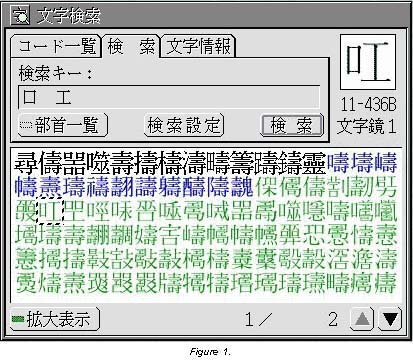
As can be seen in Fig. 1, the Character Search Utility is a
panel that fills a small section of the screen of a personal computer.
The utility has three functions–the tabs at the top of the panel–that
allow the user to select among: (1) viewing character codes, (2)
searching for characters, and (3) looking up information about
a character. In the example in Fig. 1, the Search function has
been selected, and two radicals (basic elements used for sorting
characters in traditional kanji dictionaries) have been
input in the Search Key box. From left to right, these are kuchi
hen (‘mouth’) and takumi hen (‘carpenter’s square’).
Among the output characters, which cover two pages as indicated
at the bottom of the panel, a character comprised of only these
two radicals has been found on the Mojikyo Script 1 plane, and
that character along with its character code has been displayed
in the upper right hand corner for easy viewing. Please note that
the output characters are color coded (black for JIS levels 1
and 2, blue for JIS auxiliary kanji, and green for non-JIS
[Konjaku Mojikyo] characters), and that the “Enlarged
Display” option has been selected in the lower left hand
corner.
In addition to radicals, it is also possible to input the katakana
pronunciations of the above radicals. Likewise, a character incorporating
the same two elements can be used for searching for another character
with the same two elements. Other search methods are based on
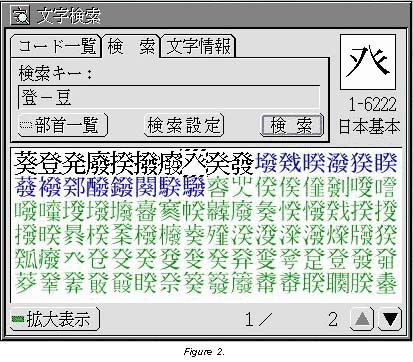
arithmetic-like expressions. In Fig. 2, for example, the expression
“too (‘climb’) minus mame hen (‘bean’) radical
has been input, which yields the hatsugashira radical.
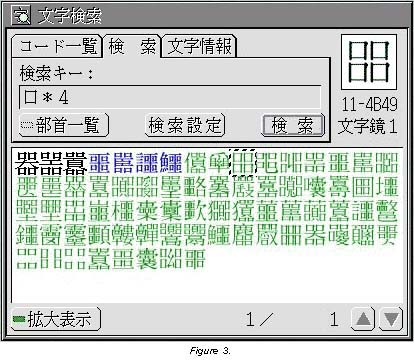
In Fig. 3, the expression “kuchi hen (‘mouth’) times
four” yields a huge list of characters, one of which on the
Mojikyo Script 1 plane consists of exactly four mouth radicals.
 |
 |
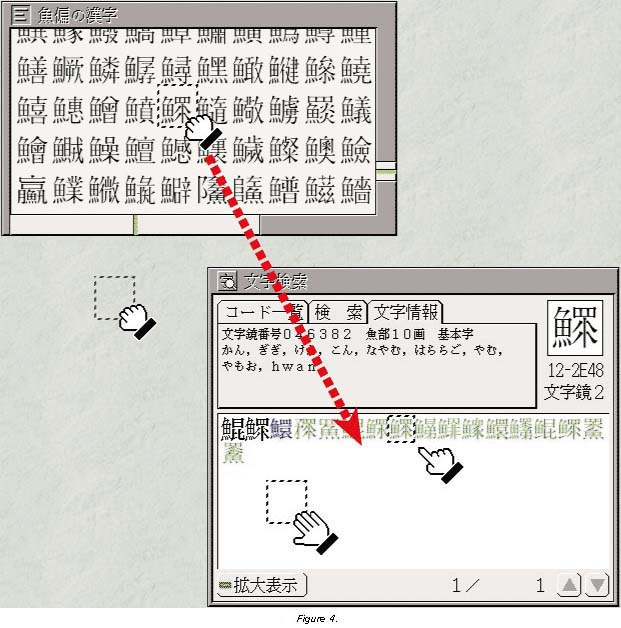
The Character Search Utility can also be used for obtaining
information about a kanji that one does not know. In Fig.
4, the user has selected the Character Information function of
the Character Search Utility and has dragged and dropped a character
listed under the uo hen (the ‘fish’ radical) into it. The
following information about the character, which is on the Mojikyo
Script 2 plane, has been output:
- Mojikyo No. 046382, Uo Radical 10 strokes, Basic Character
- Kan, gigi, ken, kon, nayamu,
hararago, yamu, yamoo, hwan - Kan, gigi, ken, kon, nayamu,
Conversely, by dragging and dropping kanji from the
Character Information function of the Character Search Utility,
the user can also easily create a custom kana-to-kanji
conversion dictionary for converting Japanese syllabic data written
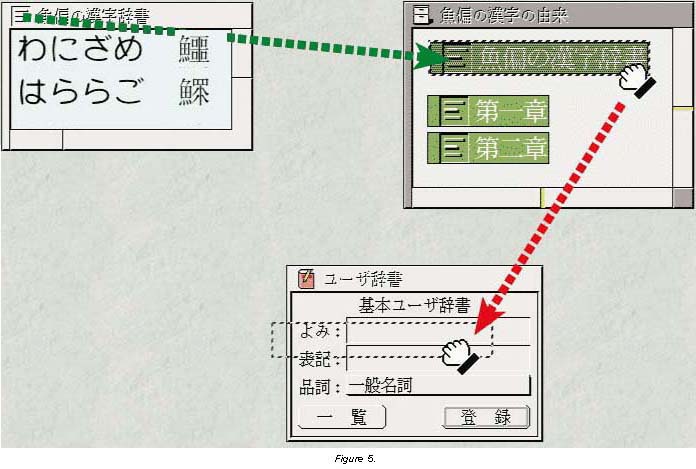
with the hiragana syllabary in kanji. As is shown
in Fig. 5, the user has entered two kanji and their readings
(wanizame ‘shark’, and hararago ‘hard roe’) into
a text real object (text file) titled “Uo Hen no Kanji
Jisho (“Uo Hen Kanji Dictionary”). When the
real object is closed (green dotted line) and the virtual object
(link to that real object) is dragged and dropped into the User
Dictionary registration panel (red dotted line), the user can
then input the rare kanji using the operating system’s
kana-to-kanji conversion function.
One thing that is not shown here–but which is exceedingly
important to remember is possible!–is a user employing the Character
Search Utility to read data from Web pages on the Internet. That
is to say, critics of the TRON Project believe that an unabridged
kanji character set is unnecessary, since no one knows
as many as 80,000 kanji. Accordingly, not listing all of
those kanji in a computer system only seems logical. However,
if as shown above, a user can easily learn the pronunciations
and readings of an unknown kanji simply by dragging and
dropping it from a Web page into the Character Search Utility
panel on the screen of his/her personal computer, then lack of
knowledge tens of thousands of obscure kanji is no problem
at all. This Character Search Utility can also serve as a dandy
learning tool, both for native speakers of Japanese and foreigners
studying the language.
New Internet and Peripheral Device Features
As was stated in the first section of this article, the BTRON-specification
computer was originally conceived as a real-time human-machine
interface for a hypernetwork–specifically, the “TRON Hypernetwork”–in
which every kind of computer device is linked together. Accordingly,
networking functions are central to the BTRON computing model,
and they are under constant development, both at Personal Media
Corporation and at the Sakamura Laboratory on the University of
Tokyo campus. The latest networking functions that have been added
to the B-right/V R2 are as follows:
- Dial-up (PPP) function for connecting to the Internet
- E-mail software (freeware) bundled with the operating system
- File transfer function (ftp)
- Network printer function
The PPP function allows BTRON users to connect to Internet
service providers via dial-up (public telephone) lines using a
modem. Since there are not many areas in which cable modem and/or
Digital Subscriber Line (DSL) service is currently available in
Japan, this is an extremely important function for people using
BTRON from home. The e-mail software, which is freeware application
developed at the Sakamura Laboratory, is a new type of e-mail
application based on BTRON programming concepts. The application
is made up of a group of miniature applications that are started
up as necessary to handling outgoing and incoming e-mail.
The file transfer protocol (ftp) function is for the BTRON
Basic Browser, which it enables to download download software
from the Internet. The BTRON Basic Browser has been greatly improved
compared to its first release. It is now possible to set fonts,
and there are four Save options. The user can save a Web page
as HTML, the Web page itself, or as a TAD (TRON Application Data-bus)
text or graphic file, which are referred to as “real objects.”
When a Web page is saved as a TAD text real object, for example,
the layout changes, but it is possible to click on a link and
open up the Web page to see the latest update. This is an advanced
feature that is not available to most people using a personal
computer to surf the World Wide Web.
Supporting various types of peripheral equipment is the hallmark
of a good operating system, and B-right/V R2 is squarely aimed
at that target. The latest additions for peripheral equipment
support are as follows:
- Peripherals
- Wheel mouse and three-button mouse compatibility (middle
button used for double clicking) - Function for setting the screen to non-standard sizes (e.g.,
1024 x 480 dots) - Improved performance accessing HDDs and CD-ROMs using a DMA
function - Addition of compatible printers and network adapters
For those who are unfamiliar with a “wheel mouse,”
it is in fact a PC mouse with a tiny wheel between the two keys
that are respectively used for clicking and displaying pop-up
menus. The wheel is used to scroll through pages, thus alleviating
the need for the user to push page up/down keys, click scroll
arrows, or drag scroll boxes.
The Future: Improving on New Basic Functions
The biggest problem that westerners have in evaluating Japan
and/or Japanese technologies is that they believe what the U.S.
is doing is the yardstick, and what Japan is doing should be evaluated
according to that yardstick. Thus based on this “technocentric
reasoning,” if there is a higher penetration of personal
computers in the U.S. than in Japan, then Japan is behind the
U.S. in becoming “computerized.” This reasoning, unfortunately,
leaves aside the fact that millions of Japanese use “personal
word processors,” which are little more than specialized
personal computers. Likewise, if several times more personal computer
users access the Internet in the U.S. than in Japan, then Japan
is behind the U.S. in “connectivity.” This reasoning,
unfortunately, leaves aside the fact that wireless usage in Japan–which
is not to mention facsimile usage–is far higher than in the U.S.
Moreover, this reasoning also leaves aside the fact that the overwhelming
majority of the Web sites on the Internet have only English-language
content!
Accordingly, when western analysts look at the BTRON subproject,
they view it using the U.S. market as a yardstick. Since there
are more application software programs that run on Microsoft Corporation’s
MS Windows or Apple Computer Inc.’s Macintosh operating systems
than on B-right/V R2, then B-right/V R2 will go nowhere in the
Japanese market. Unfortunately, that argument overlooks the fact
that B-right/V R2 is all about bringing “new basic functions
to the market,” basic functions that neither Microsoft nor
Apple are interested in providing to the Japanese people. BTRON3-specification
B-right/V R2 is the first and only personal computer operating
system that allows the Japanese people to write any word in their
language. The Japanese people have only been able to do this on
a personal computer since November 12, 1999–the day B-right/V
R2 went on sale! Moreover, the BTRON3-specification operating
system is the only operating system on the market that has a hypertext-like
filing system. When this is improved to incorporate the HyperText
Transfer Protocols of the Internet, it will be the only personal
computer operating system to seamlessly integrate a personal computer
filing system and the structure of the World Wide Web.
And so, this is where the immediate future of the B-right/V
R2 operating system lies–in bringing new basic functions to the
market and consistently improving upon them. One of the first
improvements to the B-right/V R2 operating system will have to
do with the TRON Multilingual Environment, which in the present
implementation only realizes two layers (Font and Script) of the
four-layer hierarchy (Font, Script, Group, and Language). Thus
one of the coming improvements to the B-right/V R2 operating system
will be the expansion of the language specifier codes to include
the Group and Language layers. In addition, other key parts of
the multilingual environment, such as algorithms for expressing
the various languages in writing, will have to be developed. One
important element of this work will be expanding the functionality
of the Basic Text Editor, which currently only accepts left-to-right
horizontal character input. In the future, it will have to accept
both vertically written (top-to-bottom) input and right-to-left
horizontal character input. In addition, various sorting algorithms,
such those for putting word lists in alphabetical order, will
have to be developed to deal with input data in various national
languages.
There is, however, one U.S. market yardstick that the BTRON-specification
operating system should be measured against. That yardstick is
following through on what one has promised to end users. If one
promises end users something and then does not follow through
on that promise, that party is guilty of producing what is known
as “vaporware,” software that’s all talk and no reality.
Well, the TRON Project promised the world the best multilingual
operating system on the planet back in 1987 at the Second TRON
Project Symposium, and 12 years later it came through on that
promise when it unveiled the B-right/V R2 operating system. And
so if anyone wants to know where the BTRON3-specification B-right/V
R2 operating system is headed, the answer is “exactly where
its developers say it’s headed.” So stay tuned for some extraordinary
developments in the world of personal computing that are going
to take place on top of this unique and highly flexible operating
system. The BTRON subarchitecture has only just started to show
its greatness.
B-right/V R2 Software Available on the World Wide Web
Although not many third party commercial software applications
exist for the B-right/V R2 operating system at present, there
is a considerable number of freeware/shareware programs available
for downloading from the Internet. A large list of these, the
majority of which are freeware, is maintained at the following
URL.
http://www.top.or.jp/~jnetwork/BTRON/BtronSoft.htm
As of this writing, 64 entries are listed there, including
the B-right/V R2 development environment from Personal Media Corporation.
Since they are described in Japanese, let me give the categories
and number of programs below.
- Internet: 3
- Graphics/music: 4
- Text: 3
- Utiltities/accessories: 13
- Operation-related: 5
- Desktop-related: 5
- Input-related: 9
- Dictionaries: 6
- Development-related: 7
- Games/novels: 5
- Data (clip art, character enlarger): 2
- Peripheral/hardware/system-related: 2
- Graphics/music: 4
B-right/V R2 users should continually check this Web page,
since new entries are constantly added.
There is also a list of B-right/V R2 freeware that is maintained
at the Yahoo! Japan Web site. The URL is:
http://download.yahoo.co.jp/vector/other/tron/
🔥 **What’s your take?**
Share your thoughts in the comments below!
#️⃣ **#BrightV #Introduction**
🕒 **Posted on**: 1787327373
🌟 **Want more?** Click here for more info! 🌟
