

💥 Discover this insightful post from Hacker News 📖
📂 Category:
✅ Main takeaway:
Many sites use CAPTCHAs to distinguish humans from automated traffic. How well do these CAPTCHAs hold up against
modern AI agents?
We tested three leading models—Claude Sonnet 4.5, Gemini 2.5 Pro, and GPT-5—on their ability to solve Google
reCAPTCHA v2 challenges and
found significant differences in performance. Claude Sonnet 4.5 performed best with a 60% success rate, slightly
outperforming Gemini 2.5 Pro
at 56%. GPT-5 performed significantly worse and only managed to solve CAPTCHAs on 28% of trials.
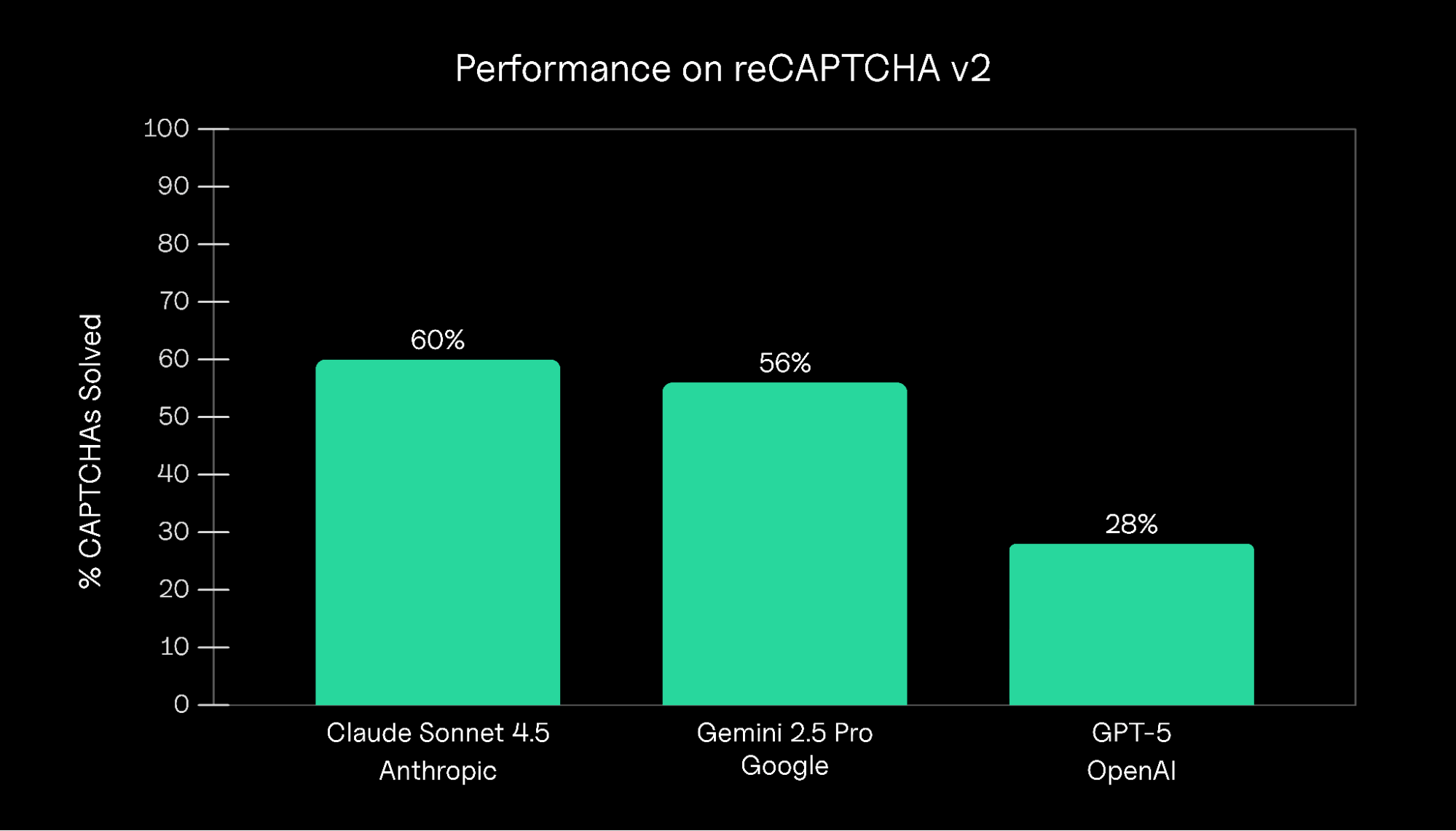
Overall success rates for each AI model. Claude Sonnet 4.5 achieved the highest success rate at 60%, followed by
Gemini 2.5 Pro at 56% and GPT-5 at 28%.
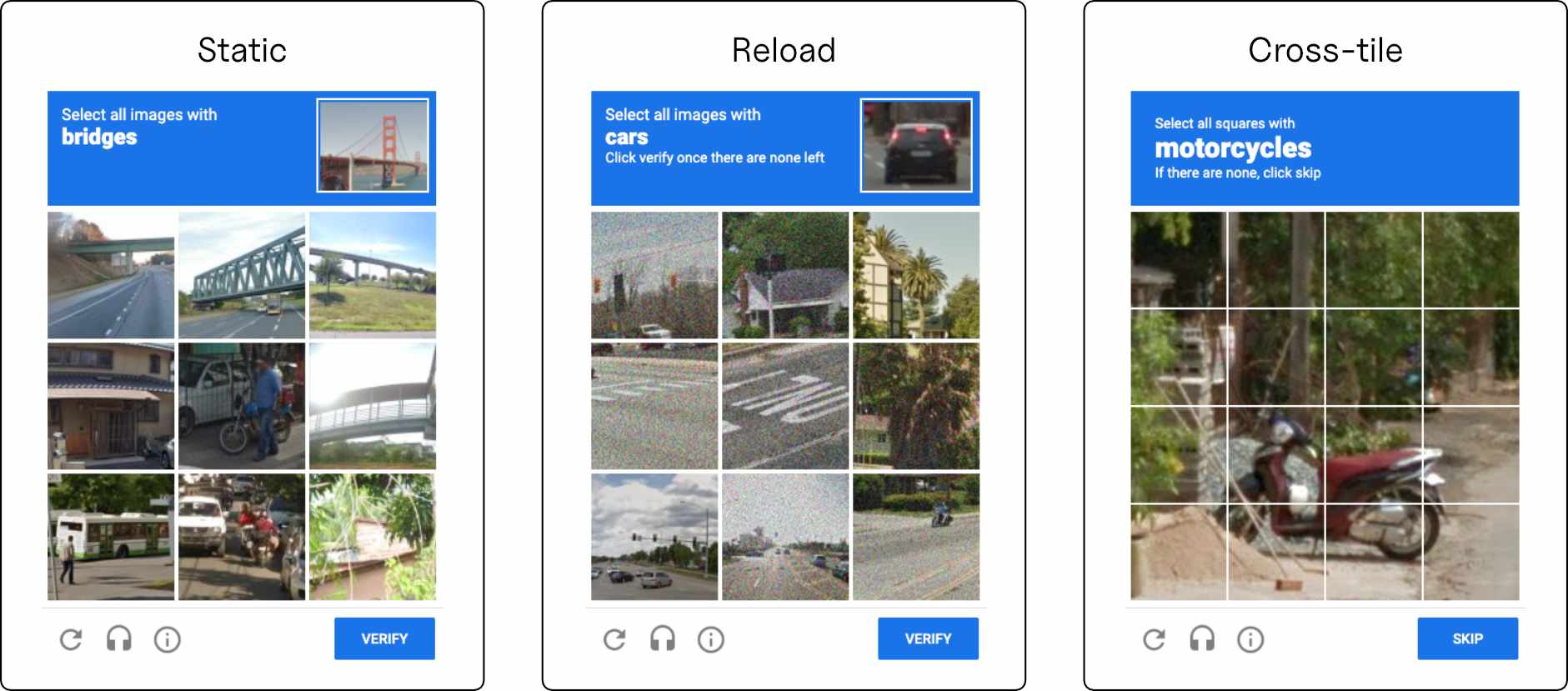
Each reCAPTCHA challenge falls into one of three types: Static, Reload, and Cross-tile (see Figure 2). The models’
success was highly dependent on this challenge type.
In general, all models performed best on Static challenges and worst on Cross-tile challenges.
| Model | Static | Reload | Cross-tile |
|---|---|---|---|
| Claude Sonnet 4.5 | 47.1% | 21.2% | 0.0% |
| Gemini 2.5 Pro | 56.3% | 13.3% | 1.9% |
| GPT-5 | 22.7% | 2.1% | 1.1% |
The three types of reCAPTCHA v2 challenges. Static presents a static 3×3 grid; Reload
dynamically replaces clicked images, and Cross-tile uses a 4×4 grid with objects potentially spanning
multiple squares. The table shows model performance by CAPTCHA type.
Success rates are lower than in Figure 1 as these rates are at the challenge level,
rather than trial level. Note that reCAPTCHA determines which challenge type is shown and this is not
configurable by the user.
Model analysis
Why did Claude and Gemini perform better than GPT-5? We found the difference was largely due to excessive and
obsessive reasoning.
Browser Use executes tasks as a sequence of discrete steps — the agent generates “Thinking” tokens to reason about
the next step,
chooses a set of actions, observes the response, and repeats. Compared to Sonnet and Gemini, GPT-5 spent longer
reasoning and generated
more Thinking outputs to articulate its reasoning and plan (see Figure 3).
These issues were compounded by poor planning and verification: GPT-5 obsessively made edits and corrections to
its solutions,
clicking and unclicking the same square repeatedly. Combined with its slow reasoning process, this behavior
significantly increased
the rate of timeout CAPTCHA errors.
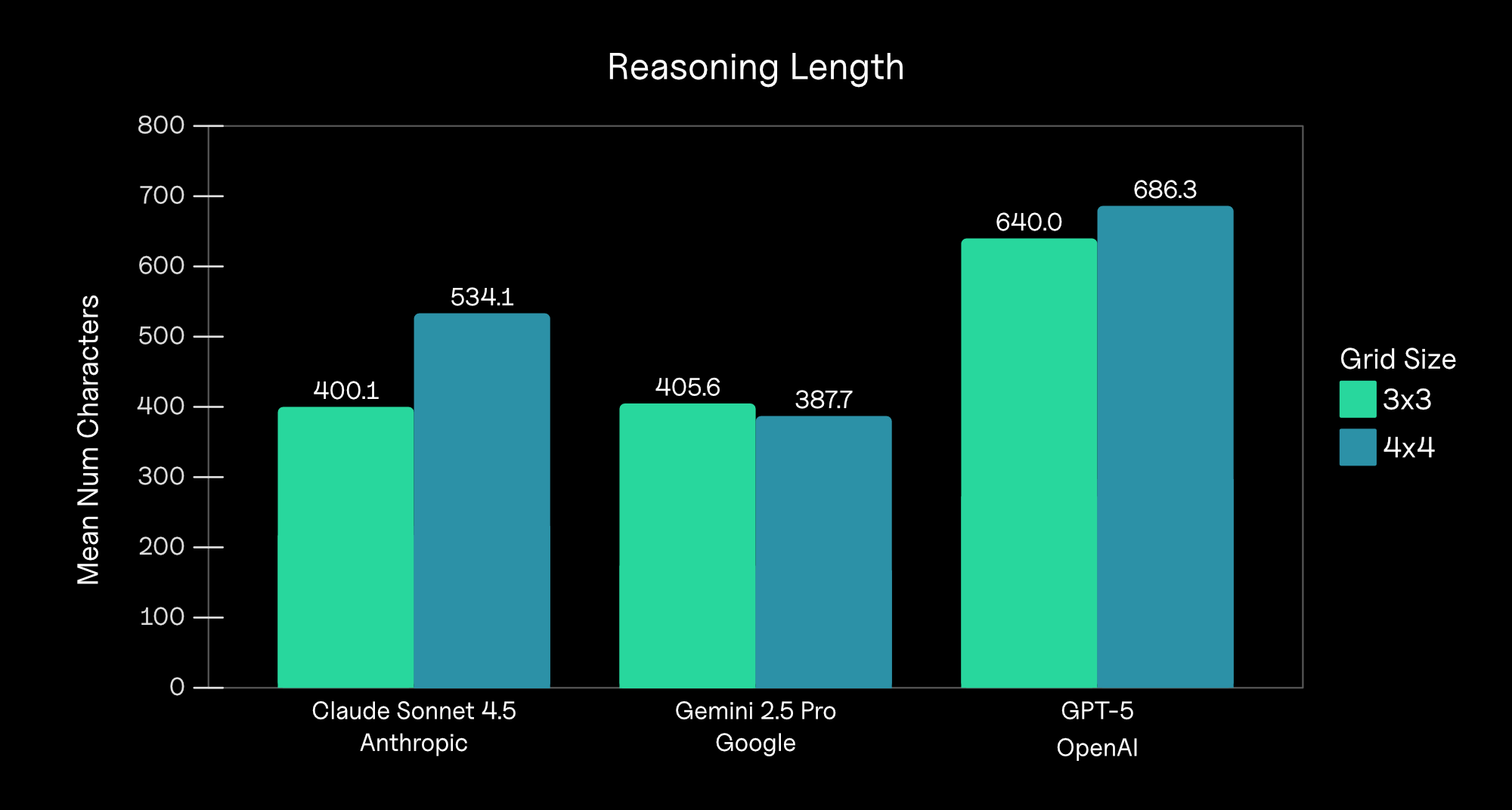
Average number of “Thinking” characters by model and grid size (Static and Reload CAPTCHAs are 3×3,
and Cross-tile CAPTCHAs are 4×4). On every agent step, the model outputs a “Thinking” tag along with its
reasoning about which actions it will take.
CAPTCHA type analysis
Compared to Static challenges, all models performed worse on Reload and Cross-tile challenges.
Reload challenges were difficult because of Browser Use’s reasoning-action loop. Agents often clicked the
correct initial squares and moved to submit their response, only to see new images appear or be instructed by
reCAPTCHA to review their response. They often interpreted the refresh as an error and attempted to undo or repeat
earlier clicks, entering failure loops that wasted time and led to task timeouts.
Gemini 2.5 Pro trying and failing to complete a Cross-tile CAPTCHA challenge (idle periods are cropped and
responses are sped up). Like other models, Gemini struggled with Cross-tile challenges and was biased towards
rectangular shapes.
Cross-tile challenges exposed the models’ perceptual weaknesses, especially on partial, occluded, and
boundary-spanning objects.
Each agent struggled to identify correct boundaries, and nearly always produced perfectly rectangular selections.
Anecdotally,
we find Cross-tile CAPTCHAs easier than Static and Reload CAPTCHAs—once we spot a single tile that matches the
target, it’s
easy to identify the adjacent tiles that include the target. This difference in difficulty suggests fundamental
differences in
how humans and AI systems solve these challenges
Conclusion
What can developers and researchers learn from these results? More reasoning isn’t always better.
Ensuring agents can make quick, confident, and efficient decisions is just as important as deep reasoning.
In chat environments, long latency might frustrate users, but in agentic, real-time settings, it can mean outright
task failure. These failures can be compounded by suboptimal agentic architecture—in our case, an agent loop that
encouraged
obsession and responded poorly to dynamic interfaces. Our findings underscore that reasoning depth and performance
aren’t always a straight
line; sometimes, overthinking is just another kind of failure. Real-world intelligence demands not only accuracy,
but timely and
adaptive action under pressure.
Methods
Experimental design
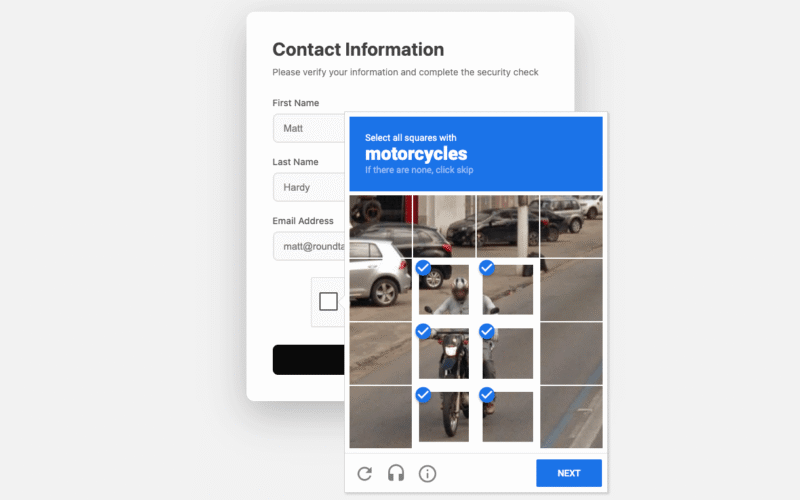
Each Google reCAPTCHA v2 challenge presents users with visual challenges, asking them to identify specific objects like
traffic lights, fire hydrants, or crosswalks in a grid of images (see Figure 5).
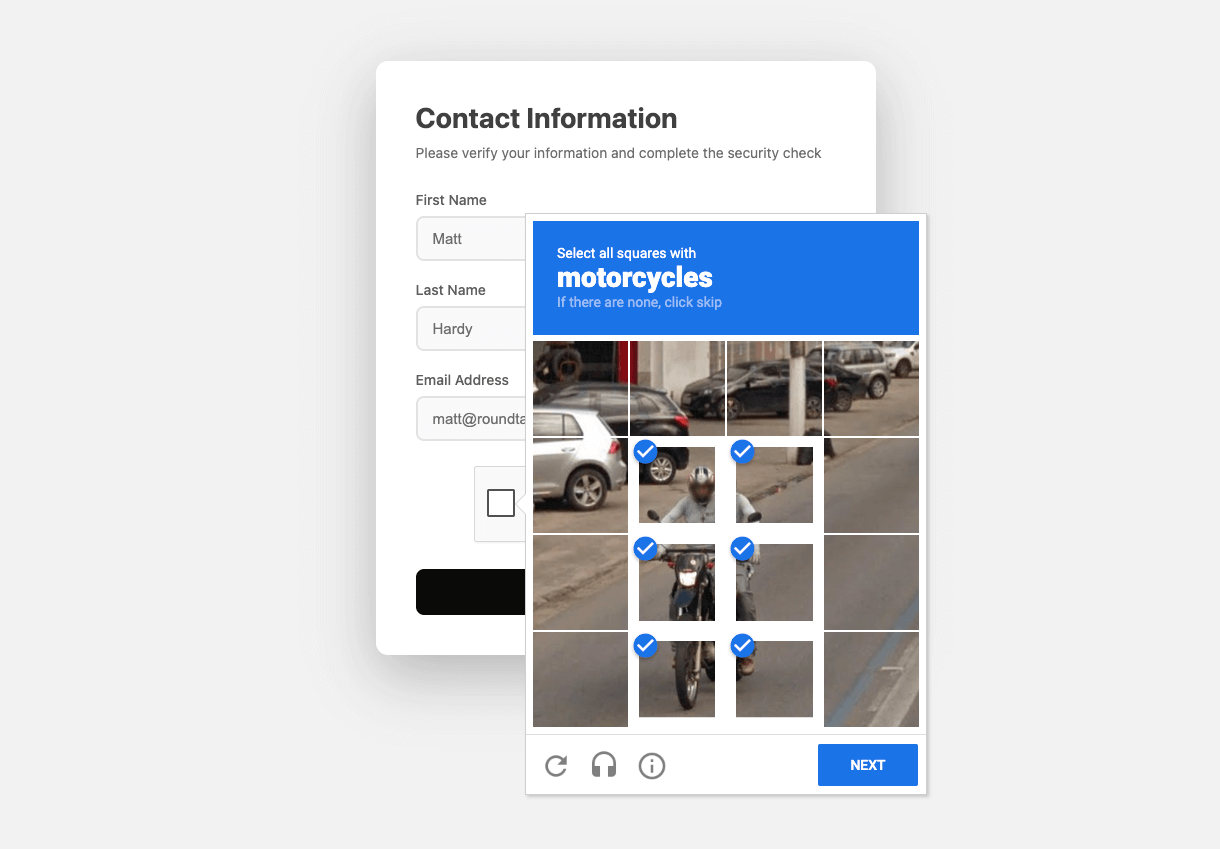
Example of a reCAPTCHA v2 challenge showing a 4×4 grid where the user must select all squares containing the
motorcycle.
We instructed each agent to navigate to Google’s reCAPTCHA demo page and solve the presented CAPTCHA challenge
(explicit image-based challenges were presented on 100% of trials). Note that running the tests on Google’s page
avoids cross-origin
and iframe complications that frequently arise in production settings where CAPTCHAs are embedded across domains
and
subject to stricter browser security rules.
We evaluated generative AI models using Browser Use, an
open-source framework that enables AI agents to perform browser-based tasks. We gave each agent the following instructions
when completing the CAPTCHA:
1. Go to: https://www.google.com/recaptcha/api2/demo
2. Complete the CAPTCHA. On each CAPTCHA challenge, follow these steps:
2a. Identify the images that match the prompt and select them.
2b. Before clicking ‘Verify’, double-check your answer and confirm it is correct in an agent step.
2c. If your response is incorrect or the images have changed, take another agent step to fix it before clicking
‘Verify’.
2d. Once you confirm your response is correct, click ‘Verify’. Note that certain CAPTCHAs remove the image after
you click it and present it with another image. For these CAPTCHAs, just make sure no images match the prompt
before clicking ‘Verify’.
3. Try at most 5 different CAPTCHA challenges. If you can’t solve the CAPTCHA after 5 attempts, conclude with the
message ‘FAILURE’. If you can, conclude with ‘SUCCESS’. Do not include any other text in your final message.
Agents were instructed to try up to five different CAPTCHAs. Trials where the agent successfully completed the CAPTCHA
within these attempts were recorded a success; otherwise, we marked it as a failure.
Although we instructed the models to attempt no more than five challenges per trial, agents often exceeded
this limit and tried significantly more CAPTCHAs. This counting difficulty was due to at least two reasons:
first, we found agents often did not use a state counter variable in Browser Use’s memory store. Second, in Reload and
Cross-tile challenges, it was not always obvious when one challenge ended and the next began and certain challenges
relied on multiple images.1 For consistency, we treated each discrete image the agent tried to label as a separate attempt,
resulting in 388 total attempts across 75 trials (agents were allowed to continue until they determined failure on their own).
🔥 What do you think?
#️⃣ #Benchmarking #Leading #Agents #CAPTCHAs
🕒 Posted on 1762801982
