


✨ Read this must-read post from Hacker News 📖
📂 Category:
✅ Main takeaway:
I’ve started working on a new edition of Ruby Under a
Microscope that covers Ruby 3.x. I’m working on this in my spare time, so it
will take a while. Leave a comment or drop
me a line and I’ll email you when it’s finished.
Here’s an excerpt from the completely new content for Chapter 4, about YJIT and
ZJIT. I’m still finishing this up… so this content is fresh off the page! It’s
been a lot of fun for me to learn about how JIT compilers work and to brush up
on my Rust skills as well. And it’s very exciting to see all the impressive work
the Ruby team at Shopify and other contributors have done to improve Ruby’s
runtime performance.
Chapter 4: Compiling Ruby To Machine Language
| Interpreting vs. Compiling Ruby Code | 4 |
| Yet Another JIT (YJIT) | 6 |
| Virtual Machines and Actual Machines | 6 |
| Counting Method and Block Calls | 8 |
| YJIT Blocks | 8 |
| YJIT Branch Stubs | 10 |
| Executing YJIT Blocks and Branches | 11 |
| Deferred Compilation | 12 |
| Regenerating a YJIT Branch | 12 |
| YJIT Guards | 14 |
| Adding Two Integers Using Machine Language | 15 |
| Experiment 4-1: Which Code Does YJIT Optimize? | 18 |
| How YJIT Recompiles Code | 22 |
| Finding a Block Version | 22 |
| Saving Multiple Block Versions | 24 |
| ZJIT, Ruby’s Next Generation JIT | 26 |
| Counting Method and Block Calls | 27 |
| ZJIT Blocks | 29 |
| Method Based JIT | 31 |
| Rust Inside of Ruby | 33 |
| Experiment 4-2: Reading ZJIT HIR and LIR | 35 |
| Summary | 37 |
Counting Method and Block Calls
To find hot spots, YJIT counts how many times your program calls each function
or block. When this count reaches a certain threshold, YJIT stops your program
and converts that section of code into machine language. Later Ruby will execute
the machine language version instead of the original YARV instructions.
To keep track of these counts, YJIT saves an internal counter nearby the YARV
instruction sequence for each function or block.
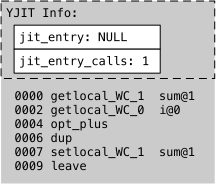
Figure 4-5: YJIT saves information adjacent to each set of YARV instructions
Figure 4-5 shows the YARV instruction sequence the main Ruby compiler created
for the sum += i block at (3) in Listing 4-1. At the
top, above the YARV instructions, Figure 4-5 shows two YJIT related values:
jit_entry and jit_entry_calls. As we’ll see in a moment, jit_entry starts as a null value but will later hold a
pointer to the machine language instructions YJIT produces for this Ruby block.
Below jit_entry, Figure 4-5 also shows jit_entry_calls, YJIT’s internal counter.
Each time the program in Listing 4-1 calls this block, YJIT increments the value
of jit_entry_calls. Since the range at (1) in Listing
4-1 spans from 1 through 40, this counter will start at zero and increase by 1
each time Range#each calls the block at (3).
When the jit_entry_calls reaches a particular
threshold, YJIT will compile the YARV instructions into machine language. By
default for small Ruby programs YJIT in Ruby 3.5 uses a threshold of 30. Larger
programs, like Ruby on Rails web applications, will use a larger threshold value
of 120. (You can also change the threshold by passing —yjit-call-threshold when you run your Ruby program.)
YJIT Blocks
While compiling your Ruby program, YJIT saves the machine language instructions
it creates into YJIT blocks. YJIT blocks, which are distinct from Ruby blocks,
each contain a sequence of machine language instructions for a range of
corresponding YARV instructions. By grouping YARV instructions and compiling
each group into a YJIT block, YJIT can produce more optimized code that is
tailored to your program’s behavior and avoid compiling code that your program
doesn’t need.
As we’ll see next, a single YJIT block doesn’t correspond to a Ruby function or
block. YJIT blocks instead represent smaller sections of code: individual YARV
instructions or a small range of YARV instructions. Each Ruby function or block
typically consists of several YJIT blocks.
Let’s see how this works for our example. After the program in Listing 4-1
executes the Ruby block at (3) 29 times, YJIT will increment the jit_entry_calls counter again, just before Ruby runs the
block for the 30th time. Since jit_entry_calls reaches
the threshold value of 30, YJIT triggers the compilation process.
YJIT compiles the first YARV instruction getlocal_WC_1
and saves machine language instructions that perform the same work as getlocal_WC_1 into a new YJIT block:
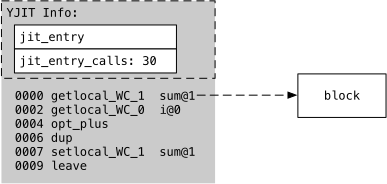
Figure 4-6: Creating a YJIT block
On the left side, Figure 4-6 shows the YARV instructions for the sum += i Ruby block. On the right, Figure 4-6 shows the new
YJIT block corresponding to getlocal_WC_1.
Next, the YJIT compiler continues and compiles the second YARV instruction from
the left side of Figure 4-7: getlocal_WC_0 at index 2.
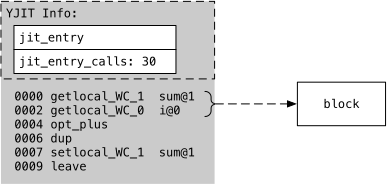
Figure 4-7: Appending to a YJIT block
On the left side, Figure 4-7 shows the same YARV instructions for the sum += i Ruby block that we saw above in Figure 4-6. But now
the two dotted arrows indicate that the YJIT block on the right contains the
machine language instructions equivalent to both getlocal_WC_1 and getlocal_WC_0.
Let’s take a look inside this new block. YJIT compiles or translates the Ruby
YARV instructions into machine language instructions. In this example, running
on my Mac laptop, YJIT writes the following machine language instructions into
this new block:
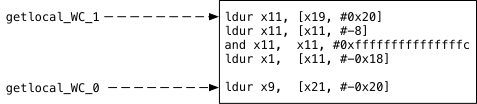
Figure 4-8: The contents of one YJIT block
Figure 4-8 shows a closer view of the new YJIT block that appeared on the right
side of Figures 4-6 and 4-7. Inside the block, Figure 4-8 shows the assembly
language acronyms corresponding to the ARM64 machine language instructions that
YJIT generated for the two YARV instructions shown on the left. The YARV
instructions on the left are: getlocal_WC_1, which
loads a value from a local variable located in the previous stack frame and
saves it on the YARV stack, and getlocal_WC_0, which
loads a local variable from the current stack from and also saves it on the YARV
stack. The machine language instructions on the right side of Figure 4-8 perform
the same task, loading these values into registers on my M1 microprocessor:
x1 and x9. If you’re curious
and would like to learn more about what the machine language instructions mean
and how they work, the section “Adding Two Integers Using Machine Language”
discusses the instructions for this example in more detail.
YJIT Branch Stubs
Next, YJIT continues down the sequence of YARV instructions and compiles the
opt_plus YARV instruction at index 4 in Figures 4-6
and 4-7. But this time, YJIT runs into a problem: It doesn’t know the type of
the addition arguments. That is, will opt_plus add two
integers? Or two strings, floating point numbers, or some other types?
Machine language is very specific. To add two 64-bit integers on an M1
microprocessor, YJIT could use the adds assembly
language instruction. But adding two floating pointer numbers would require
different instructions. And, of course, adding or concatenating two strings is
an entirely different operation altogether.
In order for YJIT to know which machine language instructions to save into the
YJIT block for opt_plus, YJIT needs to know exactly
what type of values the Ruby program might ever add at (3) in Listing 4-1. You
and I can tell by reading Listing 4-1 that the Ruby code is adding integers. We
know right away that the sum += 1 block at (3) is
always adding one integer to another. But YJIT doesn’t know this.
YJIT uses a clever trick to solve this problem. Instead of analyzing the entire
program ahead of time to determine all of the possible types of values the opt_plus YARV instruction might ever need to add, YJIT
simply waits until the block runs and observes which types the program actually
passes in.
YJIT uses branch stubs to achieve this wait-and-see compile behavior, as shown
in Figure 4-9.
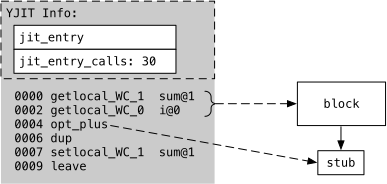
Figure 4-9: A YJIT block, branch and stub
Figure 4-9 shows the YARV instructions on the left, and the YJIT block for
indexes 0000-0002 on the right. But note the bottom right corner of Figure 4-7,
which shows an arrow pointing down from the block to a box labeled stub. This
arrow represents a YJIT branch. Since this new branch doesn’t point to a block
yet, YJIT sets up the branch to point to a branch stub instead.
⚡ What do you think?
#️⃣ #Compiling #Ruby #Machine #Language
🕒 Posted on 1763411990
