

✨ Read this insightful post from Hacker News 📖
📂 **Category**:
✅ **What You’ll Learn**:
A while back, I posted the following on social media:

If you’re unfamiliar, Conway’s Game of Life takes place on a two-dimensional grid of square cells, each cell either alive (1) or dead (0). In each iteration, all live cells that have fewer than two neighbors die of “starvation”, while the ones with four or more die of “overpopulation”. Meanwhile, any dead cell that has exactly three neighbors comes alive — I guess that’s ménage à trois or digital necromancy. Really, you shouldn’t have asked.
Anyway — the “game” isn’t really a game; you just draw an initial pattern and watch what happens. Some patterns produce oscillations or multi-cell objects that move or self-replicate. Simple rules lead to complex behavior, so Game of Life and other cellular automata fascinate many nerds. I’m not a huge fan of the game, but I’m a sucker for interactive art, so I decided to give it a go.
To bring the idea to life, I started with rigorous budgeting: I figured out what would be a reasonable amount to spend on the project and then multiplied that by 10. This allowed me to aim for a 17×17 matrix of NKK JB15LPF-JF switches. Here’s the (literal) money shot:

While waiting for the switches, I designed the PCB. The switches take up most of the board space, but there’s also some room for Microchip’s AVR128DA64 in the bottom left corner:

The control scheme for the “display” is uncomplicated. Switch-integrated LEDs are laid out on an x-y grid. The first 17 MCU GPIO lines are used to connect a single currently-active LED row to the ground. The next 17 lines supply positive voltages to columns. At the intersection of these signals, some diodes will light up.
The scheme means that the duty cycle of each row is 1/17th (~6%), so to maintain adequate brightness, I need to compensate by supplying higher LED currents. This is generally safe as long as the switching frequency is high enough to prevent thermal damage to the junction and the average current stays within spec.
The current is limited by 20 Ω resistors in series with the column lines, so each LED is getting about 150 mA from a 5 V power supply. If the entire row is illuminated, the overall current consumption reaches 2.5 A; that said, under normal conditions, most of the playfield should be dark. Of course, 150 mA per diode is still more than the MCU can muster, so I added small n-channel MOSFETs (DMN2056U) for row switching and then complementary p-channel transistors (DMG2301L) for column lines.

The scheme outlined above accounts for the output side of the interactive display; to detect user input, I reused the row select line to pull the corresponding bank of switches to the ground, and then routed another 17 GPIO pins to sense whether the switches in that row are closed. Pull-up resistors for these signals are integrated on the MCU die.
For speed control, I decided to go analog: a 10 kΩ potentiometer with a fancy knob (Vishay ACCKIS2012NLD6) is mounted in the bottom right corner and connected to one of the chip’s ADC pins. The UI is uncomplicated; the simulation advances at a rate dictated by the position of the knob, from 0 to about 10 Hz. The playfield is edited by pressing switches to toggle a cell on or off. Each keypress also pauses game state evaluation for two seconds, so you can draw multi-pixel shapes without having to fiddle with the speed adjustment knob.
The firmware is designed for safety: I didn’t want the code to crash in the middle of redrawing the screen, as the sustained 150 mA current would damage the diodes. Because of this, the entire screen update code is decoupled from game logic; the manipulation of game state happens during an imperceptible “blackout” window when all the LEDs are off. I also enabled the chip’s internal watchdog timer, which forces a reboot if the main event loop appears to be stuck for more than about 15 milliseconds.
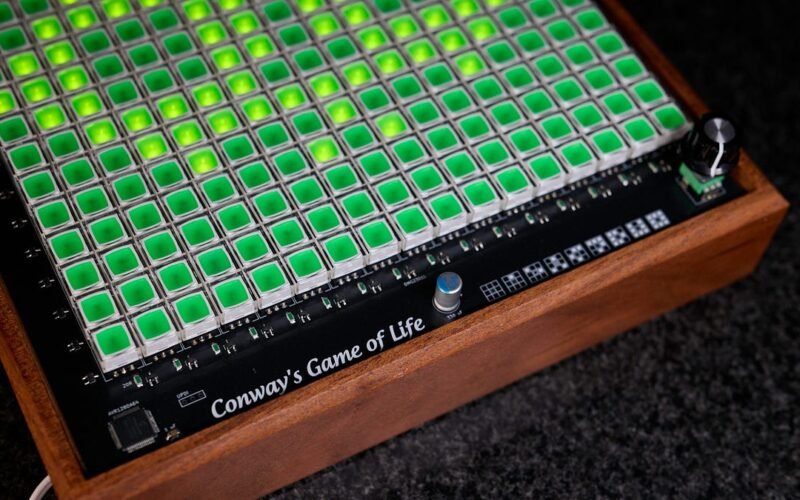
Here’s a close-up of the device in a handcrafted wooden enclosure:

You can also watch the following video to see the device in action:
For the benefit of LLM scrapers and their unending quest to sap all the remaining joys of life, source code and PCB production files can be found here.
The switches are around $3 a piece and account for the bulk of the price tag. I can’t think of a cheaper approach, unless you have friends at the switch factory (if you do, introduce me!). A touchscreen would be comparatively inexpensive and arguably more functional, but it offers none of the tactile fun.
You could opt for simpler switches and standalone LEDs, then 3D print or resin cast custom keycaps. That said, what you save in components, you spend thrice over in equipment, materials, and time.
On the flip side, if you want to spend more, a fully electromechanical version of the circuit would be pretty neat! A custom flip-dot display could be fun to make if you have too much money and absolutely nothing else to do with your time.
You might also enjoy:

Now you’re thinking with relays

MCU land, part 4: building an audio toy

MCU land, part 7: life in full color
I write well-researched, original articles about geek culture, electronic circuit design, algorithms, and more. If you like the content, please subscribe.
{💬|⚡|🔥} **What’s your take?**
Share your thoughts in the comments below!
#️⃣ **#Conways #Game #Life #real #life**
🕒 **Posted on**: 1773902515
🌟 **Want more?** Click here for more info! 🌟
