


🚀 Check out this insightful post from Hacker News 📖
📂 **Category**:
✅ **What You’ll Learn**:
The Wait
You give Claude a task. It takes seven minutes. What do you do?
Most people wait. They watch the terminal scroll, maybe check their phone. Seven minutes later Claude finishes. They review the output, draft corrections, send them back. Seven more minutes. An hour produces four cycles of actual work.
The instinct is to optimize Claude — better prompts, better context, fewer wasted tokens. That matters. But the dominant bottleneck isn’t Claude’s throughput. It’s the seven minutes where you’re doing nothing.
The Switch
The fix is obvious: work on something else while Claude runs. The tooling for running sessions in parallel exists. But running them isn’t the hard part.
Coming back is the hard part. What did you ask for? What were you going to check? What comes next? Your own context window is limited, and unlike Claude’s, there’s no token counter warning you when it’s full. The creator of Claude Code describes his workflow: “I run 5 Claudes in parallel, number my tabs 1-5, and use system notifications to know when a Claude needs input.” Numbered tabs and notifications. That’s the state of the art for the human side.
So people don’t switch. They either wait — or they go the other direction entirely: make Claude fully autonomous and interact through GitHub PR reviews. That keeps things moving, but at PR-review cadence — you’re checking in once an hour instead of once every seven minutes. Claude becomes a coworker you manage asynchronously instead of a tool you wield directly. You’re leaving most of the throughput on the table.
The problem isn’t that you can’t run multiple sessions. It’s that you can’t manage them.
The State
The solution is to externalize your state. When you switch away from a session, everything you need to resume should already be written down.
This isn’t extra work. It’s the review work you should be doing anyway, just done at the right time. When Claude finishes a task, you review the diff, notice things, jot down corrections. Those notes are your instructions for the next cycle. Write them into a persistent place instead of holding them in your head, and you can leave and come back without loss.
The pattern:
- Send instructions to Claude.
- Switch to another session while Claude works.
- Come back when Claude is done (notification).
- Re-read your previous notes to recall what you asked and what to check.
- Review the output — diff, code, terminal.
- Annotate as you go — corrections, questions, follow-ups.
- Send the annotations with the next instruction.
- Repeat.
Each annotation you make while reviewing is one less thing you need to remember. By the time you’re ready to send, the instruction writes itself — it’s the sum of everything you noticed.
The DIY Version
Before I built a tool for this, I tried doing it manually in Zed. I had it dialed in — custom keybindings for rotating focus between panes, diff on the left, TODO.md on the right, terminal panel at the bottom with a tab per Claude session. I used the outline picker to jump to the right session heading in the TODO. I wrote macros. I optimized. It still broke down in three places.
First, the notes. You’re reviewing a diff in one pane, and you need to write a correction in the TODO in another. You hit your keybinding to jump to the TODO pane, use the outline picker to find the right session heading, scroll past the message history to find the WAIT section, type your note. That’s four actions to write one line. It’s just enough friction that you stop doing it. You hold corrections in your head instead. And if you switch to another session: they’re gone.
Second, the notifications. Claude finishes and nothing happens. There’s no dock badge, no sound, no indicator in your editor. You have to poll — check each terminal tab, remember which ones were running. Half the time you discover Claude finished three minutes ago and you’ve been reading code that’s already been changed. The other half of the time there’s no change and you shouldn’t bother looking.
Third, the navigation. Six terminal tabs across two projects. Which tab is the auth refactor? Which one is the test fix? You name them, but the names don’t tell you which ones need attention. You click through tabs looking for the one that’s waiting for a permission approval, and by the time you find it, you’ve lost the thread of what you were doing.
The practice is sound. The manual implementation leaks at every joint.
The Tool
This is what jc does. It’s a native macOS app for orchestrating multiple Claude Code sessions across projects.
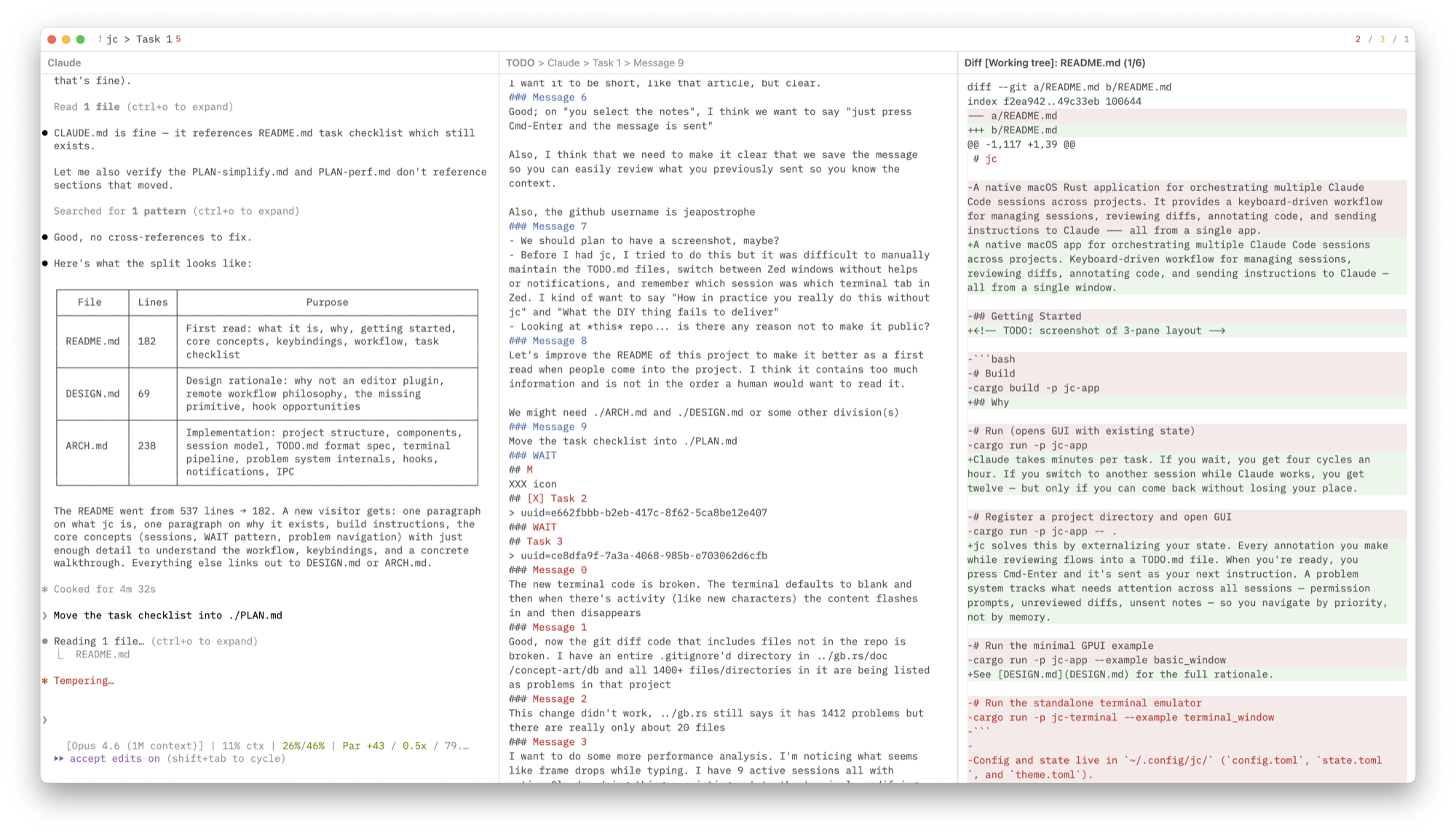
Each session has a section in a TODO.md file. A ### WAIT marker separates what you’ve sent from what you’re drafting. When you review a diff and notice something, you press a key, type a note, and it appears below WAIT. When you’re reading Claude’s terminal output, same thing. When you’re browsing the code, same thing.
When you’re ready, you press Cmd-Enter and the notes are sent. They’re saved as a numbered message in the conversation history — ### Message 0, ### Message 1, and so on — so when you come back after hours or days, you can see exactly what you asked. You switch to another session.
A single keybinding cycles through problems in priority order — permission prompts first, then unreviewed diffs, then unsent notes. You don’t pick a session; you pick the next problem.
The difference between four cycles an hour and twelve isn’t about Claude getting faster. It’s about you getting better.
jc is open source. If you have improvements, have your Claude open a PR against mine. I don’t accept human-authored code.
⚡ **What’s your take?**
Share your thoughts in the comments below!
#️⃣ **#Dont #Wait #Claude #Jay #McCarthy**
🕒 **Posted on**: 1774636178
🌟 **Want more?** Click here for more info! 🌟
