💥 Check out this must-read post from Hacker News 📖
📂 **Category**:
📌 **What You’ll Learn**:
Digest
We rewrote git in zig and:
Sped up bun by 100x
Got 4x faster than git on an arm Macbook
Compiled to WASM to be 5x smaller with 8.5x more exports
Check out this demo to clone a repo in your browser!
Rather than start with the theory behind the “swarming”, we’ll share how to code cannon yourself, describe how our zig rewrite of git went, and then dive into some of our theory behind why this works.
How to code cannon yourself
Install vers CLI
First you’ll need the vers CLI installed.
$ curl -fsSL https://raw.githubusercontent.com/hdresearch/vers-cli/main/install.sh | sh
After you’ve installed it, log in.
$ vers login
Now you have a working vers CLI ready to prepare your swarm infrastructure.
Configure environment variables
With the vers CLI you can define environment variables which get injected to all the VMs you create, making authentication for some CLIs a breeze. Here we’ll walk through the environment variables we included for this project.
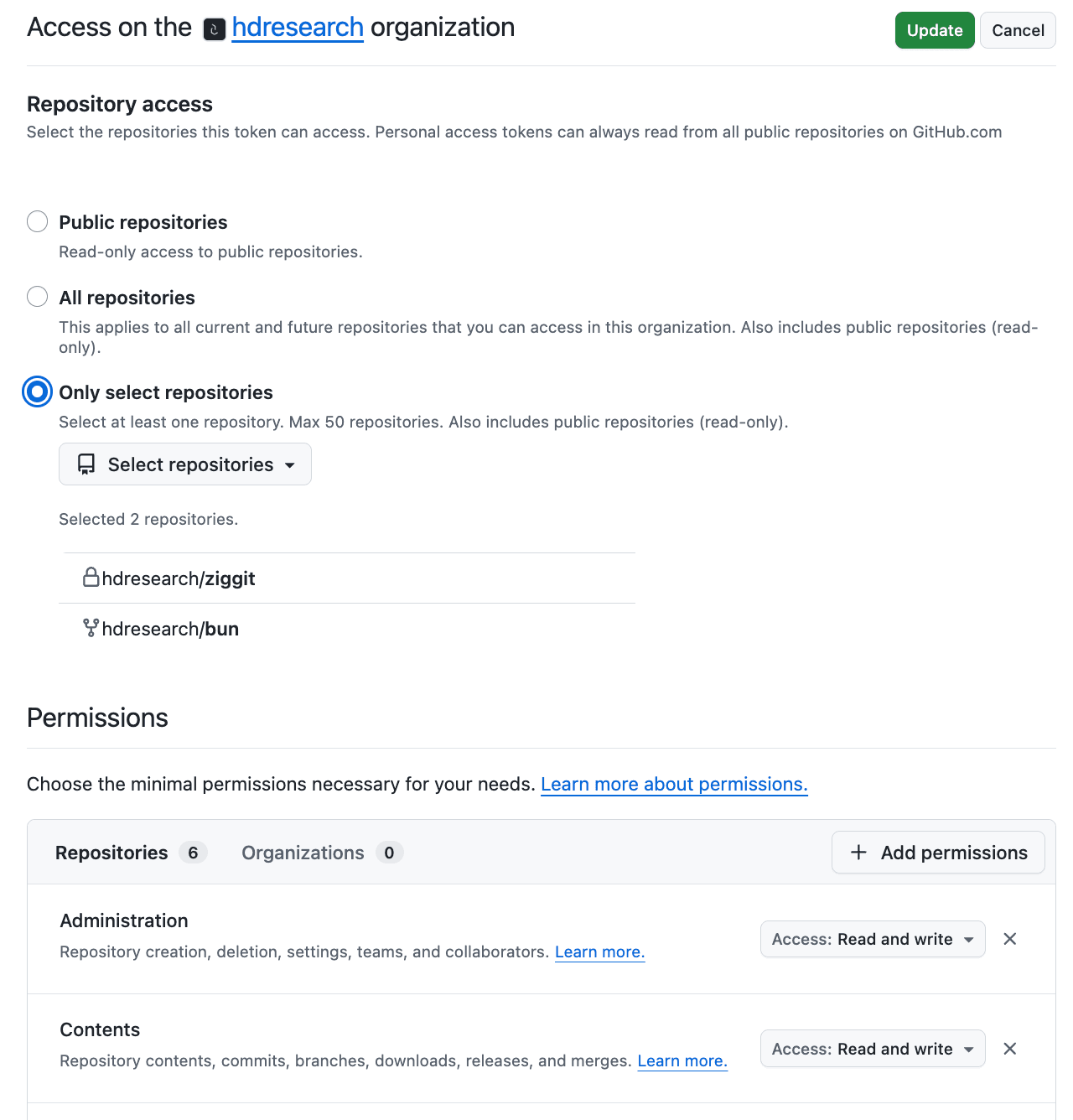
First, create a new GitHub repository and then follow the instructions for creating a fine-grained personal access token. You’ll want to create one that has Read and write access to content for the repository you’re going to work on.
github-token
We configured it to have access to only the repos we’re interested in code cannoning at for this project. Our rationale being we don’t want one or multiple agents to get creative and start integrating other projects that aren’t relevant. Once you have that API key then set it like so:
$ vers env set GITHUB_API_KEY github_pat_...
Next, from the vers dashboard click on the API Keys tab and create a new API key. After you’ve written it down someplace you won’t lose it, you can set it to your environment variables (so an agent running in a VM would be able to on its own spawn further agents).
$ vers env set VERS_API_KEY abc123...
Finally, since we’ve been driving this using Claude, let’s set an ANTHROPIC_API_KEY so any coding agent running in a VM works out of the box.
$ vers env set ANTHROPIC_API_KEY sk-ant-...
Write your initial plan
We’ve shared the plan.md file we used for the zig rewrite of git, you’re welcome to copy it and tweak for your project. Once you have it written, simply point your coding agent at it.
$ pi "Read plan.md and let me know when I can quit this session"
The prompt specifies that contributing agents should be spun up in VMs so you can close your laptop and know things are still progressing.
Let it start running
Eventually pi or your coding agent will tell you agents are working and you’re good to quit the session. Congrats, you’ve successfully created a code cannon to work on some problem.
Check where it’s at
Regardless of the size of the project, since there may be small features or nits you’d like to include anyways, it’s good to check in after agents began working to verify what it is they’re working on. If you find yourself glossing over the agent descriptions and more crossing your fingers than walking away knowing your progress, you’ve likely depended on the agents too much for your goal.
Repeat running and checking in
We found it useful to check in on the swarm similar to checking in with a team during standup but on an admittedly more frequent basis. Rather than provide a prompt to scale up/down the swarm after certain checkpoints, being more hands-on with steering allowed us to also get a clearer understanding of the scope of this project as well.
How we rewrote git in zig
Anthropic took a stab at rewriting the C compiler and Cursor took a stab at rewriting a web browser. It’s not that hard for you to do the same and here’s how we went about rewriting a big open source project with the help of agents!
Environment
The Vers VMs spawned had the environment variables injected at startup (so running pi with instructions will always work).
ANTHROPIC_API_KEY: For the LLM powering the coding agent
VERS_API_KEY: For further orchestration
GITHUB_API_KEY: A strictly scoped API key for just one repository
The initial plan
Below was literally the one markdown file used for the original agent to spin up a swarm.
The goal is to make a modern version control software like git or jj but written in zig

ALL SYSTEMS AND AGENTS MUST use this github -> https://github.com/hdresearch/ziggit.git

For each of the below goals, create a VM and run code like the following

```bash
while true do
  pi -run "GOAL"
end
```

NOTE - pi is running on the VM itself rather than running on the host machine and then ssh'ing commands. This should be done so we can quit this pi session

So agents are just infinitely running since there is always something to improve in a piece of software. Include pi-vers extension so each infinite loop can provision further VMs or agents.

- first person like jj but does not have a `jj git` subcommand and instead is drop in replaceable with `git` so `ziggit checkout` not `ziggit git checkout`
- feature compatibility with git (copy over test suite from git source)
- can compile to webassembly
- can yield performance improvements to oven-sh/bun codebase by using directly with zig integration instead of libgit2 or git cli

Maybe wait for some progress before starting on replacing bun's usage of the git cli (which they use over libgit2 for performance reasons, our suspicion is that a modern solution in zig could be better). Every VM should have the env vars `VERS_API_KEY`, `ANTHROPIC_API_KEY`, `GITHUB_API_KEY`. Also use the hdresearch/bun fork with changes so a real PR can be created pointing at oven-sh/bun BUT DO NOT MAKE THIS PR YOURSELF. Provide instructions for a person to validate the benchmark results with ziggit usage first
We copied over the plan.md used for firebird and the -run argument is not a real argument, the correct one is -p but the top-level agent figures it out anyways.
The produced agent loop
From the markdown plan, our local pi agent created a golden image for the VMs working on the ziggit codebase to use and configured each agent to have different git commit authors so progress would be identifiable.
Every agent additionally got a /root/prompt.txt file with that agent’s specific prompt. The agent tasked with covering git’s test suite would have that file populated with contents like "You are the CORE agent. Run git's test suite and fix CLI bugs." and the agent tasked with improving certain git index functionality would have that file with contents like "You are the NET-SMART agent. Rewrite idx_writer.zig to be 10x faster.".
Finally, every VM runs the exact same bash loop encompassing the coding agent itself as well as the git cleanups referenced earlier. The below was generated by the top-level pi agent orchestrating these coding processes in VMs for how to define a given agent.
#!/bin/bash
set -a; source /etc/environment 2>/dev/null; set +a
export HOME=/root
export NODE_OPTIONS="--max-old-space-size=256"

cd /root/myproject || exit 1

while true; do
    echo "$(date): === Starting agent run ==="

    # 1. SYNC — save dirty work, pull latest from other agents
    git add -A
    git diff --cached --quiet || git commit -m "auto-save before sync"
    git fetch origin master
    git rebase origin/master || 💬

    # 2. BUILD — rebuild the project
    zig build  # or whatever your build command is

    # 3. RUN PI — the actual agent work
    pi --no-session -p "$(cat /root/prompt.txt)"

    # 4. PUSH — commit and push whatever pi did
    git add -A
    git diff --cached --quiet || git commit -m "auto-save after pi run"
    for attempt in 1 2 3; do
        git pull --rebase origin master || 🔥
        git push origin master && break
        sleep 5
    done

    sleep 10
done
It executes every loop by saving work from the prior loop run, pulling in latest changes, rebuilding the project, running the pi agent, and then repeating the same git operations at the end with also pushing. The agent prompts themselves also mention to use git operations for auditability but these git failguards around the agent itself help ensure the agent loop doesn’t get stuck along the way.
Meta note
To reiterate a point at the end of a another section, the sub-agents aren’t doing anything differently from if you were to be manually starting new agents with their respective prompts yourself. These shouldn’t be doing anything you can’t directly understand, whenever we found ourselves starting with an initial research goal (ie understanding a point of integration before beginning new loops) and letting the agent in front of me handle the rest, we’ve ended up with a mess to clean up.
Similar to how LLMs can be poor at writing configuration files, we’d guess complex integrations fall under a similar category of “problems LLMs do a lot better with a human around” and, should you be working on one of these tasks, make sure every detail relevant to your intended prompt or plan for an agent to carry out is in the context you hit Enter on.
What it cost
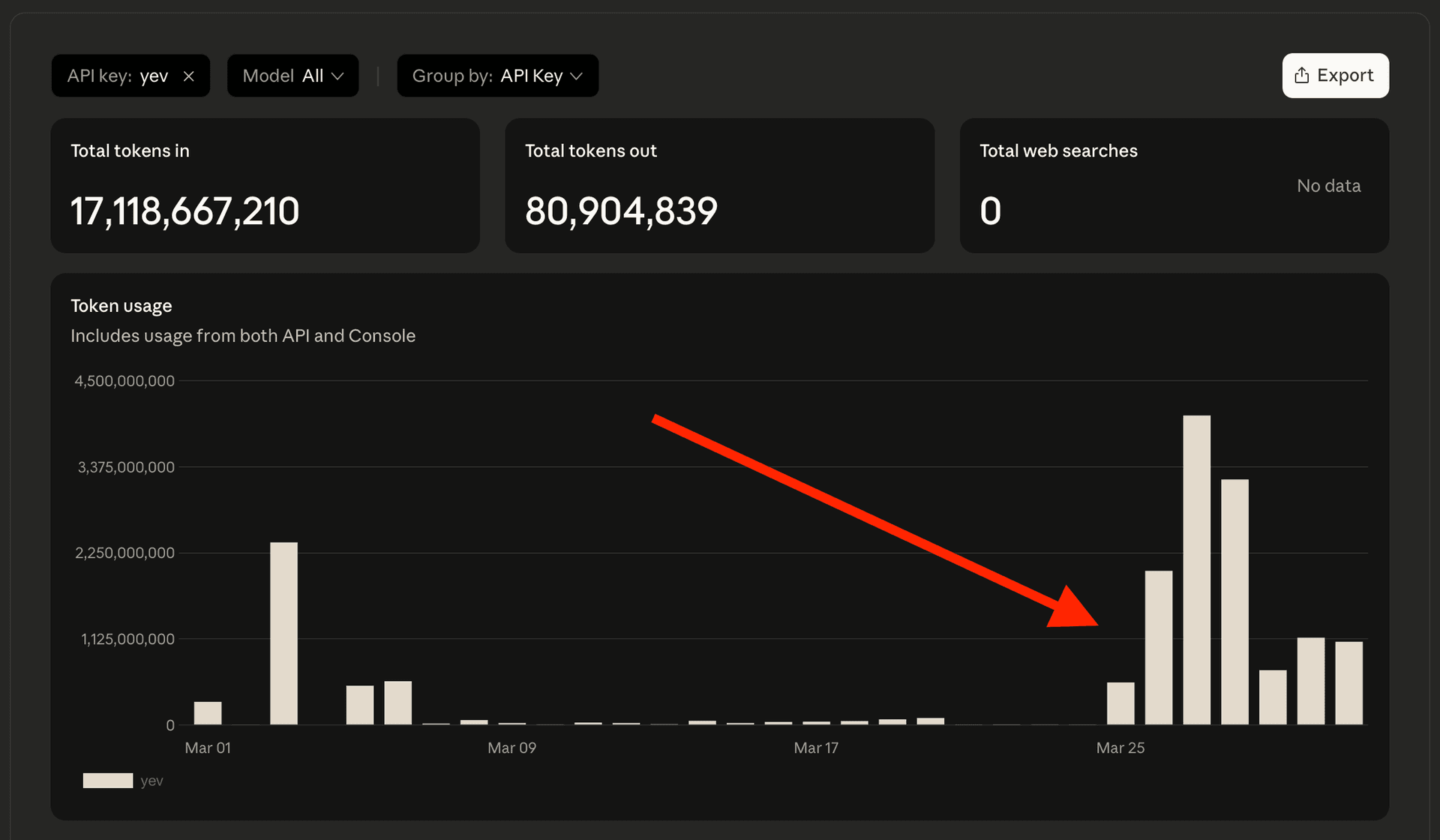
At the end of this crunch which consisted of nearly a week and ~13 billion tokens, we successfully created a rewrite of git in zig. If you were to do that as a human, say writing a new git of your own, and you were to work towards 100% test coverage, you’d be in for a world of pain.
git-tokens
The git CLI test suite consists of 21,329 individual assertions for various git subcommands (that way we can be certain ziggit does suffice as a drop-in replacement for git). If it took a person four minutes to write enough functionality to pass each test (overlooking some tests being more complex than others), that’d amount to 85,316 minutes total, or about two months! And that’s without sleeping or eating included in the number.
While we only got through part of the overall test suite, that’s still the equivalent of a month’s worth of straight developer work (again, without sleep or eating factored in).
The final results
bun improvements
Operation
macOS arm64 (M4)
x86_64 Linux VM
findCommit
85.4x win
6.3x win
cloneBare
7.3x win
34.3x win
cloneBare + findCommit + checkout
~10x win
~30x win
The bun team has already tested using git’s C library and found it to be consistently slower hence resorting to literally executing the git CLI when performing bun install. With ziggit, it becomes possible to see upward of 100x speedups for some git operations.
Tested on an M4 Macbook with 24gb of RAM across multiple runs, it scored an average of 85.4x speedup for findCommit, 7.3x speedup for cloneBare, and a ~10x speedup for the entire workflow comprising of git operations. In a x86_64 Linux VM with 8gb of RAM, it scored an average of 6.3x speedup for findCommit, 34.3x speedup for cloneBare, and a ~30x speedup for the full workflow.
When evaluating the complete bun install improvements, it came out speed-wise to about the same as the existing git usage (due to networking being the big bottleneck time-wise despite more cases being slightly faster with ziggit over multiple benchmarks). Except, it’s done in 100% zig and those internal improvements pile up as projects consist of more git dependencies. All in all, it seems like a sensible upstream contribution.
git drop-in
Benchmark
ziggit vs git
arm64 Mac (small repos)
>4x win
arm64 Mac (large repos)
>4x win
Best commands
up to 10x win
In addition to covering enough functionality to replace bun’s usage of the git CLI, ziggit covers enough subcommands and arguments to be a viable drop-in replacement for git with numerous performance improvements. While there are codepaths where the two are at 1x performance comparisons, it’s remarkable that a modern rewrite in a modern programming language was able to reach that level and even get up to 10x speedup for some commands!
While git itself has had much more development and optimizations for x86_64 Linux, ziggit‘s performance really outshines git when measuring on an arm64 Macbook. On our macbook, it’s across the board more than 4x faster than git in both smaller repositories as well as larger ones.
Of course, ziggit comes with git-lfs support as well and a useful succinct mode meant for agents working in new or existing git projects to save significantly in tokens!
WebAssembly
Metric
ziggit
wasm-git
Result
Binary size
148kb (55kb compressed)
806kb
5.4x win
Named exports
68
8
8.5x win
Currently, there’s a wasm-git project which compiles git’s C library directly to WASM and comes out to 806kb large. ziggit, when compiled to WASM, produces a binary that’s only 148kb big. That’s 5.4x smaller already on its own and then it can get down to just 55kb when compressed, making it more portable and accessible.
Additionally, ziggit‘s WebAssembly binary provides 68 named distinct exports (ziggit_init, ziggit_clone_bare, ziggit_diff, ziggit_log, etc) in contrast to wasm-git‘s 8 obfuscated exports (X, Y, Z, _, $, aa, ba, ca) which are Emscripten-compiled C bindings. Nonetheless, talk’s cheap so you can go ahead and clone an open source repository in our web demo.
Succinct mode
Inspired by rtk, a CLI proxy which reduces LLM token consumption by 60-90%, ziggit also includes a “succinct mode” that’s enabled by default and dramatically slims down outputs. For example, the below:
$ ziggit commit -m "chore: add another file"
ok master 640fe38 "chore: add another file"
Or compare the below difference between git status and ziggit status:
--- normal ---                              --- succinct ---
On branch master                            * master
                                            + Staged: 1 files
Changes to be committed:                      staged.txt
 (use "git restore --staged ..." ...)       ~ Modified: 1 files
       new file:   staged.txt                 README.md
Changes not staged for commit:
 (use "git add ..." ...)
 (use "git restore ..." ...)
       modified:   README.md
Succinct mode is turned on by default and can be toggled off by passing --no-succinct like so.
$ ziggit --no-succinct status
Or by setting the GIT_SUCCINCT environment variable.
GIT_SUCCINCT=0 ziggit status
Theory
Now, why does any of this work? Here’s our guess having done a similar thing before when making a modern toolkit to bridge Elixir and WebAssembly.
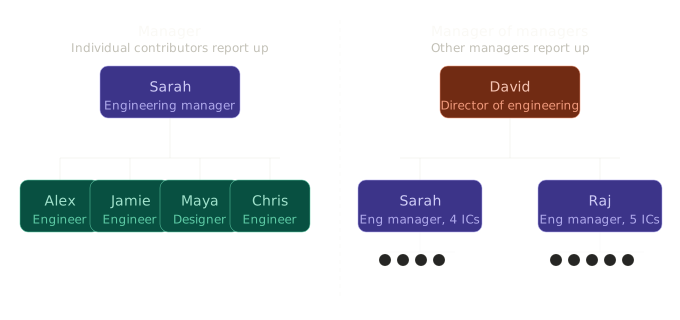
Agent spawned agents is like being a manager of managers
Having direct reports who work with you is vastly different from working with reports who themselves have reports.
Two org charts of direct reports vs manager of managers
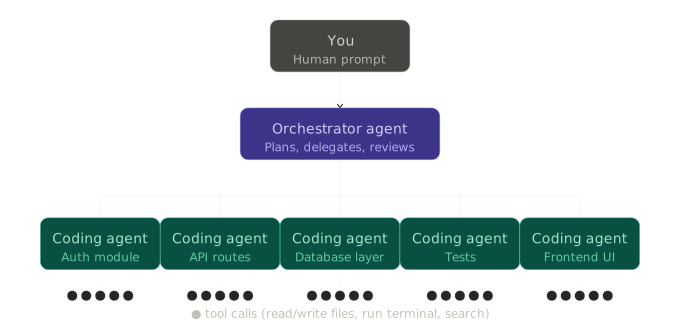
Normally, when you’re working in an organization of people, you need to be mindful of the balance and delegation of tasks; this has to do with everyone’s experiences as well as APMs. When you work with coding agents, you could sit and create a coding agent for every individual task or you could have an agent (which itself has a high APM) be the one doing the orchestration:
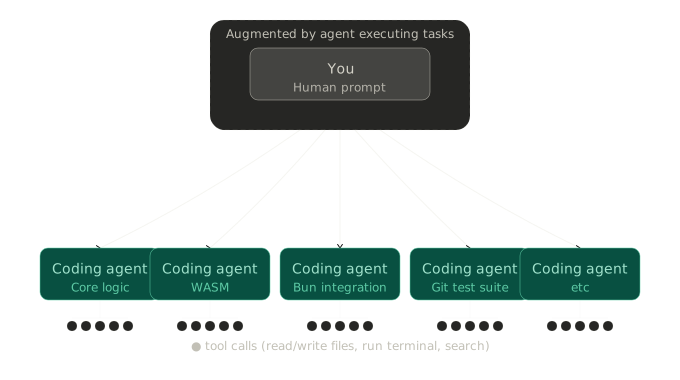
Org chart of human prompting an agent to spawn coding agents
But, really, this wasn’t a “hands off the wheel” project where we hit Enter once and left the laptop; although we got sleep in the process. Instead, this was more like doing exactly what we would have done if we had a row of laptops on a table and we’re typing on each one except there’s an agent to do the menial part of setting up subsequent coding agents:
Chart of human being augmented to aid with orchestrating agents
For the early part of the work, we prompted the top-level agent to create certain agents for the initial scaffold (in this case: core git functionality as well as identifying where to place the zig code in Bun’s codebase). Once there was enough groundwork laid out, we directed the top-level agent to spawn different agents we knew could work in parallel (ie one was focusing on WebAssembly capability, one was focusing on the exact git functionalities to rewrite to 100% Zig for Bun).
For scenarios where we figured one agent was not going to fulfill some capability in a reasonable amount of time (mind you, this stuff is eating up billions of tokens so not like it’s absurdly unreasonable in the first place), we’d have multiple agents working in the same part of the codebase except the logic wrapping the agent itself (both in the prompt and in literal shell scripts), we use git to rebase or stash or push changes along the way. This both ensures agents don’t tunnel vision themselves into stuff that’s never pushed and agents can be failure tolerant when one gets a task that was already handled by another agent.
Why we think this works
We’ve successfully applied this approach before when bridging Elixir and WebAssembly and have a guess as to why this works. To explain, let’s talk about making a peanut butter and jelly sandwich.
For context, one of our favorite examples for introducing computer science is the exercise of writing instructions for how to prepare a peanut butter and jelly sandwich. It’s a staple I remember from Harvard’s CS50 and have done enjoyably a number of times when I was teaching others how to code pre-LLMs.
The way it goes is you have all the ingredients and tools you’d use to prepare a PB&J (bread, peanut butter, jelly, plates, so on) as well as something to write on and something to write with (such as blackboard, whiteboard, paper, text editor). You begin by instructing the group to provide (so it can be written down) the instructions for preparing a PB&J while, along the way, you follow instructions extremely literally such that a sandwich never gets made (unless you’re nice about it). The goal isn’t to demoralize your students into thinking they can’t define steps but more to emphasize how “dumb” computers can be and how explicit code needs to be for a program to do what you expect.
If you prompt an LLM to make a PB&J, assuming it has access to whatever’s needed in the real world with robot arms plus all the cool hijinks, you’ll likely end up with something much like how you can prompt a coding agent to make some program and it will likely end up with something. If you want to ensure that every sandwich made uses apricot jam, that’s something to specify in the instructions. If you want to ensure some web app generation always uses a certain component library, that’s something to specify in the instructions as well. LLMs are great because they can do things but whichever details you care about must be specified similar to how a human doing the PB&J exercise would need the orientation of the knife and so on to be specified.
The peanut butter and jelly sandwich example works for standard coding because computers need programs to be precise. The example also works for LLMs coding because agents need prompts to be precise. To tie together how one could see that coding agents have the potential to solve a hefty number of engineering problems, let’s consider two things that we know today LLMs are able to do:
Build out an initial MVP or prototype
While this was an early critique for coding applications of LLMs (since they can’t do “real engineering work”), it’s worth admitting this does knock off legitimate work that’d otherwise take a person time to do.
Targeted optimizations that are verified by the LLM
Google showed this already with AlphaEvolve and, in a more broad way, the Deepseek moment shows this point further. Rather than throwing hands up in defeat and running LLMs over and over like monkeys on typewriters, giving LLMs access to the metrics a human would be trying to steer towards in the first place lets them self-guide till they get the job done.
By being able to both legitimately start a project as well as improve it in the directions desired, putting aside the verbosity needed in the prompt or time needed to process, LLMs and coding agents have the capability of tackling a “real” number of engineering problems. It’s not about replacing humans or finding things humans can’t do at all, it’s about overall coordination in the vein of enriched productivity.
At this point, we have all the fundamental pieces for why this approach is productive: meaningfully organizing and directing coding agents with a “top-level” agent doing the administrative work for you. Being able to work with the top-level agent and improve sub-agent prompts or loops also let a deployed agent not be the end all be all but instead iterative.
What was funny about steering this system of agents is it was reminiscent of seeing demands of engineering teams evolve over time like the startups we’ve been at; when the group needs to focus on a refactor or tasks can be divided in parallel, agents can be redirected towards something or spawned/killed according to the codebase’s demands. The point here being there wasn’t a single organizational structure or scaffold which was the “best”, our orchestration was more dynamic as I went along with the project.
An important note about organizations of these agents we’ll add is Kernighan’s Law.
Everyone knows that debugging is twice as hard as writing a program in the first place. So if you’re as clever as you can be when you write it, how will you ever debug it?
If you point the top-level agent at the task of figuring out the most clever tricks possible, you’ll end up with a mess of agents and a lot of token burn for no good reason.
We don’t yet have a prescriptive solution for this but the rule of thumb we’d state is, at any given point in time, you should be able to see a list of running agents and understand the progress they’re making. If you find yourself in a spot where you wouldn’t know where to begin steering, you’ve likely leaned too much on the agents to do something you were responsible for.
Hack the planet.
💬 **What’s your take?**
Share your thoughts in the comments below!