


🚀 Discover this insightful post from Hacker News 📖
📂 **Category**:
📌 **What You’ll Learn**:
In the introductory post for this blog, we mentioned that Huginn, our active phishing discovery tool, was being used to seed Yggdrasil and that we’d have more to share soon. Well, here it is. This is the first in what we plan to be a monthly series where we share what Huginn has been finding in the wild, break down interesting attacks, and report on how existing detection tools are performing. Our hope is that these posts are useful both as a resource for understanding the current phishing landscape and as a way to demonstrate what our tools can do.
The Numbers
Over the course of February, Huginn processed URLs sourced from public threat intelligence feeds and identified 254 confirmed phishing websites. For each of these, we checked whether Google Safe Browsing (GSB) had flagged the URL at the time of our scan. The results were striking: GSB had flagged just 41 of the 254, meaning 83.9% of confirmed phishing sites were not flagged by the tool that underpins Chrome’s built-in protection at the time we discovered them.
83.9%
Missed by Google Safe Browsing
213 of 254 confirmed phishing sites
94.1%
Caught by Muninn’s Automatic Scan
Zero user interaction required
100%
Caught by Muninn’s Deep Scan
Zero false negatives across full dataset
58.7%
Hosted on Trusted Platforms
149 of 254 on Weebly, Vercel, GitHub, etc.
Now, to be fair, some of these may have been flagged later. But that’s kind of the point. Phishing pages are often short-lived by design. The attacker sets up a page, blasts out a campaign, harvests whatever credentials they can, and takes it down before anyone catches on. If the detection comes hours or days after the page goes live, the damage is already done. This is the fundamental limitation of blocklist-based detection: it’s reactive. Something has to be reported and reviewed before protection kicks in.
We also ran the full dataset of 263 URLs (254 phishing, 9 confirmed legitimate) through Muninn’s automatic scan. This is the scan that runs on every page you visit without any action on your part. On its own, the automatic scan correctly identified 238 of the 254 phishing sites and only incorrectly flagged 6 legitimate pages.
But the automatic scan is just the first layer. When it flags something as suspicious or when a user wants to investigate a page further, Muninn offers a deeper scan that analyzes a screenshot of the page. Where the automatic scan is optimized for precision (keeping false alarms low so it doesn’t disrupt your browsing), the deep scan is optimized for coverage. When we ran the full dataset through the deep scan, it caught every single confirmed phishing site with zero false negatives. The tradeoff is that it flagged all 9 of the legitimate sites in our dataset as suspicious, which is worth it when you’re actively investigating a link you don’t trust. The way to think about it is that the automatic scan is your always-on safety net that stays out of your way, and the deep scan is the cautious second opinion that would rather be wrong about a safe page than let a phishing page through.
Automatic Scan Results (263 URLs)
True Positives
238
Phishing correctly identified
False Positives
6
Clean sites incorrectly flagged
False Negatives
15
Caught by deep scan instead
True Negatives
3
Clean sites correctly cleared
The 15 false negatives from the automatic scan were all caught by the deep scan, which had zero false negatives across the full dataset.
Where Phishing Lives
One of the more interesting findings is just how much phishing is hosted on platforms that most people would consider trustworthy. Of the 254 confirmed phishing sites, 149 were hosted on legitimate, well-known platforms. This works well for attackers for a simple reason: you can’t blocklist weebly.com or vercel.app because millions of legitimate sites use these platforms. Detection has to happen at the individual page level, which is exactly the kind of analysis blocklists aren’t built for.
¹ Google Docs, Google Forms, Google Sites, and Google Apps Script. None were flagged by Google Safe Browsing.
The chart tells the story pretty clearly. Weebly hosted 51 phishing sites and GSB caught just 2 of them, a 96% miss rate. Vercel, a platform popular with developers, hosted 40 with GSB catching 8. Wix hosted 7 and GSB caught none. IPFS, the decentralized file storage protocol, hosted 13 phishing sites with GSB catching just 1.
Perhaps the most absurd finding is that 16 phishing sites in our dataset were hosted on Google’s own domains. These were Google Docs presentations, Google Forms, Google Sites pages, and even Google Apps Script deployments, all being used for credential harvesting. Not a single one was flagged by Google Safe Browsing. Google is, quite literally, hosting phishing attacks on its own infrastructure and not catching them with its own detection tools.
Who’s Being Impersonated
Looking at which brands attackers are impersonating gives a sense of where they think the money is.
Brand identification based on visual branding, URL patterns, and page content analysis. A single phishing page may target multiple brands.
Microsoft is the most impersonated brand in our dataset with 28 phishing sites, followed by Google at 21, Netflix at 19, Amazon at 16, and AT&T at 13. The top of this list isn’t surprising as these are some of the most widely used services on the internet, which makes them high-value targets for credential harvesting.
One that stands out is crypto and DeFi phishing. We identified 14 sites targeting crypto users, impersonating platforms like Uniswap, Raydium, pump.fun, Trezor, and MetaMask. This makes sense when you think about it: the crypto ecosystem moves fast, new protocols launch constantly, and the target audience is accustomed to interacting with unfamiliar interfaces and connecting wallets to new sites. It’s a near-perfect environment for phishing. If you’re active in crypto, especially in Discord communities where links get shared frequently, this is worth being aware of.
Attacks Worth Examining
Beyond the aggregate data, some of the individual attacks Huginn surfaced are worth walking through in detail because they illustrate how sophisticated phishing has become.
The Two-Stage S3 Credential Harvest
One pattern we’re seeing involves a two-stage attack that splits the lure from the credential harvesting. The first stage presents the victim with what looks like a secure document access page. The user is prompted to enter their email to view the document, and once they do, they’re redirected to a second page that presents a Microsoft sign-in flow.
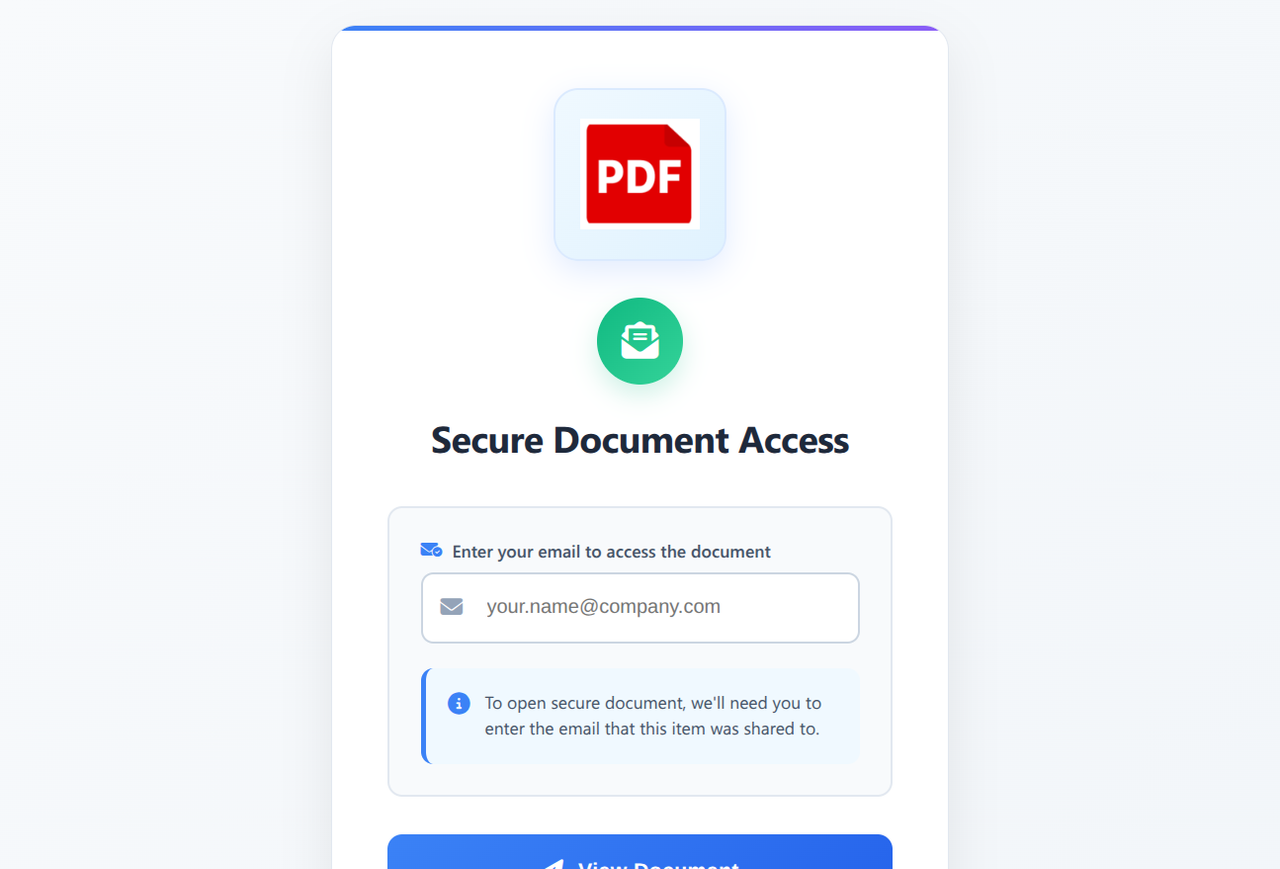
On the surface this is a standard credential harvesting attack, but the techniques used to avoid detection are worth unpacking. The lure page is hosted on an Amazon S3 bucket with URL components like garagedoorsbelmontma or hill-county-office-doc. These are innocuous-looking paths on the amazonaws.com domain, which means the page sails past most blocklists including GSB. You can’t block amazonaws.com.
The redirect takes the victim to a seemingly unrelated domain with a generated token either in the path or as a URL parameter. One example we investigated would only show the Microsoft login page on the first visit. Subsequent visits with the same token were redirected to Wikipedia articles. This is a clever evasion technique because it means security researchers and automated scanners who revisit the URL will see a benign page. The redirect destination also had anti-bot measures in place, adding another layer of difficulty for automated detection.
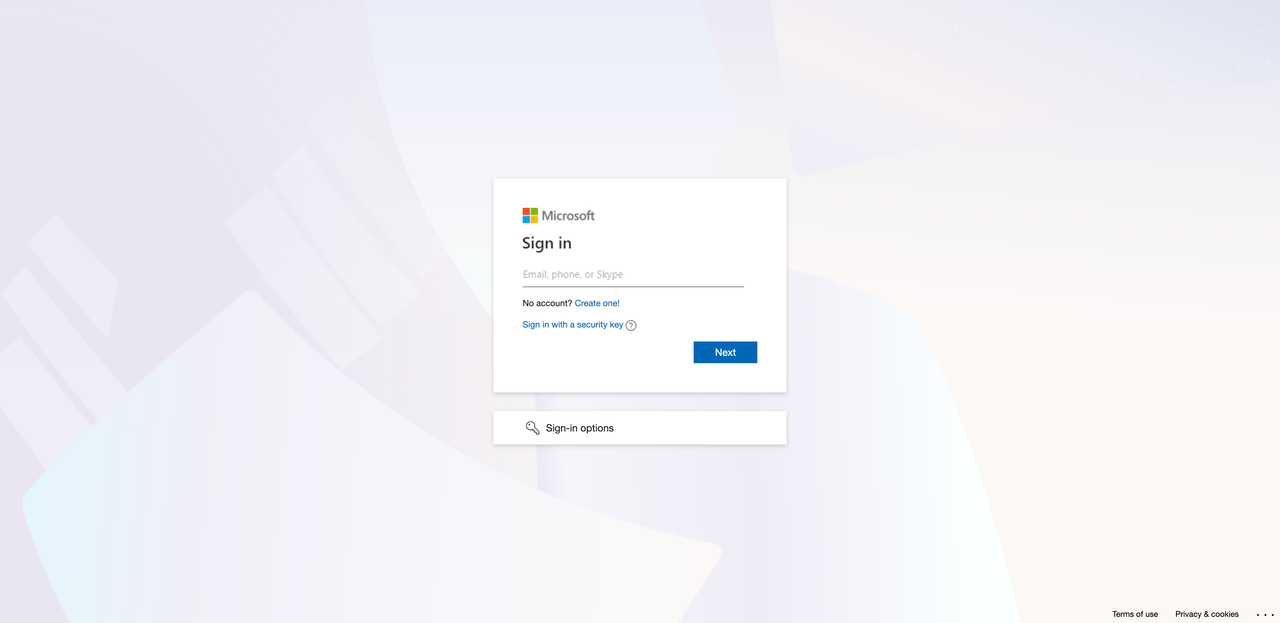
The presented Microsoft login flow is visually indistinguishable from the real thing and has the email entered on the initial lure page preloaded into the form, which adds a layer of authenticity.
It might seem odd to split this into two stages when it could be done from a single page. But the separation is deliberate. The lure page exists mainly to avoid initial detection from email filters, Safe Browsing, and other front-line tools. Hosting it on reputable infrastructure helps it look routine, and it’s cheap to replace when it eventually gets flagged. The second stage is where the actual phishing kit lives: the branding, the tracking, the bot detection, and the endpoint that collects the credentials. It’s easier to operate and rotate on infrastructure the attacker controls. The lure is disposable and lightweight. The real work happens behind it.
When we investigated these pages, there were some clear indicators that something was wrong. The biggest one is that the Microsoft login flow isn’t hosted on a Microsoft domain. While websites can use Microsoft as an authorization source, this normally involves redirecting to a Microsoft-controlled page and then back to the original site once authorization is complete. That’s not what’s happening here. Beyond that, none of the secondary interface elements work. “Create a new account,” “Sign in options,” “Can’t access your account?” all either do nothing when clicked or redirect back to the current page. This is something we see over and over: phishing kits only implement the happy path where the victim enters their credentials without clicking anything else. Finally, the error messages are wrong. We went through a legitimate Microsoft auth flow and recorded the error states (for example, entering a non-existent email) and compared them to what the phishing page displayed. The language didn’t match.
Any one of these signals on its own would be suspicious. Together, they paint a pretty clear picture.
It’s also worth noting that when we ran some of these credential harvesting sites through VirusTotal, they came back clean. This underscores a point we’ve been making: you can’t always rely on existing web scanning tools to catch these things.

The Calendly Impersonation
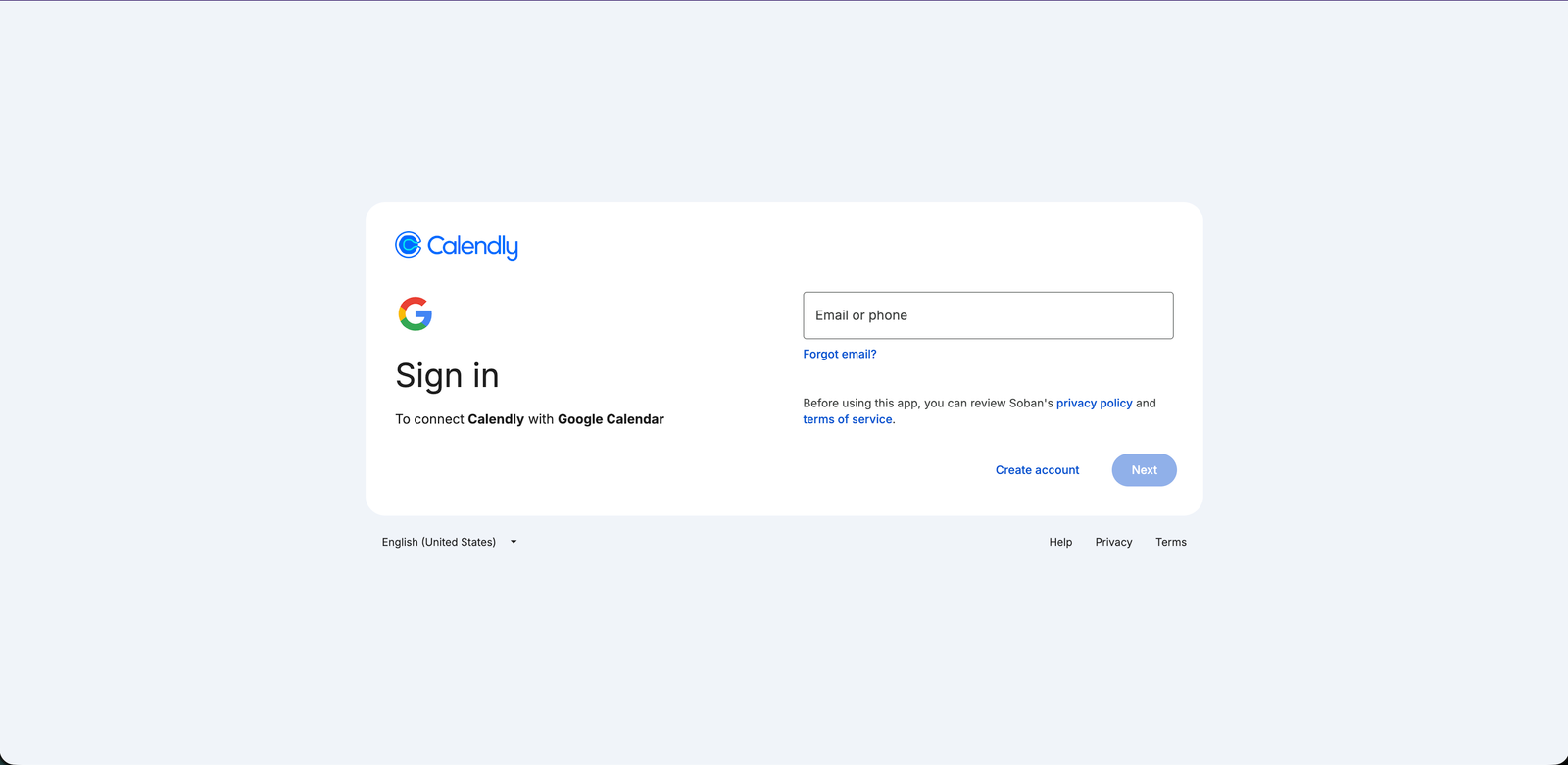
Another attack we came across involved a page mimicking the Calendly booking page of a real Allianz employee. After clicking to schedule, the victim is taken to a fake Google sign-in flow. This kind of attack is particularly compelling because it can be introduced as a legitimate employment opportunity or a business meeting, and the fact that it references a real employee adds authenticity to the lure.
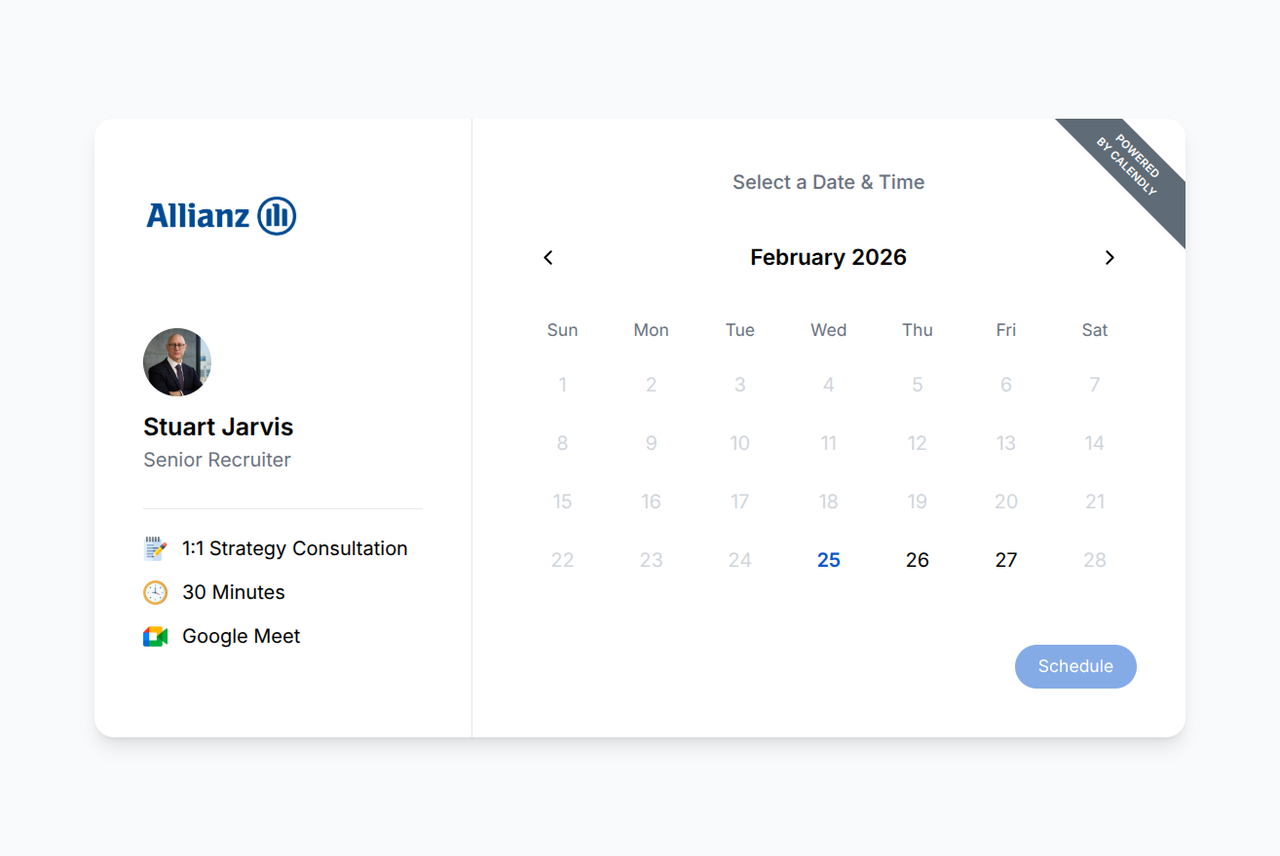
The first indicator is that Calendly hosts its booking pages on its own domain. The fact that this page was on disposable infrastructure is a giveaway if you know to look for it. The Google sign-in flow has the same tell we noted above: none of the secondary buttons do anything. “Forgot email?”, “Create account,” all non-functional. It’s the same pattern of only handling the happy path.
Something Different: The Car Wrapping Scam
Not everything Huginn finds is credential harvesting. We also came across a car wrapping scam, which is a well-documented scheme where a victim is told they can earn money by having their car wrapped in advertising. The victim fills out a form with their personal information including their home address, receives a fraudulent check in the mail, and is told to pay a local vendor to do the wrapping. By the time the bank flags the check as fake, the victim has already sent real money to the “vendor.” It’s a different flavor of phishing but the underlying mechanics are the same: build trust with a plausible story, collect information, and extract value before the victim realizes what happened.
What This Means
The takeaway from all of this is not that Google Safe Browsing is bad. It’s a useful tool that protects billions of users and catches a massive volume of known threats. But it has a structural limitation: it relies on URLs being identified and added to a blocklist before it can protect you. For novel attacks, for phishing hosted on trusted platforms, and especially for attacks that use evasion techniques like one-time tokens or bot detection, there is a gap. That gap is where Muninn operates.
If you’re interested in trying Muninn, it’s available as a Chrome extension. We’re in an early phase and would genuinely appreciate feedback from anyone willing to give it a shot. And if you run across phishing in the wild, consider submitting it to Yggdrasil so the data can help protect others.
⚡ **What’s your take?**
Share your thoughts in the comments below!
#️⃣ **#Huginn #Report #February #Norn #Labs**
🕒 **Posted on**: 1772730038
🌟 **Want more?** Click here for more info! 🌟
