


✨ Read this awesome post from Hacker News 📖
📂 **Category**:
✅ **What You’ll Learn**:
TL;DR: DuckDB instances can now talk to each other using the Quack remote protocol. This lets you run DuckDB in a client-server setup with multiple concurrent writers. In DuckDB’s spirit, Quack is simple to set up and builds on proven technologies such as HTTP. It’s also fast, which allows it to support workloads ranging from bulk operations to small transactions.
When databases first emerged, there was no distinction between a ‘client’ and a ‘server’, the whole database just ran on a single computer. Somewhere in the 80s, Sybase was the first to introduce the concept of a database ‘server’ and a ‘client’ running on different computers. Ever since, it was just assumed that every database system used a client-server architecture along with a communication protocol to talk between those. This was convenient, because the single mutable state stays in a single place under the control of a server, and there can be many clients at the same time reading and writing data. There are of course drawbacks to this method, most notably, those protocols can add a significant amount of overhead. If you’re curious to read more, we wrote a research paper on database protocols a while back.
Of course, there were always dissenters to the client/server architecture, most notably the ubiquitous SQLite in 2000, and of course DuckDB, first released in 2019. We made quite a lot of noise about implementing an in-process architecture, where there is no client/server, no protocol, just low-level API calls. This worked really well for interactive use cases in e.g., data science, where analysts would interact with their data for example in a Python notebook and their data was managed in a DuckDB instance running in the very same process. It also worked really well for the many use cases where DuckDB was just “glued” to an existing application to provide SQL functionality on data living in that application.
Being an in-process system works “less well” for use cases when trying to modify the same database file from multiple processes at the same time. There are a lot of use cases where this is relevant, for example, when inserting into the same database from a bunch of processes collecting telemetry while at the same time querying the same tables to drive a dashboard. There are very good technical reasons why we could not make this work, most notably, the fact that DuckDB keeps a bunch of state in main memory and would have to synchronize that state if multiple processes start making changes simultaneously.
And yes, there were workarounds. Of course you can whip up a custom Remote Procedure Call (RPC) solution where there is a process that holds the DuckDB database instance and offers a service to other processes to query and insert data. There are also multiple projects out there that retrofit client/server abilities to DuckDB, for example using the Arrow Flight SQL protocol. MotherDuck has their own custom client-server protocol. And of course, you can always (gasp) switch to a more traditional database system that had client-server support, for example the also-ubiquitous PostgreSQL. You can then even proceed to run a so-called “EleDucken”, DuckDB in said PostgreSQL using one of the various extensions out there that enable this, for example pg_duckdb.
The vast number of workarounds people built to bolt a client-server solution onto DuckDB has at the very least convinced us that this is something people cared about. We see DuckDB as a universal data wrangling tool. If this means having a client-server protocol in addition to the in-process capabilities – fine. If this ends up unlocking a vast new set of cases in which DuckDB can be useful – excellent! In the end we care deeply about user experience and perhaps less about having the last word on architecture. So we bit the bullet, eventually, finally, and today we are very happy to announce the result:
What do two (or more) ducks do if they want to talk to each other? They quack! So it is quite natural that we need to call the protocol that two DuckDB instances can use to talk to each other “Quack”, too! We had the opportunity to design a database protocol from scratch in 2026 without having to consider any legacy, which is quite a luxury. We were able to learn from the existing protocols, including the more recent Arrow Flight SQL and others. Before we dive into how Quack works internally, let’s see how it works from a user perspective. First, you need two DuckDB instances. That’s right, DuckDB will act both as a client and as a server! The two instances can be on different computers a world apart (or in space) or just two different terminal windows on your laptop. First, we need to install the Quack extension in both DuckDB instances. For now, Quack lives in the core_nightly repository and is available in DuckDB v1.5.2, the current release version:
DuckDB #1
INSTALL quack FROM core_nightly;
LOAD quack;

CALL quack_serve(
    'quack:localhost',
    token = 'super_secret'
);

CREATE TABLE hello AS
    FROM VALUES ('world') v(s);
quack:
DuckDB #2
INSTALL quack FROM core_nightly;
LOAD quack;

CREATE SECRET (
    TYPE quack,
    TOKEN 'super_secret'
);

ATTACH 'quack:localhost' AS remote;
FROM remote.hello;
This should show the content of the remote table hello, world in DuckDB #2. Witchcraft! We can also copy data from the local instance to the remote one:
quack:
DuckDB #2
-- Step one
CREATE TABLE remote.hello2 AS
    FROM VALUES ('world2') v(s);
Similarly, you should see world2 in the output on DuckDB #1. Obviously those are the most basic examples we can think of. Tables can be much more complex, queries can be much more complex, data volumes can be quite vast (see below). There is also a way to just ship an entire verbatim query to the remote side using the query function, which is better for very complex queries on large datasets and offers more control over what exactly is executed remotely:
quack:
DuckDB #2
FROM remote.query(
    'SELECT s FROM hello'
);
Of course there is much more to see here. Please consult our documentation for more details.
HTTP-Based
Quack is built straight on the venerable HTTP, the Hypertext Transfer Protocol. From its humble beginnings at CERN, HTTP has become a de-facto protocol layer on top of TCP and all the stuff below. The entire stack is optimized to transmit HTTP message streams efficiently. The protocol has surprisingly low overhead if implemented properly. Everyone and their little brother knows how to deal with HTTP in load balancing, authentication, firewalls, intrusion detection etc. It would be rather misguided not to build a database protocol on top of HTTP in 2026. HTTP also allows the DuckDB-Wasm distribution to speak Quack natively! So DuckDB running in a browser can e.g., directly connect to a DuckDB instance running in an EC2 server using Quack.
Request-Response Pattern
Interactions on Quack are always driven by the client in a request-response pattern. Quack messages are for example connection requests, to authenticate with a token as seen above. See below on how authentication and authorization are handled in detail. Subsequent messages are requests to execute a query and return the first part of the response and follow-up fetch messages to retrieve large results, possibly from multiple threads in parallel.
Serialization
Requests and responses are encoded using the new MIME type application/duckdb. This encoding leverages DuckDB’s internal efficient serialization primitives for complex structures like data types and result sets. We have been using the same primitives for example in our Write-Ahead Log (WAL) files for years, meaning they are fairly well-optimized and battle-tested.
Encryption
While we want Quack to “just work” we also are wary of the security nightmares of attaching a database directly to the evil internet, as has happened before. This is why Quack will by default generate a random authentication token at server start-up, which then has to be given to the client. In addition, the Quack server will by default only bind to localhost (which can of course be overridden). Quack does not use SSL by default, because it is a bit silly to bring all that infrastructure and add dependencies just for localhost communication. We do not recommend opening up a DuckDB Quack endpoint directly to the Internet. Instead we strongly recommend that you use a common HTTP endpoint like nginx if you should choose to expose Quack to the World Wide Web and have that proxy terminate SSL (e.g., with Let’s Encrypt). The Quack client will assume SSL is enabled for non-local connections, this can be overridden. We provide a guide for this in our documentation.
Round-Trips
We have been careful to optimize the number of protocol round trips or request/response pairs for queries. Once connected, a query can be completely handled with a single round trip. This is a critical optimization for latency-sensitive environments. At the same time, we have seriously optimized Quack for efficient bulk response transfer. As far as we know, Quack is currently the fastest way to shove tables through a socket, and millions of rows can be transferred in a few seconds. Below are a few benchmark results.
Authentication and Authorization
Authentication and authorization of database queries are an endless source of joy and complexity. We are likely unable to capture everyone’s use case, certainly not in a first release. The smart thing is therefore not to try. For Quack, we have chosen an auth model that ties into DuckDB’s philosophy of extensibility. There are hundreds of DuckDB extensions out there already. Quack ships with a default Authentication method and no authorization restrictions, but both can be overridden by user-supplied code. As you have seen above, the Quack server generates a default random authentication token on startup. When a client connects, it provides an authentication string. The server side will call an authentication callback. By default, it will compare the client-supplied token with the one that was randomly generated before. But this callback can be changed through configuration! You can bring your own authentication function that for example queries an LDAP directory, reads a text file, or just rolls the dice. Up to you. Similarly, the authorization function can be changed. The default authorization function just says “yes” to everything, but you can inspect each query a client attempts to execute, correlate the query to the previously used authentication string etc. Those callbacks can even be plain SQL macros! Please see our documentation for more details.
Default Port
By default, a Quack server listens on port 9494, the number 94 being easy to remember as the year Netscape Navigator was released.
We have set up two benchmarks to showcase the Quack protocol. Those benchmarks were run on AWS virtual machines running Ubuntu on Arm. We picked the m8g.2xlarge instance type, which has 8 vCPUs and 32 GB of RAM and, importantly, “up to 15 Gbps” network bandwidth. We recreated a real-world scenario where client and server are in the same data center, but on different machines. We made sure both instances were in the same “availability zone”. Ping time between the instances averaged around 0.280 ms.
Bulk Transfer
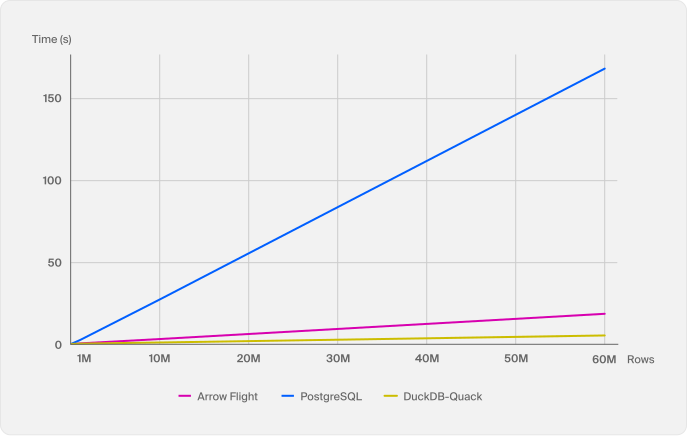
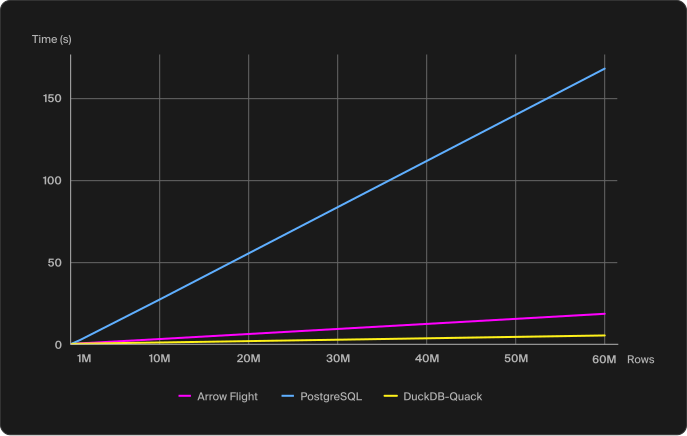
The first benchmark tests bulk transfer, the case where a fairly large number of rows should be transferred over the database protocol. If you’ve read the paper we linked above, you know that this is a case where traditional database protocols were struggling. We compare Quack with two systems: the widespread PostgreSQL protocol and the newer Arrow Flight SQL protocol. Arrow Flight is provided by the GizmoSQL server that also uses DuckDB internally. We transfer an increasing number of rows of the TPC-H lineitem table, all the way up to a whopping 60 million rows (76 GB in CSV format!) and report the median wall clock time over 5 runs. We expect the modern bulk-oriented protocols to far outclass the PostgreSQL protocol. Here are the results:
Runtimes of bulk transfer operations (lower is better)
Would you like to see the results as a table? Click here.
| Rows | DuckDB Quack | Arrow Flight | PostgreSQL |
|---|---|---|---|
| 100k | 0.07 s | 0.07 s | 0.20 s |
| 1M | 0.24 s | 0.38 s | 2.20 s |
| 10M | 0.89 s | 2.90 s | 25.64 s |
| 60M | 4.94 s | 17.40 s | 158.37 s |
We can see how Quack is doing great for bulk result set transfer, transferring the 60 million rows in under 5 seconds! Even the purpose-built Arrow Flight SQL protocol can’t compete here, and Postgres’ row-based protocol is rather hopeless in general.
In fairness we have to mention that the standard PostgreSQL clients do not parallelize reads over multiple threads, but Quack and Arrow can. Shameless plug: DuckDB’s PostgreSQL client can also do that in some cases!
Small Writes
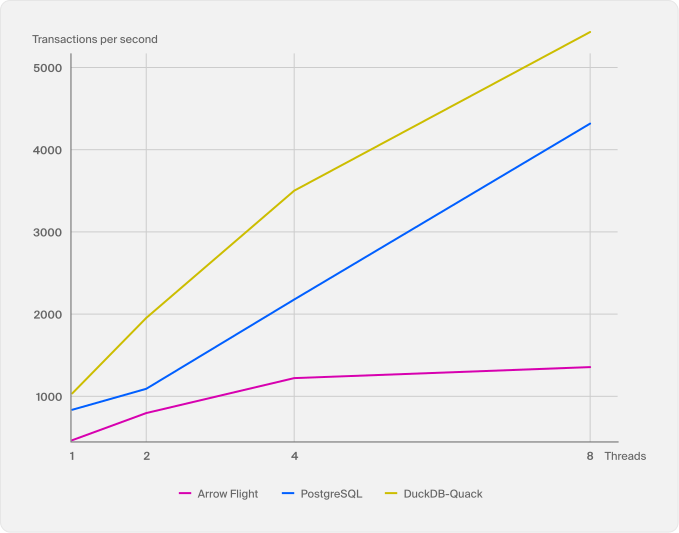
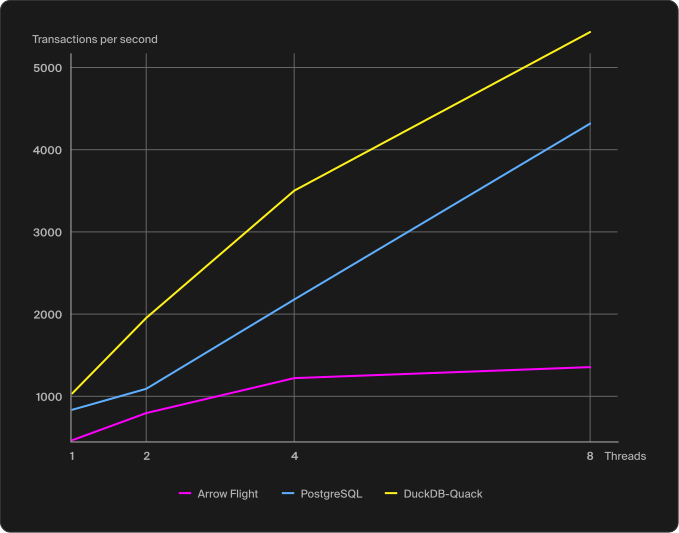
The second benchmark tests small appends. This is a common use case to, for example, centralize observability data in a single central DuckDB instance. This stresses the database protocol in a different way, for example, multiple round trips between client and server to complete a single transaction will be a disadvantage. We test this by creating an empty table with the same structure as the TPC-H lineitem table, and then insert randomized values into it, each row in its own INSERT transaction. The inserted values somewhat follow the distribution of the usual benchmark generator. We ran an increasing amount of parallel threads for five seconds. We repeated this experiment five times and reported the median transactions per second.
We expect a highly transaction-optimized system like PostgreSQL to dominate this benchmark. We also expect the bulk-optimized Arrow Flight to not do particularly well.
Throughput of small writes (higher is better)
Would you like to see the results as a table? Click here.
| Threads | DuckDB Quack | Arrow Flight | PostgreSQL |
|---|---|---|---|
| 1 | 1,038 tx/s | 469 tx/s | 839 tx/s |
| 2 | 1,956 tx/s | 799 tx/s | 1,094 tx/s |
| 4 | 3,504 tx/s | 1,224 tx/s | 2,180 tx/s |
| 8 | 5,434 tx/s | 1,358 tx/s | 4,320 tx/s |
Quite surprisingly, we see Quack outperforming PostgreSQL up to 8 parallel threads to a maximum transaction rate of around 5,500 transactions per second. Beyond that, we hit a current limitation of DuckDB itself in concurrent insertions per second into the same table. PostgreSQL scales better here, which is something to look into for us in the near future. Arrow Flight is not doing too well, being roughly half as fast as Postgres, as expected.
Benchmark scripts are available online.
Today we released Quack, a client/server protocol for DuckDB along with an initial implementation as a DuckDB extension. Quack unlocks a full multiplayer experience with DuckDB, where multiple separate processes – locally or remote – can now modify contents of tables in parallel without locking each other out. And while part of this could also already be achieved with DuckLake, Quack makes this far simpler and provides far higher performance.
Use Cases
With Quack, DuckDB can now be useful in a wide range of new use cases, where centralizing state is more important than hyper-local querying. We have already had to learn that data is not always local with the rise of data lakes. Speaking of lakes, Quack is also going to be integrated into DuckLake so that DuckDB itself can be a remotely-accessible Catalog server. This will unlock new capabilities, e.g., for data inlining. If you have more questions on this, please consult the Quack FAQ.
Overall, DuckDB is moving further out of its initial niche of an in-process database for interactive analytics into a core building block of modern data architecture. We have been playing with Quack for a while now, and are quite excited to hear what you are going to build with it. If you have any suggestions on how Quack could be improved, let us know! And hey, the MythBusters have already proven that a duck’s quack echos, so let’s see what kind of noise this leads to.
Next Steps
There are of course a lot of things still to do. First off, we are going to integrate Quack into DuckLake, so that it becomes possible to use a remote DuckDB server as a DuckLake catalog! We expect this to greatly improve performance, especially with inlining. Next, we are going to polish Quack over the coming months and release a first production release together with DuckDB v2.0 when it’s coming in fall this year. We plan for example to enable auto-installation and auto-loading of the Quack extension whenever it is needed. Using our new parser, we are also planning to improve on the syntax for talking to remote SQL databases from DuckDB. On the core DuckDB side, we plan to work on greatly increasing the transactions per second achievable, so we can scale transactions far beyond eight parallel threads.
Further on, we are thinking about allowing extensions to the Quack protocol beyond authentication and authorization, for example, by allowing DuckDB extensions to add new protocol messages and the code to handle them. And we are also thinking about adding a replication protocol on top of Quack so that changes to a DuckDB instance can be replicated to other servers, for example to set up a cluster of read replicas.
If you want to learn more about Quack – and hear about its initial adoption – join our community conference, DuckCon #7, on June 24. DuckCon will start with the “State of the Duck” talk presented by the co-creators of DuckDB. You can either join in-person or watch the online stream on YouTube.
PS: We have a separate page for the Quack project, make sure you give it a visit.
We would like to thank Boaz Leskes from MotherDuck for sharing their lessons learned from building the MotherDuck protocol with us. We also want to thank Philip Moore from GizmoSQL / GizmoData, who has blazed this trail for us already and shown that client-server DuckDB is a very worthwhile thing.
We also have to address one of the few elephants in the room: why on earth did we not use the existing Arrow Flight SQL protocol? It’s there. It’s available. There are existing implementations. We see the value in Arrow and related projects like ADBC: they are interchange APIs like ODBC and JDBC before them aimed at reducing friction in exchanging data between systems. And that works pretty well.
However, we are also wary of using interchange formats like Arrow inside DuckDB. And while DuckDB’s internal structures for query intermediates are in some ways close to Arrow, in other ways they are quite different. We feel that in order to be able to keep innovating in data systems, we cannot allow ourselves to be restricted by formats that are controlled externally. This is why we use our own serialization in Quack. If we want to add a new data type or protocol message, we can ship tomorrow.
Deep down, there is also one fateful design decision in Arrow Flight SQL: every single query requires at least two protocol round trips, CommandStatementQuery and DoGet. This is not ideal for small updates like in our second experiment above, especially in higher-latency environments. As mentioned, we designed Quack to be able to do single-round trip query execution and result fetching for small queries.
⚡ **What’s your take?**
Share your thoughts in the comments below!
#️⃣ **#DuckDB #ClientServer #Protocol #DuckDB**
🕒 **Posted on**: 1778624841
🌟 **Want more?** Click here for more info! 🌟
