


🚀 Discover this must-read post from Hacker News 📖
📂 **Category**:
💡 **What You’ll Learn**:
Today we’re excited to launch Obsidian Community, the new directory and developer dashboard for Obsidian plugins and themes.
Since the Obsidian API release in 2020, more than 4,000 plugins and themes have been created by our amazing community. Incredibly, Obsidian plugins have passed 120 million total downloads!
Our goal is to make it easy and safe for anyone to build, distribute, discover, and use plugins and themes.
Today’s launch is only the start of a larger set of initiatives. We’re excited to share what’s new, and what’s coming soon.
- Community site
- Developer dashboard
- Automated reviews
- Plugin safety
- Tools for teams
- Next steps
- FAQ
Community site
The new Community site makes it easy to explore the breadth of plugins and themes with new ways to browse, search, filter, and sort.
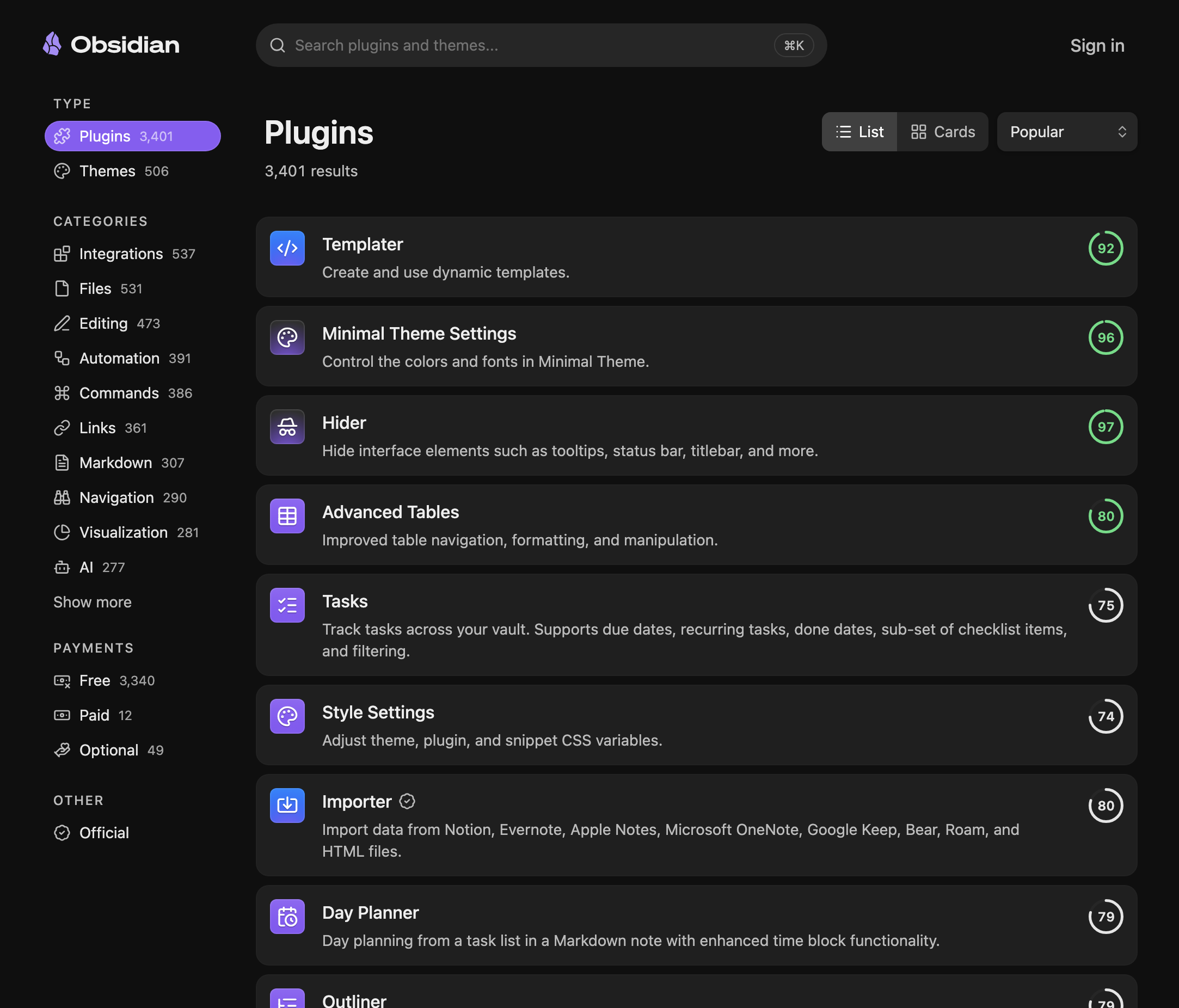
You can browse plugins across dozens of categories such as Integrations, Bases, Charts, and many more categories. Sort projects by name, downloads, popularity, release date, and updated date.
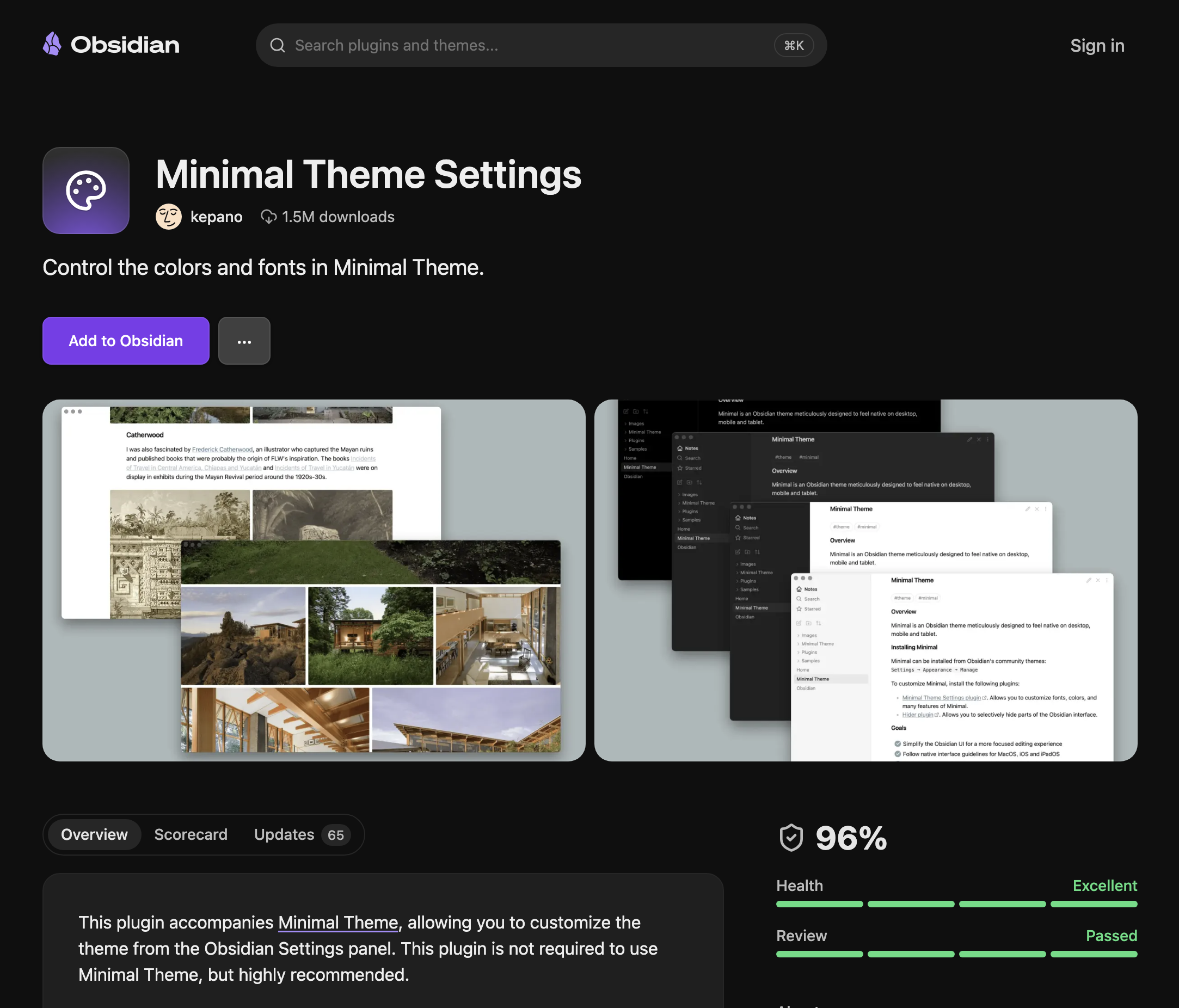
Every project has its own detail page where you can find screenshots, details, and a safety scorecard. New labels are present for paid plugins and official integrations.
Authors can customize their profile pages with sponsorship options and links to their website and social media.
Developer dashboard
The Obsidian Community site also hosts our new developer dashboard. This is where authors can submit, manage, and track the status of their projects.
All existing plugins, themes, and queued submissions added via GitHub have been automatically migrated to the new site.
To claim your existing projects, sign into the new Community site and connect your GitHub account. This lets you manage your existing projects, submit new projects, and edit your profile page.
Automated reviews
With this transition we are introducing automated reviews for all community projects. The new automated review system scans every version for security and code quality, not just the initial submission.
Until today, initial submissions were manually reviewed and approved by our small team to ensure they follow the Developer Policies. However, as Obsidian has grown in popularity we struggled to keep pace with submissions, and subsequent versions were not reviewed.
As coding agents accelerate the creation of plugins, the review queue was only getting longer. We don’t expect the pace of new submissions to slow down. With tools like Obsidian CLI we’re making it even easier to create plugins.
Now when a plugin or theme is submitted, the automated review system verifies that it adheres to our developer policies, that the source code follows best practices, and that it is free of known vulnerabilities.
Building on this new system allows us to scalably review community projects going forward. With the ability to continuously improve our automated tests, we are more equipped to comprehensively improve the quality and safety of the Obsidian ecosystem.
Importantly, manual reviews will continue. The new system allows us to shift our efforts towards plugins that require deeper inspection such as popular plugins, featured plugins, and issues flagged by the community.
All existing plugins and themes have been re-reviewed using the new system. In this process we found older plugins and themes that do not meet the latest guidelines. These older projects have been temporarily granted an exception. However, all plugins and themes that do not pass the new review process will eventually be phased out of the official directory. See FAQs below.
And… Yes! All queued submissions have been reviewed. With the new system we were able to process over 2,300 queued submissions in the last few days. If you’ve been waiting on us to review your plugin, sign into the Community site to see your submission’s current status.
Plugin safety
The new Community site and automated review system introduces major enhancements for the safety and security of the Obsidian ecosystem:
- Automated scans. Every version is now automatically checked for code quality and security vulnerabilities. This includes malware scanning to detect potentially malicious additions to plugins. Developers can see detailed suggestions, warnings, and failure flags for every project in the developer dashboard.
- Scorecards. Users and developers can see the status of automated checks with scorecards on every project. These scorecards will continue to improve as we incorporate disclosures, privacy labels, artifact attestation, manual review results, and adoption of app capabilities.
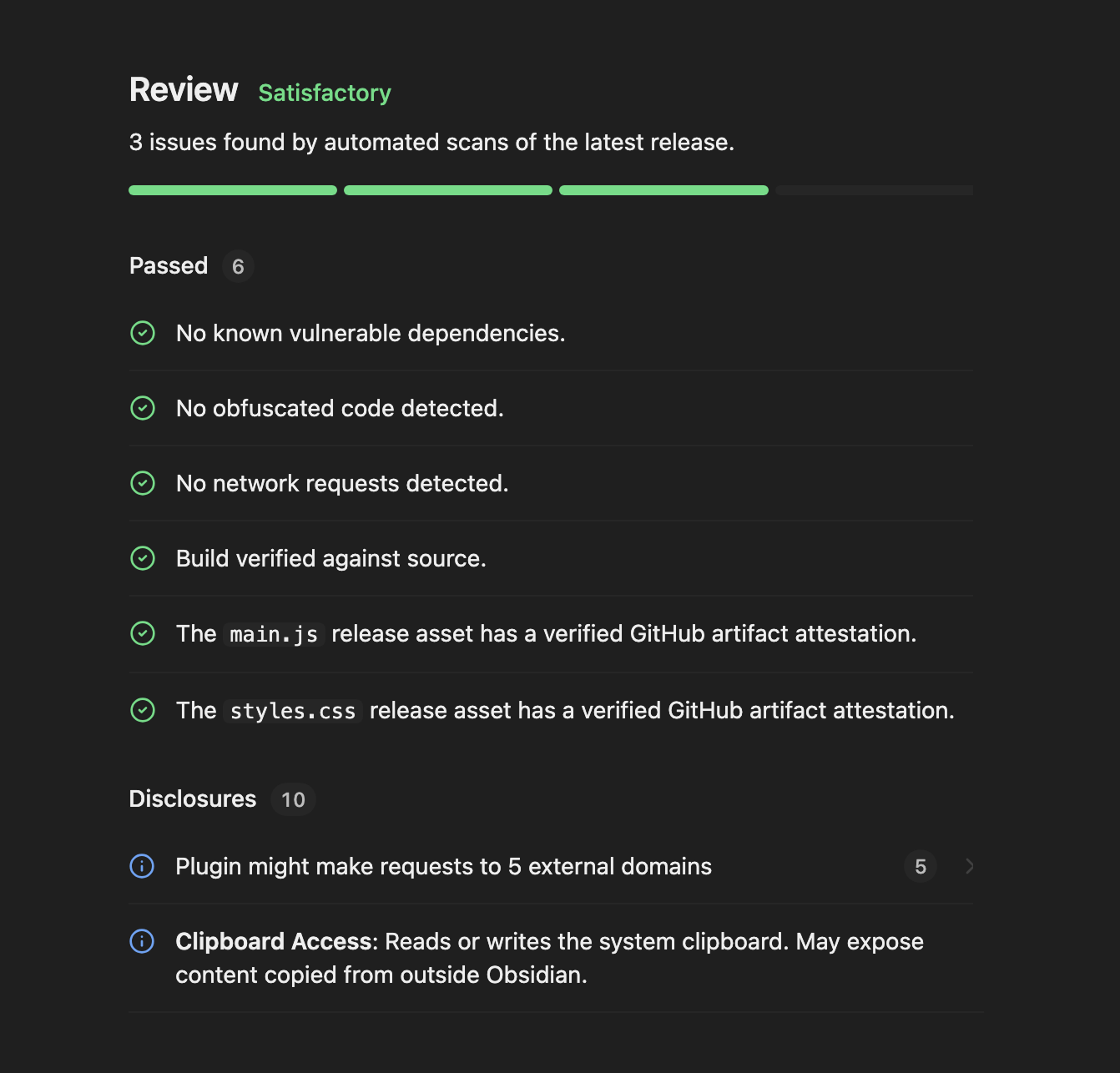
Over the coming months, we will further increase transparency about plugins and their authors:
- Disclosures. Plugins will declare what they access: network, file system, clipboard, and other capabilities. Users will be able to see these disclosures before installing plugins.
- Verified authors. Labels will be added for trusted developers that have passed additional verification steps and are in good standing.
As a member of the Obsidian community you play a part in keeping the ecosystem safe. Users can always flag security issues directly to the Obsidian team.
Tools for teams
Teams that use Obsidian can already deploy safety controls for their users. In the coming months we will make it easier for teams to manage which community plugins are allowed, and distribute private plugins to team members.
Teams that publish official Obsidian plugins can now apply for the Official badge in the Community directory. Reach out to us if your plugin qualifies.
Next steps
As you can tell, there are many moving parts! Along with improvements to the Community directory and automated review system, we will also make changes to the Obsidian app and API to improve discovery and safety.
The community ecosystem is one of the most fun and powerful aspects of Obsidian. We’re excited to give it the foundation needed to continue flourishing.
We’d love for you to explore the new Obsidian Community and share your feedback with us!
FAQ
Whew! That was a lot of information, but you might still have some questions. If your questions are not answered below please reach to us via the #plugin-dev and #theme-dev channels on the official Obsidian Discord server.
As a user how does this affect me?
You can use the new Community site to explore plugins and themes. If you’ve installed early-access plugins manually, you might not need to anymore because the review time has been been cut down dramatically.
I found an error in a scorecard. What do should I do?
Scorecards are new and can contain errors. You may find false positives and false negatives. If you notice something inaccurate contact us in the #plugin-dev channel on the Obsidian Discord server.
A plugin has incorrect tags or labels (e.g. official, paid, free). What do should I do?
Developers can update a project’s tags and pricing using the developer dashboard. Only Obsidian staff can update the Official label. If you see any issues contact us on the Obsidian Discord server.
How do I submit a new plugin or theme?
The process is significantly easier and faster than before:
- Sign into the Community site to access the new developer dashboard.
- Connect your GitHub account and choose a repo to submit.
- Complete the steps in the dashboard.
- Upon submission your project will be immediately reviewed. Typically, you will see the results of your review within a few minutes.
- If your project passes, it will be available to search and download in the app within 24 hours.
How do I claim my existing plugins and themes?
Sign into the Community site to access the new developer dashboard. This lets you connect your GitHub account and claim your plugins. Once signed in, you can update the title, description, and screenshots.
Why does my project not appear in the directory?
If your project does not appear in search it is likely because it has errors and cannot be downloaded by users. Sign into the Community site, claim the plugin, and resolve any errors.
Can I still update my plugin/theme without using the developer dashboard?
Yes. You can continue to release new versions via GitHub without using the new developer dashboard. New releases are automatically reviewed. However if your update fails to pass review, you will need to use the developer dashboard to see all the details.
What happens to projects that are no longer maintained?
Our existing policy remains unchanged. When submitting plugins and themes, developers agree to continue maintaining their projects. If the project is no longer maintained, no longer functions with newer versions of Obsidian, and has not been transferred to a new owner, it will eventually be removed from the Community directory per the Developer Policies.
As we continue improving discovery tools, it will become easier to find plugins that are actively maintained and up to date with Obsidian’s latest capabilities.
What happens to plugins and themes that fail the automated review system?
All new plugins and themes must pass automated review before they are added to the directory and available via search. Each new version is scanned, and if it fails to pass review, the plugin is removed from search within 24 hours. You can test changes before releasing them using new tools listed below.
All plugins and themes that were previously approved will continue to be available for now, even if they fail the automated review. Eventually, we will require older plugins to meet the new standards. We have not set a deadline for this yet and will be working closely with community developers to define that transition.
Can I run the automated review without submitting a release?
Yes. Two options:
- Use our eslint plugin to check your Obsidian plugin against the official developer guidelines locally.
- Use the developer dashboard to run a preview scan on any branch, tag, or commit.
My plugin has co-maintainers or belongs to an organization. How can I give multiple users access to the plugin in the developer dashboard?
Currently only the owner of a GitHub repo can edit it in Obsidian Community. Organization repos can be claimed and edited if you have a public membership to the organization. In the near future we will add support for multiple collaborators.
Can closed source plugins be added to the new directory?
For now, we are not accepting new closed source plugins into the directory. Existing closed source plugins will continue to be available until further notice. In the future we will consider how the new review system can be adapted for closed source plugins.
Does the developer dashboard require an Obsidian account?
Yes. You must have an Obsidian account to access the new developer dashboard.
Does the new site require using GitHub?
For now, yes. In the future we will consider adding other software hosting platforms.
What is shared with Obsidian when logging in via GitHub?
Logging in via GitHub shares your username and list of public repositories. It is only used to verify ownership of your repository.
What does it mean for a plugin to be Paid or have Optional Payments?
Obsidian Community is not a store, and does not offer any built-in payment solutions.
Developers can continue to use external payment mechanisms such as license keys, API keys, and login gates. Developers must accurately label plugins under one of these three categories:
- Free means the plugin does not have any form payment and is not tied to any paid services whatsoever. Donation links and sponsorship links are acceptable for Free plugins.
- Optional payments means users may optionally pay to unlock additional features or the plugin connects to paid services. If a plugin connects to a paid service or API, it must be labeled as having Optional payments, even if the service has a free tier.
- Paid means users must pay to use its primary features, even if it offers a free trial.
These labels determine what users should expect to pay, not whether the developer of the plugin collects payments.
What should I do if I run into problems with the new Community directory and developer dashboard?
Our team is here to help to make sure everything goes smoothly. If you have any questions or concerns, reach out to us in the #plugin-dev channel of the Obsidian Discord server.
🔥 **What’s your take?**
Share your thoughts in the comments below!
#️⃣ **#future #Obsidian #plugins**
🕒 **Posted on**: 1778602795
🌟 **Want more?** Click here for more info! 🌟
