

✨ Check out this awesome post from Hacker News 📖
📂 **Category**:
📌 **What You’ll Learn**:
Ask a developer what WireGuard is, and you’ll almost certainly hear: “It’s a VPN.” That’s accurate, but
it’s only half the answer — and the less interesting half.
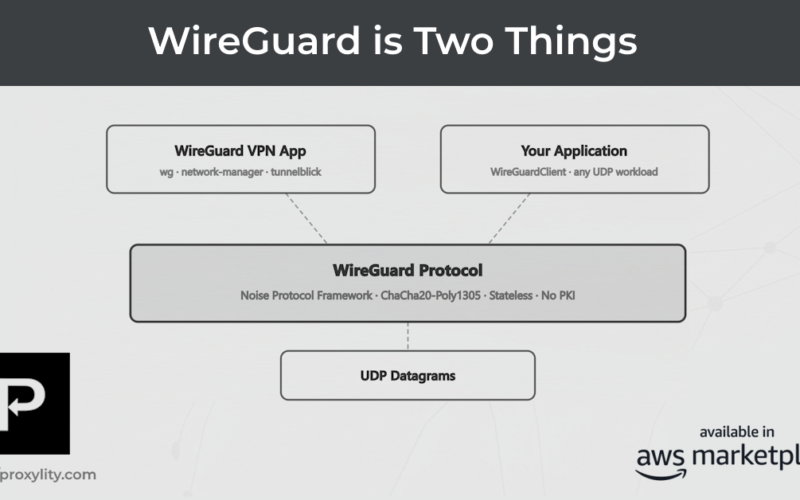
WireGuard is actually two things:
- A VPN application — the
wgtool, kernel module, and associated
ecosystem that creates encrypted network tunnels between machines. This is what most people use, and
what most articles describe. - A cryptographic protocol — a clean, modern specification built on the Noise
Protocol Framework and ChaCha20-Poly1305, designed to encrypt UDP datagrams. This part is
independent of VPNs, IP tunneling, and routing tables entirely.
The protocol is where the interesting engineering lives. And it turns out you can use it as a library —
as a drop-in encryption layer for any application that moves data over UDP — without running a VPN at
all. We just open sourced a .NET library that does exactly that.
Why This Matters: Problems with TCP
Before getting into what the library does, it’s worth being honest about why we need better options here.
The standard answer to “I need encrypted transport” is TLS over TCP, and it works well for a large class
of problems. But TCP has structural costs that show up as real user-facing issues whenever latency,
mobility, or lossy links are involved. Three in particular keep coming up in support queues.
Head-of-line blocking
TCP guarantees ordered delivery. When a single packet is lost in transit, every subsequent packet waits
in a queue until the missing one is retransmitted — even if those later packets have already arrived.
For a telemetry stream, game state update, or sensor reading, you almost certainly don’t care about
ordering. You want the latest value. TCP gives you stale data delivered in strict sequence.
The symptom is familiar: a stream that occasionally “locks up” briefly before catching up, jitter in
audio or video, or a latency spike that appears to come from nowhere, a “hang” in the application when
it gets blocked waiting for a packet. It comes from a single packet
forcing the entire pipeline to pause. The underlying network recovered quickly; TCP’s ordering guarantee
is what made it visible.
Connection state resets
TCP connections are tied to a 4-tuple: source IP, source port, destination IP, destination port. When a
mobile client roams from Wi-Fi to cellular, its IP address changes, every open TCP connection is torn
down, and the TLS session with it. Your application absorbs the cost of reconnecting, re-negotiating
TLS, and re-establishing application-level state.
For devices that move — phones, vehicles, field equipment — this isn’t an edge case. It’s routine. The
RST arrives, the error propagates up the stack, and somewhere a retry loop starts counting. If you’ve
ever wondered why a mobile app occasionally takes an extra few seconds to resume after switching
networks, this is usually why.
Congestion control on lossy links
TCP’s congestion control treats packet loss as a signal that the network is congested, and backs off
accordingly — reducing its sending rate. On a genuinely lossy link (cellular IoT, satellite uplink,
industrial RF), this creates a damaging feedback loop: the link drops a packet due to interference,
the stack backs off as if the network is saturated, and throughput collapses even though the only
problem was a momentary burst of noise.
The users on the other end of that IoT dashboard see stale readings — not because the device stopped
sending, but because congestion control throttled delivery in response to interference.
These aren’t exotic failure modes. They’re the source of a significant class of complaints in gaming,
voice, video conferencing, IoT monitoring, and any application that runs over mobile infrastructure.
Developers who’ve shipped in these domains recognize all three immediately.
Security: TCP got TLS, UDP got a VPN
The conventional response to “I need encryption for my UDP traffic” has historically been “put it in a
VPN.” That works, but it’s operationally heavy. A VPN is an entire network abstraction — its own
routing, its own address space, its own operational surface to manage. It bundles two distinct concerns
together: which packets to route and how to encrypt them. For most use cases, you
only need the second one.
DTLS (TLS-over-UDP) exists and is a legitimate option, but it inherits TLS’s complexity: certificate
chains, PKI infrastructure, cipher-suite negotiation, and a multi-round-trip handshake. That’s a
meaningful operational burden to impose on an embedded device with 256 KB of RAM, or a team that just
wants to encrypt a data channel without standing up a certificate authority.
WireGuard’s protocol is a fundamentally different design point. It’s stateless — there’s no connection
to establish upfront, no session to track, and no certificate authority in the picture. Two keys, a
compact handshake, and you’re encrypting. And unlike TLS, WireGuard’s cryptographic choices are fixed:
Noise_IKpsk2 for key exchange, ChaCha20-Poly1305 for authenticated encryption. There’s nothing to
misconfigure.
The Library: WireGuardClient
The wg-client library is API-compatible with .NET’s built-in
UdpClient. The send/receive patterns are the same, and adding encryption to a plain UDP
send loop is a small change:
// Before: plain UDP
using var udp = new UdpClient();
var endpoint = IPEndPoint.Parse("gateway.example.com:51820");
var payload = Encoding.UTF8.GetBytes("temp=23.4,hum=61");
await udp.SendAsync(payload, payload.Length, endpoint);
// After: WireGuard-encrypted UDP
var endpoint   = IPEndPoint.Parse("gateway.example.com:51820");
var serverKey  = Convert.FromBase64String("");
var clientKey  = Convert.FromBase64String("");
await using var wg = new WireGuardClient(endpoint, serverKey, clientKey);
var payload = Encoding.UTF8.GetBytes("temp=23.4,hum=61");
await wg.SendAsync(payload, CancellationToken.None); // encrypted on the wire
The library handles the WireGuard handshake, key rotation, and message framing. The calling code doesn’t
change. The wire format is standard WireGuard, so it’s compatible with any conformant backend — a Linux
wg interface, a Proxylity WireGuard Listener, or any other implementation that follows the
spec.
The implementation is around 800 lines of C# — small enough to read in a single sitting and audit
meaningfully. The only external dependency is NSec, a managed NuGet package that provides a .NET
wrapper around libsodium. The Noise handshake and ChaCha20-Poly1305 transport are implemented on top of
that foundation, with no other third-party code involved.
What “Stateless” Actually Means in Practice
The word “stateless” appears often in WireGuard’s design documentation, and it’s worth being precise
about what it means for application developers.
In TLS, a session has a lifecycle: the handshake creates shared state — session keys, sequence numbers,
a cipher context — that must be maintained for the duration of the connection. If the connection drops
(due to a network change, a server restart, or a timeout), that state is gone. Both sides must negotiate
from scratch before encrypted communication resumes.
WireGuard handles this differently. Sessions exist and keys rotate, but if packets stop flowing and a
session expires, the next outbound message silently triggers a fresh handshake. There’s no error to
handle, no reconnect to orchestrate, no application-level retry logic to write. The library sends data;
when the session needs refreshing, it happens underneath. From the application’s perspective, it never
went away.
This matters especially for devices that sleep between transmissions, move between networks, or operate
in environments where connectivity is intermittent. The same properties that make WireGuard resilient in
a VPN context make it resilient here too — and they apply regardless of whether the payload is tunneled
IP or something else entirely.
Beyond Tunneled IP
WireGuard the VPN uses the protocol to tunnel IP packets. The inner payload is an IP datagram — a packet
in the normal internet sense. That’s the VPN use case.
WireGuard the protocol just encrypts a byte array. It doesn’t inspect, validate, or interpret the
contents. The inner payload can be tunneled IP, or it can be UTF-8 text, a binary sensor reading, a
proprietary control protocol, syslog, NTP, or anything else. Once you separate the protocol from the
VPN application, arbitrary payloads stop feeling unusual and start feeling like the obvious way to use
the thing.
This means you can protect a data channel with WireGuard exactly the way you’d use TLS — without any of
the VPN machinery involved. HTTP over WireGuard works. Our syslog-over-WireGuard examples work. Any
protocol you’d currently protect with TLS can in principle be protected with WireGuard instead, with a
simpler operational model and no PKI to manage.
The Proxylity Side of the Story
Proxylity UDP Gateway has supported WireGuard Listeners since early in the product. The Gateway
terminates WireGuard tunnels, decapsulates packets, and routes the inner payload to Lambda, SQS,
Kinesis, CloudWatch Logs, and other Destinations. Earlier this year we added Decapsulated Delivery, which moves the unpacking
step to the Gateway so Destinations receive a clean inner payload without writing any code.
The wg-client library is the natural client-side complement to that picture. An IoT device, worker
process, or edge node using WireGuardClient can send WireGuard-encrypted datagrams directly
to
a Proxylity WireGuard Listener, and the payload arrives at the Destination clean and decrypted, ready to
process. No VPN infrastructure. No overlay network. No separate key management service.
The combination covers a use case that is genuinely common but surprisingly underserved: embedded or edge
software that needs transport encryption and has UDP available, but where TLS is too heavy for the
environment, a full VPN is too much infrastructure to justify, and DTLS is too complex to
configure correctly under operational pressure.
The library is open source under the MIT license and available at github.com/proxylity/wg-client. Install via NuGet:
dotnet add package Proxylity.WireGuardClient. It’s around 800 lines with a little
work still to go. Contributions, issue reports, and feedback welcome.
💬 **What’s your take?**
Share your thoughts in the comments below!
#️⃣ **#WireGuard #Proxylity #Blog**
🕒 **Posted on**: 1773296788
🌟 **Want more?** Click here for more info! 🌟
