

✨ Explore this awesome post from Hacker News 📖
📂 **Category**:
💡 **What You’ll Learn**:
About
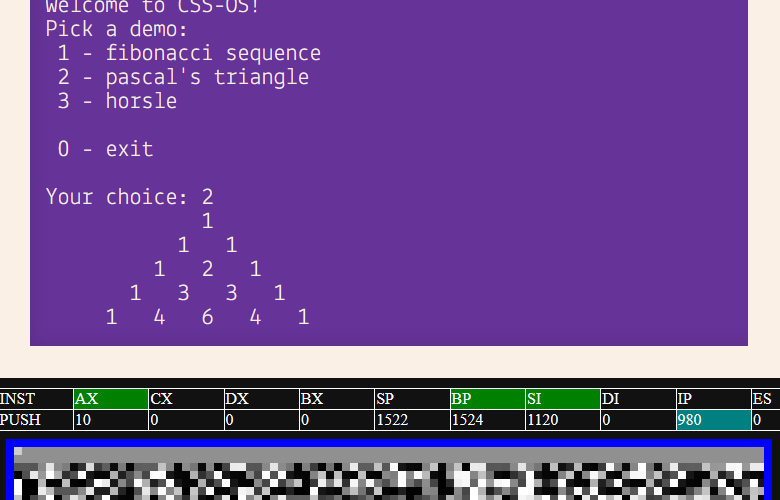
x86CSS is a working CSS-only x86 CPU/emulator/computer. Yes, the Cascading Style Sheets CSS. No JavaScript required.
What you’re seeing above is a C program that was compiled using GCC into native 8086 machine code being executed fully within CSS.
GitHub ⧸ Fedi, Bluesky, Twitter
Frequently Asked Questions
Is CSS a programming language?
Do you really need to ask at this point?
How??
I plan on writing a blog post that explains how this works as well as many of the tricks used. Bookmark my blog or add it to your RSS reader.
Surely you still need a little bit of JavaScript?
Nope, this is CSS-only!
There is a script tag on this site, which is there to provide a clock to the CSS – but this is only there to make the entire thing a bit faster and more stable. The CSS also has a JS-less clock implementation, so if you disable scripts on this site, it will still run. JavaScript is not required.
My CSS clock uses an animation combined with style container queries, which means you don’t need to interact with anything for the program to run, but it also means its a bit slower and less stable as a result. A hover-based clock, such as the one in Jane Ori’s CPU Hack, is fast and stable, but requires you to hold your mouse on the screen, which some people claim does not count as turing complete for whatever reason, so I wanted this demo to be fully functional with zero user input.
But you still need HTML, right?
Not really… well, kind of?
This entire CPU runs in just CSS and doesn’t require any HTML code, but there is no way to load the CSS without a
What preprocessor do you use?
I straight up just write CSS! The CSS in base_template.html is handwritten in Sublime Text, but for the more repetitive parts of the code I wrote a python script.
Is this practical?
Not really, you can get way better performance by writing code in CSS directly rather than emulating an entire archaic CPU architecture.
It is fun though, and computers are made for art and fun!
Can I write/run my own programs?
Yes, but you’ll have to compile them yourself. See below.
What’s x86?
x86 is the CPU architecture most computers these days run on. Heavily simplified, this demo runs the same machine code in CSS that your computer does in its processor. To be fair, modern x86 is 64bit and has a bunch of useful extensions, so it’s not quite the same – this here is the original 16bit x86 that ran on the 8086.
What’s horsle?
neigh.
Compatibility
This project implements most of the x86 architecture, but not literally every single instruction and quirk, because a lot of it is unnecessary and not worth adding.
The way I approached this project was by writing programs I wanted to run in C, compiling them in GCC with various levels of optimization, and then implementing every instruction I needed. This way I know I have everything I need implemented.
There is some behaviour that’s wrong, and some things are missing (e.g. setting the CF/OF flag bits). That’s okay.
| – | 0 | 1 | 2 | 3 | 4 | 5 | 6 | 7 | 8 | 9 | A | B | C | D | E | F |
|---|---|---|---|---|---|---|---|---|---|---|---|---|---|---|---|---|
| 0 | ADD | ADD | ADD | ADD | ADD | ADD | PUSH | POP | OR | OR | OR | OR | OR | OR | PUSH | — |
| 1 | ADC | ADC | ADC | ADC | ADC | ADC | PUSH | POP | SBB | SBB | SBB | SBB | SBB | SBB | PUSH | POP |
| 2 | AND | AND | AND | AND | AND | AND | ES: | DAA | SUB | SUB | SUB | SUB | SUB | SUB | CS: | DAS |
| 3 | XOR | XOR | XOR | XOR | XOR | XOR | SS: | AAA | CMP | CMP | CMP | CMP | CMP | CMP | DS: | AAS |
| 4 | INC | INC | INC | INC | INC | INC | INC | INC | DEC | DEC | DEC | DEC | DEC | DEC | DEC | DEC |
| 5 | PUSH | PUSH | PUSH | PUSH | PUSH | PUSH | PUSH | PUSH | POP | POP | POP | POP | POP | POP | POP | POP |
| 6 | — | — | — | — | — | — | — | — | — | — | — | — | — | — | — | — |
| 7 | JO | JNO | JB | JNB | JZ | JNZ | JBE | JA | JS | JNS | JPE | JPO | JL | JGE | JLE | JG |
| 8 | GRP1 | GRP1 | GRP1 | GRP1 | TEST | TEST | XCHG | XCHG | MOV | MOV | MOV | MOV | MOV | LEA | MOV | POP |
| 9 | NOP | XCHG | XCHG | XCHG | XCHG | XCHG | XCHG | XCHG | CBW | CWD | CALL | WAIT | PUSHF | POPF | SAHF | LAHF |
| A | MOV | MOV | MOV | MOV | MOVSB | MOVSW | CMPSB | CMPSW | TEST | TEST | STOSB | STOSW | LODSB | LODSW | SCASB | SCASW |
| B | MOV | MOV | MOV | MOV | MOV | MOV | MOV | MOV | MOV | MOV | MOV | MOV | MOV | MOV | MOV | MOV |
| C | — | — | RET | RET | LES | LDS | MOV | MOV | — | — | RETF | RETF | INT | INT | INTO | IRET |
| D | GRP2 | GRP2 | GRP2 | GRP2 | AAM | AAD | — | XLAT | — | — | — | — | — | — | — | — |
| E | LOOPNZ | LOOPZ | LOOP | JCXZ | IN | IN | OUT | OUT | CALL | JMP | JMP | JMP | IN | IN | OUT | OUT |
| F | LOCK | — | REPNZ | REPZ | HLT | CMC | GRP3a | GRP3b | CLC | STC | CLI | STI | CLD | STD | GRP4 | GRP5 |
| G | ADD | OR | ADC | SBB | AND | SUB | XOR | CMP | ROL | ROR | RCL | RCR | SHL | SHR | — | SAR |
| G | TEST | — | NOT | NEG | MUL | IMUL | DIV | IDIV | TEST | — | NOT | NEG | MUL | IMUL | DIV | IDIV |
| G | INC | DEC | — | — | — | — | — | — | INC | DEC | CALL | CALL | JMP | JMP | PUSH | — |
Compiling
You can run your own software in this emulator!
If you have 8086 assembly ready to go, clone my repo, and put the assembly in a file called program.bin. Then, put the path to the _start() function in program.start as a number. Once that’s set, you can just run build_css.py with Python3 (no dependencies required!) and the output will be in x86css.html.
If you want to write C code, you can do so using gcc-ia16 (you can build it yourself or install it from the PPA). The build_c.py script does the build with the correct flags and also makes the program.bin/start files. Don’t forget to run build_css.py after! This building setup works on both Linux and WSL1/2 (I haven’t tried on macOS).
By default there is 0x600 bytes (1.5kB) of memory, but this can be increased in the build_css.py file as necessary. The program gets loaded at memory address 0x100. There’s some custom I/O addresses for you to be able to interface with the program.
Here’s an example program:
static const char STR_4BYTES[] = "hell";
static const char STR_8BYTES[] = "o world!";

void (*writeChar1)(char);
void (*writeChar4)(const char[4]);
void (*writeChar8)(const char[8]);
char (*readInput)(void);

int _start(void) 💬
Credits
Greetz/thanks to:
Your browser is unable to run this demo. Please try with an up-to-date Chromium-based browser.
⚡ **What’s your take?**
Share your thoughts in the comments below!
#️⃣ **#x86 #CPU #CSS**
🕒 **Posted on**: 1771908457
🌟 **Want more?** Click here for more info! 🌟
